Moz Q&A is closed.
After more than 13 years, and tens of thousands of questions, Moz Q&A closed on 12th December 2024. Whilst we’re not completely removing the content - many posts will still be possible to view - we have locked both new posts and new replies. More details here.
Does Bing ignore robots txt files?
-
Bonjour from "Its a miracle is not raining" Wetherby Uk

Ok here goes... Why despite a robots text file excluding indexing to site
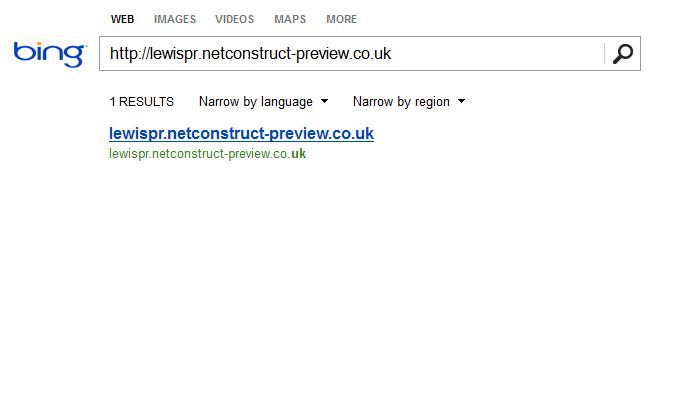
http://lewispr.netconstruct-preview.co.uk/ is the site url being indexed in Bing bit not Google?
Does bing ignore robots text files or is there something missing from http://lewispr.netconstruct-preview.co.uk/robots.txt I need to add to stop bing indexing a preview site as illustrated below.
http://i216.photobucket.com/albums/cc53/zymurgy_bucket/preview-bing-indexed.jpg
Any insights welcome
-
Thanks Clever PHD - we are now adding your recommendations to our preview sites
-
I know this does not sound related, but Matt Cutts explains this same situation on Google. It is probably the same reasoning for Bing.
http://www.mattcutts.com/blog/robots-txt-remove-url/
Looking at your screen shot, it looks as if all that is being shown in Bing is just the URL, no title tag, description, no other information.
What Matt says is that they did not technically crawl the url, but they are aware that it exists. Example, there is another page linking to it with related content or the anchor tag on the link relates to the keyword search you are performing.
You are searching for the URL specifically and so it makes sense that they would show the URL as it relates to that search, but they are not showing any information from the page as they do not have it as they did not spider it, again, they are just aware of the URL. Kind of like talking to a lawyer eh?
If you search for any other keywords does this excluded site show up? Probably not. If the do, then they are probably only showing the URL like in the example above.
The video has more details. Here are the solutions he gives, I will outline them as well
-
Use the Bing URL removal tool - bing bang boom. Done.
-
(my new favorite) Let the page / site be indexed but then show an noindex nofollow meta tag on the page / site. There is a subtle but important difference in the meta tag vs the robot.txt file. The spiders have to be able to crawl the page to be able to see what they are supposed to do with it.
http://support.google.com/webmasters/bin/answer.py?hl=en&answer=93710
"When we see the noindex meta tag on a page, Google will completely drop the page from our search results, even if other pages link to it."
The thing is, if you have a robots.txt file that says don't crawl the site, then the spider never gets to the noindex meta tag to know to delete the page from the index. It sounds a little backwards, but when the page is already in the search index, you have to let the spider crawl it to then see the noindex tag so that the search engine will know to remove it from the index.
Here is what you can do as this seems to only be an issue with Bing and just with the home page. Open up the robots.txt to allow Bing to crawl the site. Restrict the crawling to the home page only and exclude all the other pages from the crawl.
On the home page that you allow Bing to crawl, add the noindex no follow meta tag and you should be set.
All of that said.
If you have a single URL listed in bing with no meta data, it may not be worth all the above effort as you are not ranking for any valuable key words, but that is your call It is always interesting to see how the spiders and engines think so I wanted to pass this along.
Cheers!
PS - If you have a ton of pages like this - then you just would allow Bing to crawl them all and add the noindex nofollow tag to all of them.
-


Got a burning SEO question?
Subscribe to Moz Pro to gain full access to Q&A, answer questions, and ask your own.
Browse Questions
Explore more categories
-
Moz Tools
Chat with the community about the Moz tools.
-
SEO Tactics
Discuss the SEO process with fellow marketers
-
Community
Discuss industry events, jobs, and news!
-
Digital Marketing
Chat about tactics outside of SEO
-
Research & Trends
Dive into research and trends in the search industry.
-
Support
Connect on product support and feature requests.
Related Questions
-

Role of Robots.txt and Search Console parameters settings
Hi, wondering if anyone can point me to resources or explain the difference between these two. If a site has url parameters disallowed in Robots.txt is it redundant to edit settings in Search Console parameters to anything other than "Let Googlebot Decide"?
Technical SEO | | LivDetrick0 -

Is sitemap required on my robots.txt?
Hi, I know that linking your sitemap from your robots.txt file is a good practice. Ok, but... may I just send my sitemap to search console and forget about adding ti to my robots.txt? That's my situation: 1 multilang platform which means... ... 2 set of pages. One for each lang, of course But my CMS (magento) only allows me to have 1 robots.txt file So, again: may I have a robots.txt file woth no sitemap AND not suffering any potential SEO loss? Thanks in advance, Juan Vicente Mañanas Abad
Technical SEO | | Webicultors0 -

Removing CSS & JS Files from Index
Hi, Google has indexed a few .CSS and .JS files that belong to our WordPress plugins and themes. I had them blocked via robots, but realized this doesn't prevent indexation (and can likely hurt us since Google wants to access these files). I've since removed the robots instructions, submitted a removal request via Search Console, but want to make sure they don't come back. Is there a way to put a noindex tag within .CSS and .JS files? Or should I do something with .htaccess instead?
Technical SEO | | kirmeliux1 -

Log in, sign up, user registration and robots
Hi all, We have an accommodation site that asks users only to register when they want to book a room, in the last step. Though this is the ideal situation when you have tons of users, nowadays we are having around 1500 - 2000 per day and making tests we found out that if we ask for a registration (simple, 1 click FB) we mail them all and through a good customer service we are increasing our sales. That is why, we would like to ask users to register right after the home page ie Home/accommodation or and all the rest. I am not sure how can I make to make that content still visible to robots.
Technical SEO | | Eurasmus.com
Will the authentication process block google crawling it? Maybe something we can do? We are not completely sure how to proceed so any tip would be appreciated. Thank you all for answering.3 -

Google indexing despite robots.txt block
Hi This subdomain has about 4'000 URLs indexed in Google, although it's blocked via robots.txt: https://www.google.com/search?safe=off&q=site%3Awww1.swisscom.ch&oq=site%3Awww1.swisscom.ch This has been the case for almost a year now, and it does not look like Google tends to respect the blocking in http://www1.swisscom.ch/robots.txt Any clues why this is or what I could do to resolve it? Thanks!
Technical SEO | | zeepartner0 -

How to Remove a website from your Bing Webmaster Tools account
I have a site in Bing Webmaster Tools that I no longer work on. I can't seem to find where to delete this website from my webmaster tools account. Anyone know how (there doesn't seem to be anything obvious under Bing Help or on a Google Search).
Technical SEO | | TopFloor0 -

Two META Robots tags on a page - which will win?
Hi, Does anybody know which meta-robots tag will "win" if there is more than one on a page? The situation:
Technical SEO | | jmueller
our CMS is not very flexible and so we have segments of META-Tags on the page that originate from templates.
Now any author can add any meta-tag from within his article-editor.
The logic delivering the pages does not care if there might be more than one meta-robots tag present (one from template, one from within the article). Now we could end up with something like this: Which one will be regarded by google & co?
First?
Last?
None? Thanks a lot,
Jan0 -

Will an XML sitemap override a robots.txt
I have a client that has a robots.txt file that is blocking an entire subdomain, entirely by accident. Their original solution, not realizing the robots.txt error, was to submit an xml sitemap to get their pages indexed. I did not think this tactic would work, as the robots.txt would take precedent over the xmls sitemap. But it worked... I have no explanation as to how or why. Does anyone have an answer to this? or any experience with a website that has had a clear Disallow: / for months , that somehow has pages in the index?
Technical SEO | | KCBackofen0