Moz Q&A is closed.
After more than 13 years, and tens of thousands of questions, Moz Q&A closed on 12th December 2024. Whilst we’re not completely removing the content - many posts will still be possible to view - we have locked both new posts and new replies. More details here.
Should my website link to my google business listing given that I already link from google business to my website ?
-
I have a website with individual Location Landing Pages for each of my Depots. I also have individual Google Local Business Listings for each of my depots.
Should I have a link from my Website Location Landing Pages to the associated Google local Business listings or not ?... Given that I already have a link on my Google Business listing to the relevant Location Page on my website.
I wasn't sure whether linking both ways would be more beneficial thus enforcing things better or whether it's not needed to link both ways .
thanks
Pete
-
Many thanks Both
That's what I was thinking.
Will do.
thanks again,
Pete
-
Hi Pete,
yes, you should link both ways.
1.) From your Google Business / Local Profile to your homepage or if you have more than one location on your site, to the corresponding local subpage
2.) on the homepage or local subpage put a link to your google Profile. use the publisher tag when linking e.g.
[](https://plus.google.com/{ID der Google+ Seite})
Hope that helps,
Peter
-
My personal opinion would be to link your Google Business page to the home page of your site and then the corresponding location pages to their respective pages on your site. There is no such thing as too many links from Google to your site.
It generally looks a lot better the the engines if everything you do ties together and does so appropriately. I don't think it's the best idea to take a general page and point that to specific locations if each location has a corresponding Google page.



Got a burning SEO question?
Subscribe to Moz Pro to gain full access to Q&A, answer questions, and ask your own.
Browse Questions
Explore more categories
-
Moz Tools
Chat with the community about the Moz tools.
-
SEO Tactics
Discuss the SEO process with fellow marketers
-
Community
Discuss industry events, jobs, and news!
-
Digital Marketing
Chat about tactics outside of SEO
-
Research & Trends
Dive into research and trends in the search industry.
-
Support
Connect on product support and feature requests.
Related Questions
-

Why is a Google Listing Showing Up in a Different Town Than Its Address?
I have a client who runs a dental office on the outskirts of Racine, WI. His address specifically shows up as being in Racine, however, his GMB profile has always showed with the category of "Dentist in Mount Pleasant, WI" displaying below the photos. (Mount Pleasant is the next town over and his office straddles the line between the two towns in Google's overlay map of the town.) Obviously this is frustrating and I'm concerned that his location is hurting his ability to rank in the larger, more populous town of Racine. Have any other SEOs ever encountered this? And if so, how have you approached the issue? Location pages? Mentions of the location more often on the pages? tsLvH2B
Local Listings | | formandfunctionagency1 -

Seasonal Setting Options for Google My Business
Hi there, Not sure if anyone will have any insight but I have a seasonal business that I am closed for from September to March. I don't want to mark my business as "permanently closed" through Google My Business as I don't want my customers to think I've gone out of business. I've seen a few times through forums that you can change your business to temporarily closed, but I can't find the specifics on how to do this. Any insight, suggestion or resources would be great! Thanks!
Local Listings | | MainstreamMktg1 -

Google listing only appears when I move / zoom in or out of the map
Hi everyone, We are having an issue with this local business. The Google listing isn't immediately appearing on the map. You have to move the map or zoom in and out for the listing to appear. I find this really odd as our competitors - with no reviews and way further in proximity - are appearing with no issues. The listing is only about 4km where I'm doing the search, while competitors with no reviews are about 20km away. We are ranking in the top 5 organically for the search term I used (pool renovations brisbane), but nowhere in local unless the map is moved. When the listing appears, sometimes the pin also looks grey instead of red, while others are red (if that makes sense). On top of this, their organic rankings have also been on a downward trend since June. I'm currently doing a backlink audit to see if it's contributing to the issue. If anyone also has other ideas, could you please let me know? Thanks.
Local Listings | | nhhernandez1 -

Improve Google Business ranking
While my client's websites have been ranking well in SERP for their keyterms I'm at a lost on what I can do to improve their Google business/map presence. I'm referring to their listing where the top three come up or when you search on Google Maps.
Local Listings | | FPK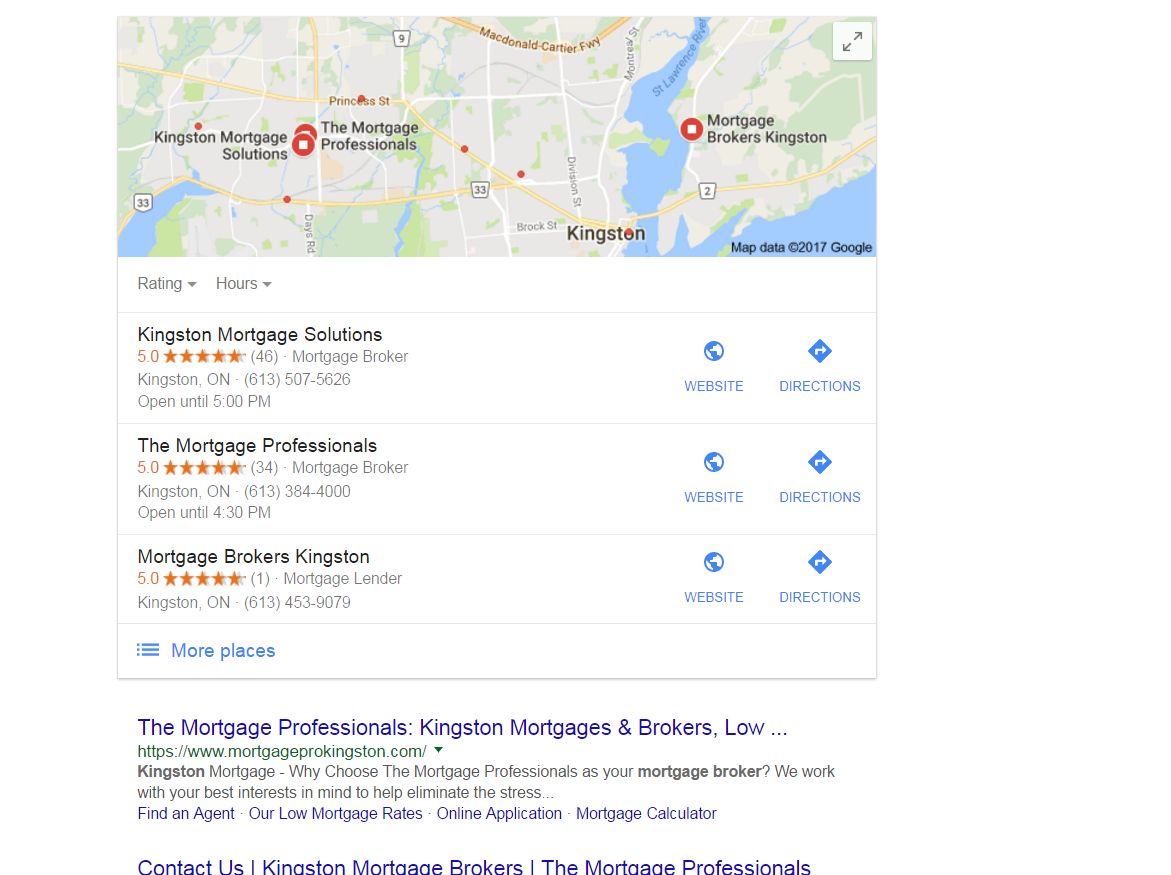
https://gyazo.com/26ec78ed7f712157ec72492199545431 Ex 1. Several months ago my client was ranked #1 both for SERP and maps until they dropped to 2nd on maps. Now they're ranked 1st in search yet 2nd for local business rankings as you can see from the screenshot above. At one point my client's business did have more reviews than the 1st ranking business yet they still weren't 1st. Ex. 2. Client(s) is ranked 4th in search and doesn't show in the top 3 map listings for their search term. If you click on More places to view Google Maps they're listed all the way down as the 15th listing or worse can't even be found when searching by their main SEO key term . Of course they are found by searching for their business name so it's not like there is a problem with the listing. I make sure to: Completely fill out their Google Business profile(NAP, hours and add pictures) Have my client try to gain positive reviews Manage and respond to reviews(mainly the negative ones) Add map and Google business link to their website Can anyone offer any other insight on what else can be done to improve their local presence on maps that I might be missing?0 -

Why would a website link disappear from a Google Place listing?
Hi, a local non-profit recently re-branded their name from MacDonald Center to Maybelle Center. When they updated their business information their website link disappeared. They've updated from within and dashboard to no avail. We've requested edits/updates via Google Map maker but it says Denied. Here's a URL for the SERP result. Note the button for "website" would normally appear by the button for "directions" https://www.google.com/search?sourceid=chrome-psyapi2&ion=1&espv=2&ie=UTF-8&q=maybelle center portland&oq=maybelle center portland&aqs=chrome..69i57j69i59j69i61.4316j0j7
Local Listings | | Flock.Media Can someone please explain why this is happening and how we can fix it? They are a great community organization who's about to receive some media coverage and we'd really appreciate it if users hearing about the group be able to easily access their new website.
They are aware of their duplicate listings but, typical of non-profits, have limited time and funds so are prioritizing to address more urgent issues first. However, I don't believe duplicate listings would cause such an issue but please let me know if I'm wrong here
0
Can someone please explain why this is happening and how we can fix it? They are a great community organization who's about to receive some media coverage and we'd really appreciate it if users hearing about the group be able to easily access their new website.
They are aware of their duplicate listings but, typical of non-profits, have limited time and funds so are prioritizing to address more urgent issues first. However, I don't believe duplicate listings would cause such an issue but please let me know if I'm wrong here
0 -

Using same business number on different websites
Hello, I have number of websites in different locations with different business name and address with verified listings. However, I am thinking to use the same phone number on all the websites as it is difficult for me to keep track of all the numbers. So, is it okay to use the same phone number on different websites with different business name and address? Waiting for your thoughts. Brian
Local Listings | | BrianBotts.0 -

How To Change Image Used In Business Knowledge Graph...
How can one change the image that Google shows in a business' knowledge graph in the SERPs? And the image I am referring to is the one that typically appears to the left of the map within the knowledge graph box, above the business' name. The current image that is being used in my client's case is an image that was uploaded in their Google+ My Business profile, but there doesn't appear to be any particular reason why that one was chosen (it wasn't the first or last image uploaded, nor is it selected as the profile picture). As user-interaction increasingly becomes important in rankings, I would like to change this to something more attractive. Thank you for any help and guidance!
Local Listings | | gbkevin1 -

Does embedding Google map help local SEO?
Hi I am curious if adding a embedded Google map to a footer helps for Local seo? Thank you
Local Listings | | Berner1