Moz Q&A is closed.
After more than 13 years, and tens of thousands of questions, Moz Q&A closed on 12th December 2024. Whilst we’re not completely removing the content - many posts will still be possible to view - we have locked both new posts and new replies. More details here.
Should I "no-index" two exact pages on Google results?
-
Hello everyone,
I recently started a new wordpress website and created a static homepage.
I noticed that on Google search results, there are two different URLs landing on same content page.
I've attached an image to explain what I saw.
Should I "no-index" the page url?
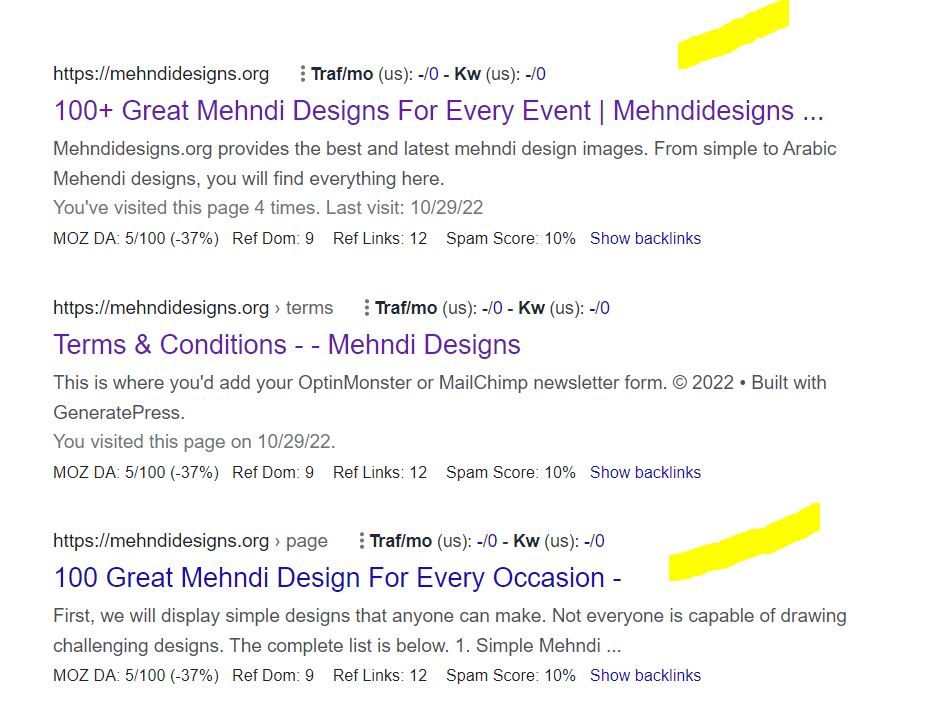
In this picture, the first result is the homepage and I try to rank for that page. The last result is landing on same content with different URL.
So, should I no-index last result as shown in image?
-
In any SEO plugin, you can go to edit the secondary article and in canonical URL you put the link to the home page.
-
@amanda5964 You can use canonical meta tag to tell google that those are the exact same pages. Google will index one of them which google choose best for the SERP.
-
Hi @amanda5964 actually could I ask if there is a reason for having these identical pages? You might want to consider simply combining the pages - i.e. deleting your sub page and redirecting to home if the content is identical.
-
I would not no-index. Typically it is more effective to use a canonical link from the secondary content to the main page you want the traffic directed to.




Got a burning SEO question?
Subscribe to Moz Pro to gain full access to Q&A, answer questions, and ask your own.
Browse Questions
Explore more categories
-
Moz Tools
Chat with the community about the Moz tools.
-
SEO Tactics
Discuss the SEO process with fellow marketers
-
Community
Discuss industry events, jobs, and news!
-
Digital Marketing
Chat about tactics outside of SEO
-
Research & Trends
Dive into research and trends in the search industry.
-
Support
Connect on product support and feature requests.
Related Questions
-

Who is correct - please help!
I have a website with a lot of product pages - often thousands of pages. As each of these pages is for a specific lease car they are often only fractionally different from other pages. The urls are too long, the H1 is often too long and the Title is often too long for "SEO best practice". And they do create duplication issues according to MOZ. Some people tell me to change them to noindex/nofollow whilst others tell me to leave them as they are as best not to hide from google crawler. Any advice will be gratefully received. Thanks for listening.
Technical SEO | | jlhitch0 -

Staging website got indexed by google
Our staging website got indexed by google and now MOZ is showing all inbound links from staging site, how should i remove those links and make it no index. Note- we already added Meta NOINDEX in head tag
Intermediate & Advanced SEO | | Asmi-Ta0 -

Unsolved Using NoIndex Tag instead of 410 Gone Code on Discontinued products?
Hello everyone, I am very new to SEO and I wanted to get some input & second opinions on a workaround I am planning to implement on our Shopify store. Any suggestions, thoughts, or insight you have are welcome & appreciated! For those who aren't aware, Shopify as a platform doesn't allow us to send a 410 Gone Code/Error under any circumstance. When you delete or archive a product/page, it becomes unavailable on the storefront. Unfortunately, the only thing Shopify natively allows me to do is set up a 301 redirect. So when we are forced to discontinue a product, customers currently get a 404 error when trying to go to that old URL. My planned workaround is to automatically detect when a product has been discontinued and add the NoIndex meta tag to the product page. The product page will stay up but be unavailable for purchase. I am also adjusting the LD+JSON to list the products availability as Discontinued instead of InStock/OutOfStock.
Technical SEO | | BakeryTech
Then I let the page sit for a few months so that crawlers have a chance to recrawl and remove the page from their indexes. I think that is how that works?
Once 3 or 6 months have passed, I plan on archiving the product followed by setting up a 301 redirect pointing to our internal search results page. The redirect will send the to search with a query aimed towards similar products. That should prevent people with open tabs, bookmarks and direct links to that page from receiving a 404 error. I do have Google Search Console setup and integrated with our site, but manually telling google to remove a page obviously only impacts their index. Will this work the way I think it will?
Will search engines remove the page from their indexes if I add the NoIndex meta tag after they have already been index?
Is there a better way I should implement this? P.S. For those wondering why I am not disallowing the page URL to the Robots.txt, Shopify won't allow me to call collection or product data from within the template that assembles the Robots.txt. So I can't automatically add product URLs to the list.0 -

Ranking going south
Hi - I have a site Simply Stairlifts and I don't understand it but I've followed all the SEO processes of cleaning the site and building links, but ranking just keeps falling - any advise would be very gratefully received 👍 .
SEO Tactics | | Naju2310 -

Indexed pages
Just started a site audit and trying to determine the number of pages on a client site and whether there are more pages being indexed than actually exist. I've used four tools and got four very different answers... Google Search Console: 237 indexed pages Google search using site command: 468 results MOZ site crawl: 1013 unique URLs Screaming Frog: 183 page titles, 187 URIs (note this is a free licence, but should cut off at 500) Can anyone shed any light on why they differ so much? And where lies the truth?
Technical SEO | | muzzmoz1 -

How Does Google's "index" find the location of pages in the "page directory" to return?
This is my understanding of how Google's search works, and I am unsure about one thing in specific: Google continuously crawls websites and stores each page it finds (let's call it "page directory") Google's "page directory" is a cache so it isn't the "live" version of the page Google has separate storage called "the index" which contains all the keywords searched. These keywords in "the index" point to the pages in the "page directory" that contain the same keywords. When someone searches a keyword, that keyword is accessed in the "index" and returns all relevant pages in the "page directory" These returned pages are given ranks based on the algorithm The one part I'm unsure of is how Google's "index" knows the location of relevant pages in the "page directory". The keyword entries in the "index" point to the "page directory" somehow. I'm thinking each page has a url in the "page directory", and the entries in the "index" contain these urls. Since Google's "page directory" is a cache, would the urls be the same as the live website (and would the keywords in the "index" point to these urls)? For example if webpage is found at wwww.website.com/page1, would the "page directory" store this page under that url in Google's cache? The reason I want to discuss this is to know the effects of changing a pages url by understanding how the search process works better.
Technical SEO | | reidsteven750 -

CDN Being Crawled and Indexed by Google
I'm doing a SEO site audit, and I've discovered that the site uses a Content Delivery Network (CDN) that's being crawled and indexed by Google. There are two sub-domains from the CDN that are being crawled and indexed. A small number of organic search visitors have come through these two sub domains. So the CDN based content is out-ranking the root domain, in a small number of cases. It's a huge duplicate content issue (tens of thousands of URLs being crawled) - what's the best way to prevent the crawling and indexing of a CDN like this? Exclude via robots.txt? Additionally, the use of relative canonical tags (instead of absolute) appear to be contributing to this problem as well. As I understand it, these canonical tags are telling the SEs that each sub domain is the "home" of the content/URL. Thanks! Scott
Technical SEO | | Scott-Thomas0 -

Home Page .index.htm and .com Duplicate Page Content/Title
I have been whittling away at the duplicate content on my clients' sites, thanks to SEOmoz's pro report, and have been getting push back from the account manager at register.com (the site was built here and the owner doesn't want to move it). He says these are the exact same page and he can't access one to redirect to the other. Any suggestions? The SEOmoz report says there is duplicate content on both these urls: Durango Mountain Biking | Durango Mountain Resort - Cascade Village http://www.cascadevillagehotel.com/index.htm Durango Mountain Biking | Durango Mountain Resort - Cascade Village http://www.cascadevillagehotel.com/ Your help is greatly appreciated! Sheryl
Technical SEO | | TOMMarketingLtd.0