Moz Q&A is closed.
After more than 13 years, and tens of thousands of questions, Moz Q&A closed on 12th December 2024. Whilst we’re not completely removing the content - many posts will still be possible to view - we have locked both new posts and new replies. More details here.
Are citations the way to go even if there is no Google Places listing
-
If there are no Google Places / Local listing for a keyword search term, for example... "web design vancouver", do building citations still help in enabling websites to move up the organic rankings?
-
Hi Gavo,
While what Marcus points out is true (you can prompt local results for web design companies by adding 'in' to your query), it's important to understand that Google does not view web design companies as being truly local, hence their lack of inclusion in the results for the most common service + city or city + service queries. To my understanding, Google's thinking on this is that most web design (and SEO) companies operate virtually (don't meet with clients face-to-face).
So, you can add your web design company to Google's local index, and you can build citations for it, but it's likely that your overall organic rankings will hinge more on other forms of marketing in which you engage. Think content development, earning links, social outreach, etc.
-
Hey,
Not sure if you aware of this but local search results do show up if you search this term: ‘web design in vancouver’...but hey thats not what you asked so lets get on with the answer:
Creating citations simply to improve your website ranking will work, but your on-page optimisation needs to be at its best. My first tip would be to fill every citation with as much detail as possible. Make sure you add photos and videos and have a unique description for each citation site, but remember to include your keywords in the description. The Name, Address & Phone Number (NAP) will need to be kept consistent to get the full benefit of creating these citations.
For on-page optimization, I can recommend a few small changes that can go a long way! My first step of advice would be to add a schema markup of your address into the footer of the website. A schema markup allows google to recognise the address as a formatted address, instead of viewing it as a piece of text. Another useful tip is to make sure you are getting the full benefit from your page titles. I tend to structure page titles like this:
target keyword | Business name
so for a web design company in vancouver called Funky web design, I would do something along the lines of this:
Web Design In Vancouver | Funky Web Design
Hope this helps!
-
Yup It will But Do Add your Website Link whole building these listings. Adding NAP Only will not help much.
Thanks




Got a burning SEO question?
Subscribe to Moz Pro to gain full access to Q&A, answer questions, and ask your own.
Browse Questions
Explore more categories
-
Moz Tools
Chat with the community about the Moz tools.
-
SEO Tactics
Discuss the SEO process with fellow marketers
-
Community
Discuss industry events, jobs, and news!
-
Digital Marketing
Chat about tactics outside of SEO
-
Research & Trends
Dive into research and trends in the search industry.
-
Support
Connect on product support and feature requests.
Related Questions
-

Google My Business pages for New Construction Communities
I have a number of builders of new homes as clients. Typically, they build out a whole neighborhood at once and give the neighborhood a fancy name. We were planning to create Google My Business pages for these communities but then ran into some potential challenges. As new communities, they are sometimes not on Google's radar yet Some of them have model homes where you might take a tour with a realtor that serves the community exclusively but many don't. So here come the questions... Is there a way to make Google speed up its process of recognizing new addresses? I have to choose an address to associate with the GMB page, probably the address of model home. Is this going to create annoying problems for a buyer who someday buys that model home? Since some communities don't have a model home, I could arbitrarily assign an address of one of the neighborhood homes to the GMB page, but this leads to the same question about creating a GMB page that will exist after the builder has sold all the houses in the community. Will it be weird to have the GMB referring to someone's private residence down the road? My assumption is that claiming a GMB page would help with local ranking if someone searches for something like "new homes" in addition to providing easy driving directions to someone who has done a bit of research and Googles the name of the new home community while out driving and searching for homes. These seem to be the main benefits, but are the challenges associated with questions 1-3 even worth the trouble of trying to claim listings for these communities?
Local Listings | | TheKatzMeow0 -

Radius Size around GMB location for google local search
We are a digital marketing agency Our clients are (virtually all) retail automotive dealerships. We compete in various market places coast to coast (USA). Since Google puts retail automotive dealerships under Local SEO umbrella, is it known ( published ) how large is the radius around my client's Google My Business rooftop's address? How wide is their search 'reach' according to Google? Asked another way, in a triangular, three SEO geo area, with one city being at the epicenter of the population dispersion, and my client, versus my client's competitors being different distances from where the majority of the population emanates from, all other SERP factors being equal (assumption) between the two competitors, how far is each clients REACH from a Local Search standpoint. Is this known? Published by Google. ONE example: https://www.google.com/maps/dir/BMW+of+South+Albany,+U.S.+9W,+Glenmont,+NY/42.7662693,-73.8138088/@42.6727121,-73.7993527,12z/data=!4m9!4m8!1m5!1m1!1s0x89dde0fe8829c405:0xd915fb9b3b60bf33!2m2!1d-73.7973301!2d42.589211!1m0!3e0
Local Listings | | GaryT_SEO1 -

Tracking Phone Numbers in Google My Business Listings and Beyond
Hey all, Wanted to run something by you. I am getting pressed to use tracking phone numbers for all of our GMB pages for over 100 locations across the country. Has anyone done this for their own listings or for their clients? Because I will have to do it for GMB, this means I will be sending these same phone numbers out to the other major directories and data sources around the web. The phone numbers do contain the local area code for each city and do directly connect our customers to their specific location without any kind of redirecting. How is Google looking at this? I have read before it is a no-no but have also read it is not a big deal. Any thoughts would be much appreciated! -Ben
Local Listings | | Davey_Tree0 -

Improve Google Business ranking
While my client's websites have been ranking well in SERP for their keyterms I'm at a lost on what I can do to improve their Google business/map presence. I'm referring to their listing where the top three come up or when you search on Google Maps.
Local Listings | | FPK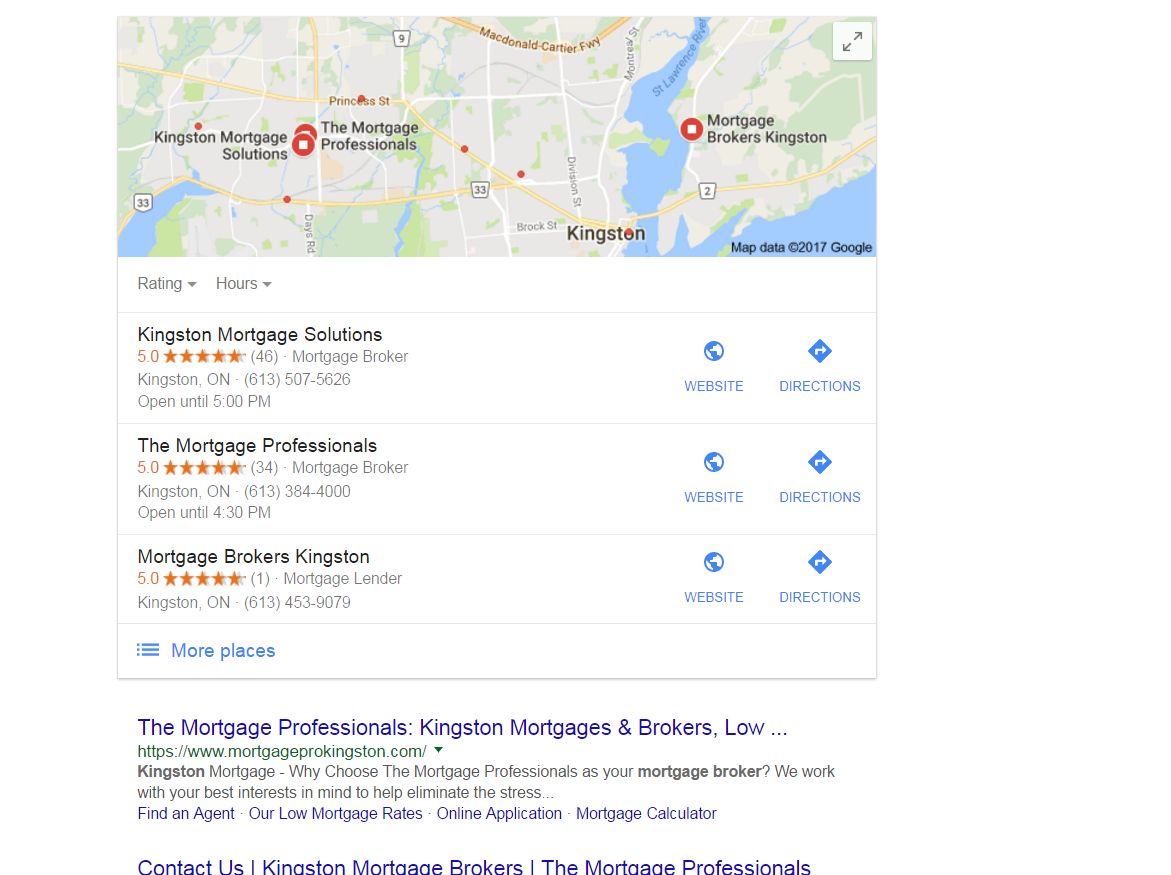
https://gyazo.com/26ec78ed7f712157ec72492199545431 Ex 1. Several months ago my client was ranked #1 both for SERP and maps until they dropped to 2nd on maps. Now they're ranked 1st in search yet 2nd for local business rankings as you can see from the screenshot above. At one point my client's business did have more reviews than the 1st ranking business yet they still weren't 1st. Ex. 2. Client(s) is ranked 4th in search and doesn't show in the top 3 map listings for their search term. If you click on More places to view Google Maps they're listed all the way down as the 15th listing or worse can't even be found when searching by their main SEO key term . Of course they are found by searching for their business name so it's not like there is a problem with the listing. I make sure to: Completely fill out their Google Business profile(NAP, hours and add pictures) Have my client try to gain positive reviews Manage and respond to reviews(mainly the negative ones) Add map and Google business link to their website Can anyone offer any other insight on what else can be done to improve their local presence on maps that I might be missing?0 -

Is there a purpose to the "google my business" description?
Hi there Can someone tell me if the description serves a purpose in the google my business profile since:
Local Listings | | coolhandluc
a) It is not displayed anywhere as far as i have seen (maps, 3 pack local results, knowledge graph, organic results)
b) It is no longer considered as a ranking factor since it was abused so much Thanks0 -

Google Maps redirect notice on track-able URL's (how do I track maps visits in analytics?)
We've been using trackable URL's to track Google My Business visits in analytics for years.
Local Listings | | RedNovaLabs91
Example: ?utm_source=GoogleLocal&utm_medium=example&utm_campaign=example In the past month I've noticed Google showing a redirect notice on any listing with a trackable URL. It happened for a day or so a few weeks ago - and then it's been a more permanent situation since this past week. Redirect Notice
The previous page is sending you to: www.example.com
If you do not want to visit that page, you can return to the previous page. I'm fine with removing the trackable URL's - however - I'm not sure how to track maps visits via analytics without using them. I can't find any updated information on options. The last post on moz was in 2011 (http://azwa.1clkaccess.in/blog/tracking-traffic-from-google-places-in-google-analytics). The alternate tactics in that post no longer work. So my question is:
- How do I track Google Maps (My Business) visits through analytics without using tracking URLs?1 -
How to remove a former business location from Google Places?
I've received a strange response from Google Places on local listings for a home builder. Google's rep suggested that we not list the new home sales center (a model home) since at some point it will change from being a business listing to a residential listing. That is just wrong. It will be a place of business for the next 3 years and then will flip to being a private residence. These days it is uncommon, but not that rare to turn over ownership from public to private or vice versa (A residence becoming a law or other commercial establishment. Or a whole office building becoming condos.) The issue is, when it does happen, how do we get Google and others to recognize that a business is no longer a business location? I've had trouble bringing down the address of former former model home sales centers on Google Places much to the chagrin of the residents.
Local Listings | | BlairKuhnen0 -

How to get a verification tick next to the URL in a Google Plus Local page?
Google Plus Local: https://plus.google.com/+PrestedHallFeering Website: www.prested.co.uk So how do I get the verification tick next to the URL on this businesses Google page? Also, even though the website is much strong then those in the map listings for Wedding Venues In Essex, whats preventing this website from appearing in there? My local optimisation knowledge is poor!
Local Listings | | jasondexter0
