Moz Q&A is closed.
After more than 13 years, and tens of thousands of questions, Moz Q&A closed on 12th December 2024. Whilst we’re not completely removing the content - many posts will still be possible to view - we have locked both new posts and new replies. More details here.
How to deal with wrong location in Google SERP
-
Hi,
If I understand correctly, Google provides search results based on the location of the user. That's fine, because most of my clients are local.
But if I look at my own search results, Google thinks I'm in a totally different town. Most likely based on my IP address.
Of course I can solve that for myself, but the same goes for my potential clients.
Is there a way to deal with this, from an seo perspective? For instance find out where most of the the IP providers are located and target that location?
-
Hi Hans,
Unfortunately IP addresses are not great on a desktop pc, not always but sometimes our Internet Service Provider seems to play havoc with our actual location.
However on mobile it is usually a lot more reliable, so make sure your site is mobile friendly!
As long as you have all your data set up and Google+ and the likes linked then your local listings will work correctly,
I wouldn't recommend targeting a popular IP location as it is not your true location. Keeping your town/city in your tagging will help for local searches for those who include there location in their searches.But if your client's ISPs have their IP address located wrongly, I am afraid this is something you cannot compensate for.
Kind Regards,
Jimmy
-
I don't think IP factor matters that much
Going to disagree with this here I'm afraid because I have seen some quite overwhelming results based on a user location. I am based in Chester, UK - If I search, based on my IP, I will be shown local results earlier - that kind of thing. I'm not saying this is always going to be the case, but based on locations, it can play a pretty major part.
@Hans - There are lots of things you can do to try and remedy this, but remember that Google has the final say. You could try building your brand strength more and perhaps talk create a few blog posts based around location and product, talk about surrounding towns that you cover and suggestions as Umar mentions above.
Also you could do a little testing and see how your competitors get around this issue. Crossing every 't' and dotting every 'i' is going to be a big key to success.
-Andy
-
Hey Hans,
I don't think IP factor matters that much.. If you have a proper citations of NAP, optimized local content, G+ local pages, links from local sources and other local listings; I don't think this IP factor gonna hurt you that much.
But if you're very much sure that all the things are perfect and you're still not climbing then you can think about the local IPs.
-
Hi Umar,
Thanks for your answer! I'm not sure we're talking about the same thing here.
Let me explain: my company is in town X. I want it to be found by people in town X.
My potential client also lives in town X. But Google says he lives in town Y. Because his IP address tells that to them.
It seems that I'm lower in the search results than I would have been if the client was located in X, as he should. Or am I wrong here?
Cheers,
Hans -
Hey Hans,
Yes, Search engines use the following signals to determine the location of your website:
- Hosting location (I think it's still matters)
- Domain tld (eg .co.uk for the UK and .com for the US)
It is important to check that the actual location of your servers is reflected in their IP address using a tool like this one. I remember once Matt Cutts discussed this topic "How should I serve different content based on user location?" here https://youtu.be/GFf1gwr6HJw
Hope this helps!




Got a burning SEO question?
Subscribe to Moz Pro to gain full access to Q&A, answer questions, and ask your own.
Browse Questions
Explore more categories
-
Moz Tools
Chat with the community about the Moz tools.
-
SEO Tactics
Discuss the SEO process with fellow marketers
-
Community
Discuss industry events, jobs, and news!
-
Digital Marketing
Chat about tactics outside of SEO
-
Research & Trends
Dive into research and trends in the search industry.
-
Support
Connect on product support and feature requests.
Related Questions
-

Improve Google Business ranking
While my client's websites have been ranking well in SERP for their keyterms I'm at a lost on what I can do to improve their Google business/map presence. I'm referring to their listing where the top three come up or when you search on Google Maps.
Local Listings | | FPK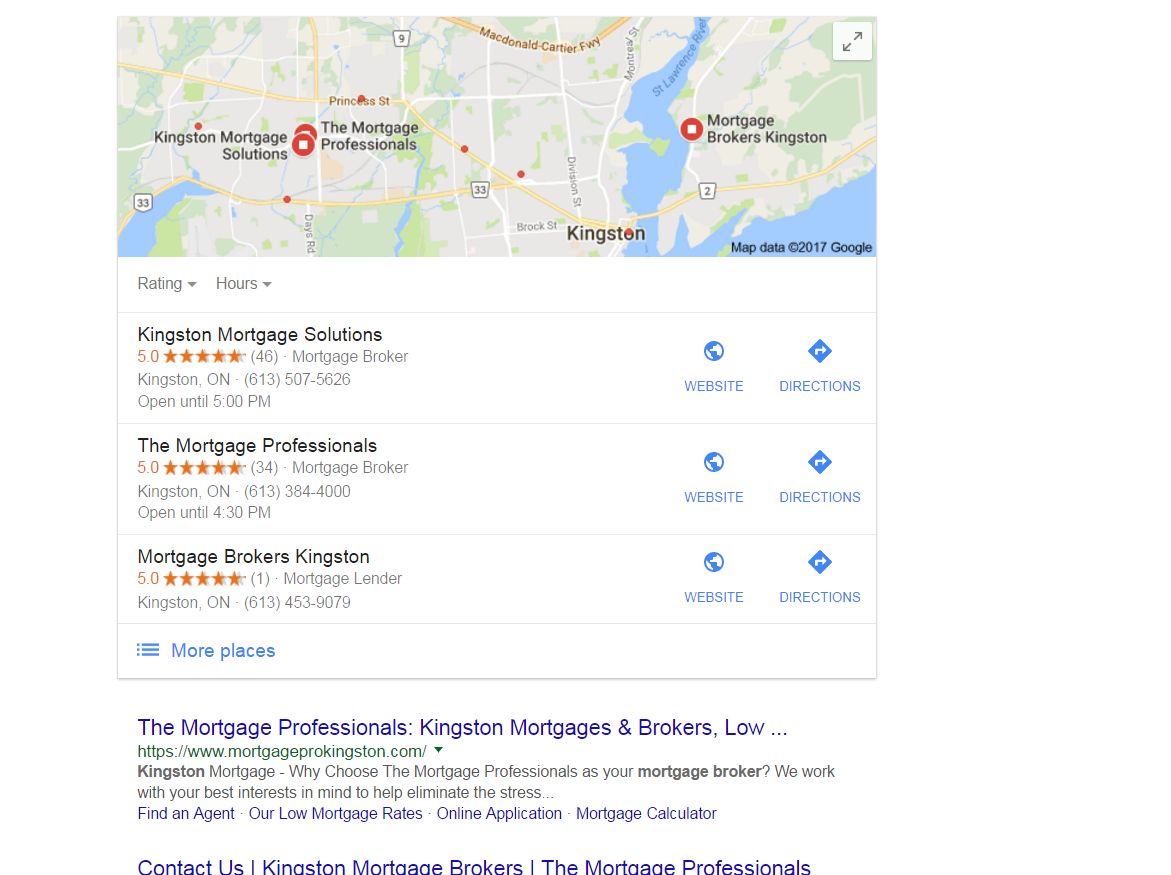
https://gyazo.com/26ec78ed7f712157ec72492199545431 Ex 1. Several months ago my client was ranked #1 both for SERP and maps until they dropped to 2nd on maps. Now they're ranked 1st in search yet 2nd for local business rankings as you can see from the screenshot above. At one point my client's business did have more reviews than the 1st ranking business yet they still weren't 1st. Ex. 2. Client(s) is ranked 4th in search and doesn't show in the top 3 map listings for their search term. If you click on More places to view Google Maps they're listed all the way down as the 15th listing or worse can't even be found when searching by their main SEO key term . Of course they are found by searching for their business name so it's not like there is a problem with the listing. I make sure to: Completely fill out their Google Business profile(NAP, hours and add pictures) Have my client try to gain positive reviews Manage and respond to reviews(mainly the negative ones) Add map and Google business link to their website Can anyone offer any other insight on what else can be done to improve their local presence on maps that I might be missing?0 -

How do I treat multiple buildings on the same college campus on Google for local SEO?
Should I delete them? Simply give them a different address like "City, State, Zip"? I see the benefit of having key buildings on campus in Google Maps, but I don't want those to affect my accuracy score and, thus, my local rankings for SEO.
Local Listings | | GabeGibitz1 -

HELP! Google Local dropped!
I noticed that my Google Local page does not show in any search results anymore. Looking at Moz Local, it appears that I had 250 views on August 30th and 0 after that. It just dropped overnight. I looked at Google My Business and I noticed that I had a duplicate listing (no idea where it came from). It wasn't verified though. I deleted that. I also noticed that my address has been changed to Drive instead Dr. I was very careful in making it the same everywhere, but it changed without me changing it. Perhaps someone so kindly "suggested an edit" and I didn't see that happen. Anyone have any ideas. My organic search ranking is still strong. #3 for most search terms. And we have a very strong Google Local reviews. I mean, it even shows business that have been permanently closed over me!!! And we have photos, great reviews, and regularly post to Google+. I seriously need some help. I am a small business owner that does all of my own SEO because I can't afford a good SEO. 😞
Local Listings | | CalicoKitty20000 -

Using Hashtag for Google My Business
I was told by a Google My Business representative to include #{keywords} in my description. I was told this would boost my rankings. Has anyone else heard of this?
Local Listings | | Smart_Start0 -

Google Places - Remove Completely vs. Permanently Closed?
This is a bit confusing to explain so bear with me please. We have a client that used to have an old law practice with a partner. The site and backlinks were very large and it had a lot of domain authority. It also had a very large citation profile and history. The two lawyers have since split, but there remains multiple Google Places listings out there for the old partnership. We have fixed the one showing the old business practice name, but not the one that he setup for his personal name. One of the biggest hassles is that the old location he setup has his attorney name in the actual listing. The issue is that we cannot close the old listing (we tried this), as it comes up permanently closed when you Google his name. If you search for his new Law Firm, the correct business listing that we have set up will show. The new listing also includes his name and has over 50 five star reviews. We hoped that the large amount of legitimate reviews would get rid of or at least suppress the old listing, but it is not happening. So I am a bit confused as to what to do. If we close the old listing Google shows the red "permanently closed" listing when you Google his name. We cannot update the old listing information to show his new address as then it will compete with the new listing that we setup that shows all the positive reviews. The old listing was not created by us, and the new one was. The new one shows when you search for his Law Firm name in Google, but not for his personal name i.e "NAME HERE ATTORNEY" or "HIS NAME and LOCATION" Interested to hear your thoughts. The only way I can think to fix this is to contact Google directly and see if there is a way to permanently delete the listing from Google maps, but I am not aware that this is possible.
Local Listings | | David-Kley0 -

Google My Business for a Multi-Business Showroom
We are considering signing up for a multi-business showroom co-op concept in our area. Basically this space (1 address) has 10+ businesses that have their products represented at the location. There is one person working that passes along the leads to the individual companies when someone visits the showroom and shows interest in a product. I know at least 5 of the businesses are using this address for a Google My Business profile, and we would like to also. I am looking for some advice on best practices and strategy to ensure were not violating any of Google's policies. Here is a link to the showroom: http://www.brookfieldhomeandideacenter.com/
Local Listings | | JohnWeb120 -

Wrong Category Displaying Google Business Page?
Our firm keeps displaying "bankruptcy attorney" on google business page. Granted, we do that, as well as a variety of other services, but our primary category is "Personal Injury Attorney". I was told the categories are randomly selected, but I don't think that's true. Every time I've looked (or had other people look for us) on local, it displays as "bankruptcy attorney." What should I do? Is there a way to lock in the "Personal Injury Attorney" category, so it's the one that displays? Should I get rid of all the other categories except for "personal injury attorney?" Any other suggestion? Thanks, Ruben
Local Listings | | KempRugeLawGroup0 -

How to get a verification tick next to the URL in a Google Plus Local page?
Google Plus Local: https://plus.google.com/+PrestedHallFeering Website: www.prested.co.uk So how do I get the verification tick next to the URL on this businesses Google page? Also, even though the website is much strong then those in the map listings for Wedding Venues In Essex, whats preventing this website from appearing in there? My local optimisation knowledge is poor!
Local Listings | | jasondexter0