Moz Q&A is closed.
After more than 13 years, and tens of thousands of questions, Moz Q&A closed on 12th December 2024. Whilst we’re not completely removing the content - many posts will still be possible to view - we have locked both new posts and new replies. More details here.
WordPress Sub-directory for SEO
-
Hi There,
I'm working on a WordPress site that includes a premium content blog with approx 900 posts.
As part of the project, those 900 posts and other membership functionality will be moved from the main site to another site built specifically for content/membership.
Ideally, we want the existing posts to remain on the root domain to avoid a loss in link juice/domain authority.
We initially began setting up a WordPress Multisite using the sub-directory option. This allows for the main site to be at www.website.com and the secondary site to be at www.website.com/secondary.
Unfortunately, the themes and plugins we need for the platform do not play nicely with WordPress Multisite, so we started seeking a new solution, and, discovered that a second instance of WordPress can be installed in a subdirectory on the server. This would give us the same subdirectory structure while bypassing WordPress Multisite and instead, having two separate single-site installs.
Do you foresee any issues with this WordPress subdirectory install? Does Google care/know these are two separate WordPress installs and do we risk losing any link juice/domain authority?
-
@himalayaninstitute said in WordPress Sub-directory for SEO:
WordPress can be installed in a subdirectory
I have done this a lot and I mean a lot what you want to do is set up a reverse proxy on your subdomain and this will allow you to not only bypass having to use multisite for subfolder but if you want to power it separately you can you do not have to it all. You should probably use your same server and power through Fastly our CloudFlare
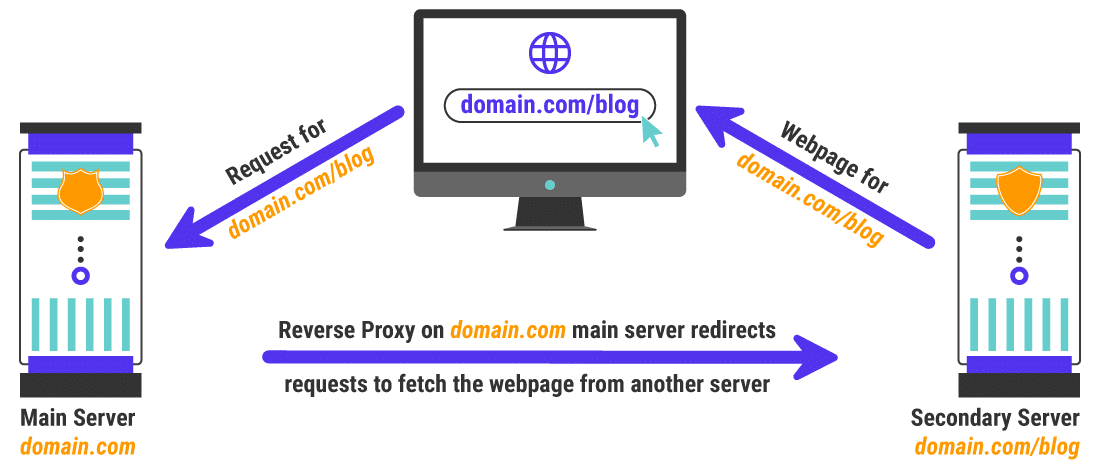
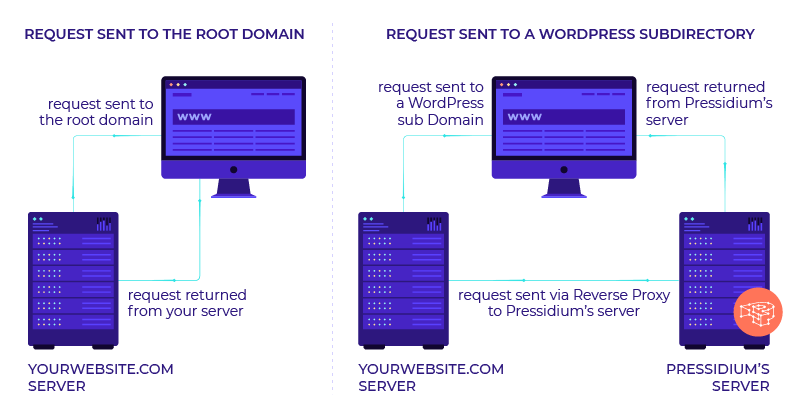
once you set this up it is super easy to keep it running in your entire site will be much faster as a result as well
my response to someone else that needed a subfolder
https://azwa.1clkaccess.in/community/q/topic/69528/using-a-reverse-proxy-and-301-redirect-to-appear-sub-domain-as-sub-directory-what-are-the-seo-risksplease also look at it explained by these hosting companies is unbelievable easy to implement compared to how it looks and you can do so with Fastly or cloudflare in a matter of minutes
-
https://servebolt.com/help/article/cloudflare-workers-reverse-proxy/
-
https://support.pagely.com/hc/en-us/articles/213148558-Reverse-Proxy-Setup
-
https://wpengine.com/support/using-a-reverse-proxy-with-wp-engine/
-
https://thoughtbot.com/blog/host-your-blog-under-blog-on-your-www-domain
-
https://crate.io/blog/fastly_traffic_spike
*https://support.fastly.com/hc/en-us/community/posts/4407427792397-Set-a-request-condition-to-redirect-URL -
https://coda.io/@matt-varughese/guide-how-to-reverse-proxy-with-cloudflare-workers
-
https://www.cloudflare.com/learning/cdn/glossary/reverse-proxy/
-
https://gist.github.com/LimeCuda/18b88f7ad9cdf1dccb01b4a6bbe398a6
I hope this was of help
tom
-
-
@nmiletic The content section of the site requires a unique UI Design and other robust functionality, so having a separate theme/plugins in its own directory is going to be the way we go here. Thanks for your assistance!
-
@himalayaninstitute Have you thought about adding a page and making all of this new content a subpage? Or changing your permalink structure to include a category in the URL? You can then add all of these posts under that category and have the URL show up as www.example.com/category/page-or-post-name
-
The website at the subdirectory will be an online learning platform with a blog, online courses, memberships, gated content, etc. The content currently lives on the main site, so, it's great that we can move it into the subdirectory without taking a hit from Google.
Since these are fundamentally two separate websites, we're not concerned about needing to manage them independently.
Thanks again for your input and advice, we greatly appreciate it!
-
@amitydigital said in WordPress Sub-directory for SEO:
Google will view it as one site so you shouldn't have any issues from that perspective. The Google bot is just looking at pages and won't know/care that the underlying CMS that is running some pages is a different install than other pages. The downside is you now have two websites to maintain, two themes, two sets of files, etc... That may result in a bit of a headache in the future.
As @amitydigital put it, the issue with your approach would be repetitive tasks. You will not loose any DA nor PA (being that you implement a correct 301 redirection). What is going to be on the subdirectory?
-
Google will view it as one site so you shouldn't have any issues from that perspective. The Google bot is just looking at pages and won't know/care that the underlying CMS that is running some pages is a different install than other pages. The downside is you now have two websites to maintain, two themes, two sets of files, etc... That may result in a bit of a headache in the future.





Got a burning SEO question?
Subscribe to Moz Pro to gain full access to Q&A, answer questions, and ask your own.
Browse Questions
Explore more categories
-
Moz Tools
Chat with the community about the Moz tools.
-
SEO Tactics
Discuss the SEO process with fellow marketers
-
Community
Discuss industry events, jobs, and news!
-
Digital Marketing
Chat about tactics outside of SEO
-
Research & Trends
Dive into research and trends in the search industry.
-
Support
Connect on product support and feature requests.
Related Questions
-

How to Boost Your WordPress Website Speed to 95+ (Without Premium Plugins)
I'm reaching out for some advice on improving my WordPress website's speed. I'm currently using a free theme for this fusion magazine and aiming for a score of 95+ on Google PageSpeed Insights. I'm aware that premium plugins can significantly enhance performance, but I'm hoping to achieve similar results using primarily free solutions and manual optimizations.
Technical SEO | | mohammadrehanseo0 -

Unsolved Using Weglot on wordpress (errors)
Good day to you all, Does anyone have experience of the errors being pulled up by Moz about the utility of the weglot plugin on Wordpress? Moz is pulling up URLs such as: https://www.ibizacc.com/es/chapparal-2/?wg-choose-original=false These are classified under "redirect issues" and 99% of the pages are with the ?wg-choose parameter in the URL. Is this having an actual negative impact on my search or is it something more Moz related being highlighted. Any advice be appreciated and a resolution .. Im thinking I could exclude this parameter.
Moz Pro | | alwaysbeseen0 -

Duplicate Content and Subdirectories
Hi there and thank you in advance for your help! I'm seeking guidance on how to structure a resources directory (white papers, webinars, etc.) while avoiding duplicate content penalties. If you go to /resources on our site, there is filter function. If you filter for webinars, the URL becomes /resources/?type=webinar We didn't want that dynamic URL to be the primary URL for webinars, so we created a new page with the URL /resources/webinar that lists all of our webinars and includes a featured webinar up top. However, the same webinar titles now appear on the /resources page and the /resources/webinar page. Will that cause duplicate content issues? P.S. Not sure if it matters, but we also changed the URLs for the individual resource pages to include the resource type. For example, one of our webinar URLs is /resources/webinar/forecasting-your-revenue Thank you!
Technical SEO | | SAIM_Marketing0 -

Unsolved Google URL inspection live test rendering issue.
Hi Everyone, This is my first post on Moz. I have been trying to get this thing sorted and have read everywhere and everyone just says don't worry about it. I would really like some advice/suggestions on this it will be really helpful. When I use the Google URL inspection tool from the Google search console the page rendering is completely broken. The tool refuses to load resources each time. At end of the day that's how the website is rendered in Google cache. I have already tried disabling cache plugins and Cloudflare but nothing works. site - nationalcarparts.co.nz
Support | | caitlinrolex789
This is how it renders when using URL inspection tool -
https://prnt.sc/7XKHtEU01gEl and if you check cache:https://nationalcarparts.co.nz this is how Google is caching it. Plugins I am using - Elementor Version 3.6.1, Elementor Pro Version 3.6.4, Exclusive Addons Elementor Version 2.5.4, Exclusive Addons Elementor Pro Version 1.4.6, WP- rocket, Cloudflare Pro plan with the plugin. Please if someone has fixed this issue and has a possible solution for it. Thanks cacheissue1.PNG1 -

SEO implications of moving fra a sub-folder to a root domain
I am considering a restructure of my site, and was hoping for some input on SEO implications which I am having some issues getting clarity in. (I will be using sample domains/urls because of language reasons, not an english site), Thinking about moving a site (all content) from example.com/parenting -> parenting.com. This is to have a site fully devoted to this theme, and more easily monitor and improve SEO performance on this content alone. Today all stats on external links, DA etc is related to the root domain, and not just this sub-department. Plus it would be a better brand-experience of the content and site. Other info/issues: -The domain parenting.com (used as example) is currently redirected to example.com/parenting. So I would have to reverse that redirect, and would also redirect all articles to the new site. The current domain example.com has a high DA (67), but the new domain parenting.com has a much lower DA (24). Question: Would the parenting.com domain improve it's DA when not redirected and the sub-folder on the high-DA domain is redirected here instead? Would it severly hurt SEO traffic to make this change, and if so is there a strategy to make the move with as little loss in traffic as possible? How much value is in having a stand-alone domain, which also is one of the most important keywords for this theme? My doubt comes mostly from moving from a domain with high DA to a domain with much lower DA, and I am not sure about how removing the redirect would change that, or if placing a new redirect from the subfolder on the current site would help improve it. Would some DA flow over with a 301 redirect? Thanks for any advice or hints to other documentation that might be of interest for this scenario 🙂
Intermediate & Advanced SEO | | Magne_Vidnes0 -
Get DA/PA Bulk Mode
Hi, everyone. I want to know if you know any way to get DA & PA metrics with any software (not Netpeak Checker please, is very low) or any add-on for Google Sheet or Microsoft Excel (like Majestic has for Google Sheets). Up today any software works always and sometimes the results are not really. Please, team of MOZ and Community, help me. And team of MOZ, the SEOs around the world need a solution for this. We scrapped many domains every day for build our privates blogs networks and also for search opportunities for link our sites. Please, provide us anyway (software, tool in your suite, I don't know) for this essential function in the SEO World. Thanks!
API | | seotrafilea0 -

Is tabbed content bad for SEO?
I work for a Theater show listings and ticketing website. In our show listings pages (e.g. http://www.theatermania.com/broadway/this-is-our-youth_302998/) we split our content into separate tabs (overview, pricing and show dates, cast, and video). Are we shooting ourselves in the foot by separating the content? Are we better served with keeping it all in a single page? Thanks so much!
Intermediate & Advanced SEO | | TheaterMania0 -

Does font size affect SEO?
In the eyes of Google, would the font text size of say a news article affect SEO? For example, a slightly larger font being easier to read by those with bad eyes? Accessibility? If so, what size would be ideal? 10, 12, 14? Your thoughts and suggestions are greatly appreciated.
Intermediate & Advanced SEO | | Peter2640