Moz Q&A is closed.
After more than 13 years, and tens of thousands of questions, Moz Q&A closed on 12th December 2024. Whilst we’re not completely removing the content - many posts will still be possible to view - we have locked both new posts and new replies. More details here.
How to stop Google crawling after 301 redirect?
-
I have removed all pages from my old website and set 301 redirect to new website. But, I have verified old website with Google webmaster tools' HTML verification file which enable me to track all data and existence of pages in Google search for my old website. I was assumed that, Google will stop crawling and DE-indexed all pages after 301 redirect. Because, I have set 301 redirect before 3 months.
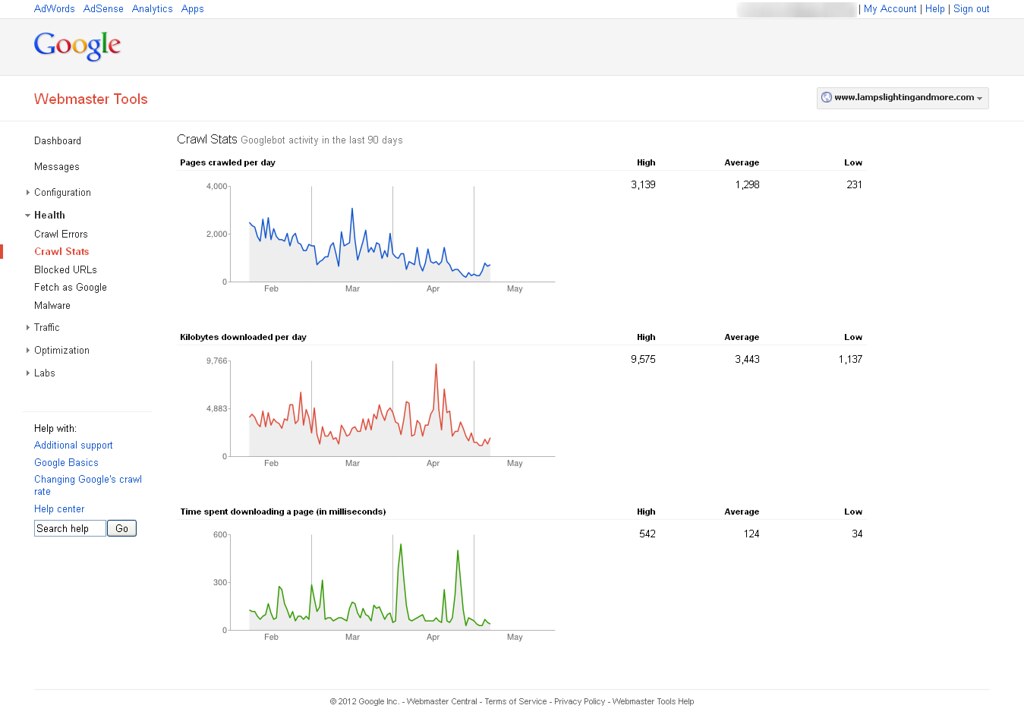
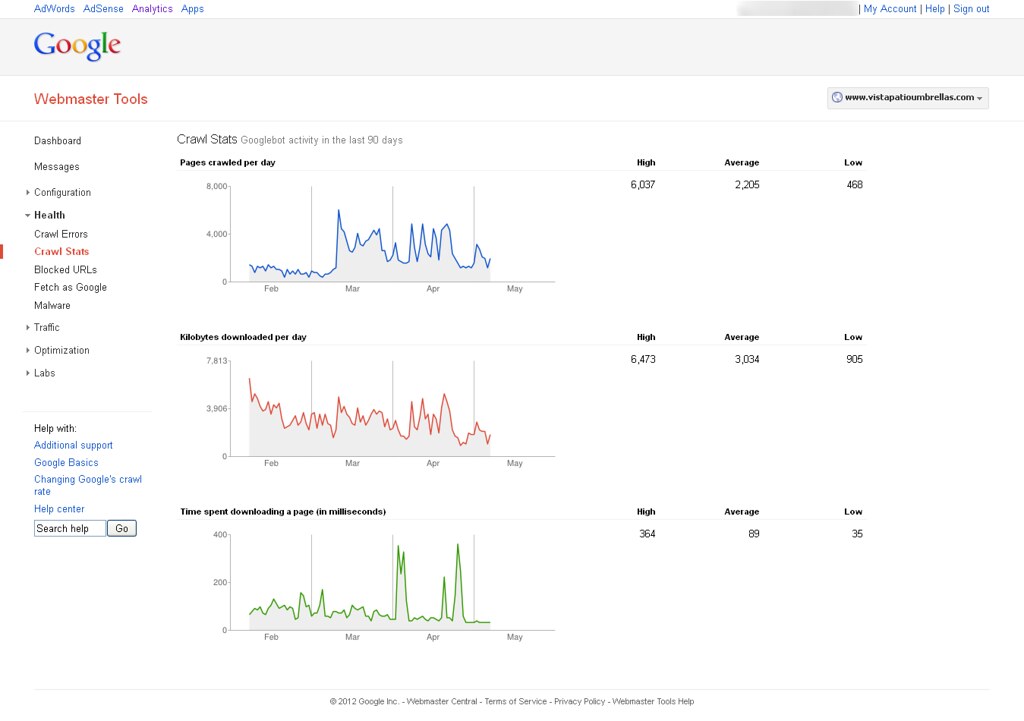
Now, I'm able to see Google bot activity on my website with help of Google webmaster tools. You can find out attachment to know more about it. How can it possible & How Google can crawl removed pages?
You can see following image to know more about it.
&
-
Google is most likely following links on other sites pointing to your old site and then 301'ing to the new site so you're seeing activity in WMT
looking here is still see two pages in the index:
you can go in and remove the site in WMT using the remove URL tool and see if that stops activity in that old WMT account. Crawling or not crawling, reporting or not reporting, there is not an issue here though - the 301's appear to be properly set up.


Got a burning SEO question?
Subscribe to Moz Pro to gain full access to Q&A, answer questions, and ask your own.
Browse Questions
Explore more categories
-
Moz Tools
Chat with the community about the Moz tools.
-
SEO Tactics
Discuss the SEO process with fellow marketers
-
Community
Discuss industry events, jobs, and news!
-
Digital Marketing
Chat about tactics outside of SEO
-
Research & Trends
Dive into research and trends in the search industry.
-
Support
Connect on product support and feature requests.
Related Questions
-

301 Redirect from query string to new static page
If i want to create a redirect from a page where the slug ends like this "/?i=4839&mid=1000&id=41537" to a static, more SEO friendly slug like "/contact-us/", will a standard 301 redirect suffice? Thanks, Nails
Intermediate & Advanced SEO | | matt.nails0 -

301 redirect hops from non-https and www
It's best practice to minimize the amount of 301 redirect hops. Ideally only one redirect hop. It's also best practice to 301 redirect (or at least canonical) your non-https and/or your non-www (or www) to the canonical protocol/subdomain. The simplest (and possibly the most common) way to implement canonical protocol/subdomain redirects is through a load balancer or before your app processes the request. Both of which will just blanket 301 to the canonical domain/protocol regardless if the path exists or not In which case, you could have: Two hops. i.e. hop #1 http://example.com/foo to https://example.com/foo, hop #2 https://example.com/foo to https://example.com/bar 301 to a 404. Let's say https://example.com/dog never existed, but somebody for whatever reason linked to it (maybe a typo). If I request https://www.example.com/dog, the load balancer would 301 to a 404 page. Either scenario above should be fairly rare. However, you can't control how people link to you. Should I care about either above scenario? I could have my app attempt to check if the page exists before forwarding, but that code could be complicated.
Intermediate & Advanced SEO | | dsbud0 -

Images Returning 404 Error Codes. 301 Redirects?
We're working with a site that has gone through a lot of changes over the years - ownership, complete site redesigns, different platforms, etc. - and we are finding that there are both a lot of pages and individual images that are returning 404 error codes in the Moz crawls. We're doing 301 redirects for the pages, but what would the best course of action be for the images? The images obviously don't exist on the site anymore and are therefore returning the 404 error codes. Should we do a 301 redirect to another similar image that is on the site now or redirect the images to an actual page? Or is there another solution that I'm not considering (besides doing nothing)? We'll go through the site to make sure that there aren't any pages within the site that are still linking to those images, which is probably where the 404 errors are coming from. Based on feedback below it sounds like once we do that, leaving them alone is a good option.
Intermediate & Advanced SEO | | garrettkite0 -

301 redirection pointing to noindexed pages
I have rather an unusual situation where a recently launched affiliate site does not have any unique content as its all syndicated content. For that reason we are currently using the noindex,nofollow meta tags to keep the pages out of the search engines index until we create unique content for the pages. The problem is that due to a very tight timeframe with rebranding, we are looking at 301 redirecting (on a page to page basis) another high authority legacy domain to this new site before we have had a chance to add unique content to it and remove the noindex,nofollow tags. I would assume that any link authority normally passed through the 301 would be lost in this scenario but Im uncertain of what the broader impact might be. Has anyone dealt with a similar scenario? I know this scenario is not ideal and I would rather wait until the unique content is up and noindex tags are removed before launching the 301 redirect of the legacy domain but there are a number of competing priorities at play outside of SEO.
Intermediate & Advanced SEO | | LosNomads0 -

Too many 301 redirects?
Hey, My company currently has one chief website with about 500-600 other domains that all feature the same material as the chief website. These domains have been around for about 5 years and have actually picked up some link traffic. I have all of these identical web-pages utilizing rel=canonical but I was wondering if I would be better served, from SEO purposes, to 301 redirect all of these sites to their respective pages on our chief website? If I add 500 301 redirects, will the major search engines consider this to be black-hat link-building even though the sites are related and technically already feature the same content? For an example, the chief website is www.1099pro.com and I would 301 redirect the below sites to the chief site: 1099softwarepro.com 1099softwarepro.info 1099softwarepro.net 1099softwarepro.biz 1099softwareprofessionals.com 1099softwareprofessionals.info ...you get the point
Intermediate & Advanced SEO | | Stew2220 -

How is Google crawling and indexing this directory listing?
We have three Directory Listing pages that are being indexed by Google: http://www.ccisolutions.com/StoreFront/jsp/ http://www.ccisolutions.com/StoreFront/jsp/html/ http://www.ccisolutions.com/StoreFront/jsp/pdf/ How and why is Googlebot crawling and indexing these pages? Nothing else links to them (although the /jsp.html/ and /jsp/pdf/ both link back to /jsp/). They aren't disallowed in our robots.txt file and I understand that this could be why. If we add them to our robots.txt file and disallow, will this prevent Googlebot from crawling and indexing those Directory Listing pages without prohibiting them from crawling and indexing the content that resides there which is used to populate pages on our site? Having these pages indexed in Google is causing a myriad of issues, not the least of which is duplicate content. For example, this file <tt>CCI-SALES-STAFF.HTML</tt> (which appears on this Directory Listing referenced above - http://www.ccisolutions.com/StoreFront/jsp/html/) clicks through to this Web page: http://www.ccisolutions.com/StoreFront/jsp/html/CCI-SALES-STAFF.HTML This page is indexed in Google and we don't want it to be. But so is the actual page where we intended the content contained in that file to display: http://www.ccisolutions.com/StoreFront/category/meet-our-sales-staff As you can see, this results in duplicate content problems. Is there a way to disallow Googlebot from crawling that Directory Listing page, and, provided that we have this URL in our sitemap: http://www.ccisolutions.com/StoreFront/category/meet-our-sales-staff, solve the duplicate content issue as a result? For example: Disallow: /StoreFront/jsp/ Disallow: /StoreFront/jsp/html/ Disallow: /StoreFront/jsp/pdf/ Can we do this without risking blocking Googlebot from content we do want crawled and indexed? Many thanks in advance for any and all help on this one!
Intermediate & Advanced SEO | | danatanseo0 -

Changing a parent category and 301 redirecting
I have a set of three pages that are subpages of a parent. The structure is as follows: mysite.com/directory/personal-widgets mysite.com/directory/commercial-widgets mysite.com/directory/widgets-services The partent page name "directory" really isn't working for where I want these pages to evolve. So I want to change it to "guides" In a world without worrying about google, I would simply change the parent page to guides, so they look like this, and be done with it: mysite.com/guides/personal-widgets But, the obvious problem is that I have external links to the page now. And the pages have a nice PR. And they also have Facebook page Likes and I don't know if I'll lose those. I know that if I should do this I should redirect the pages to the new pages of course. My question is: Will redirecting the old URL to the new URL with a 301 cause anything negative to happen that I might not be expecting? Does Google dislike Redirects for any reason, or understand they are sometimes necessary?
Intermediate & Advanced SEO | | bizzer0 -

301 Redirects After Company Acquisition
We recently acquired a company, and now we are going to redirect all of the pages on their site to their respective pages on our site. Do we need to keep the original pages on their site active? For how long? Ideally, we would like to redirect everything and remove the old site entirely so we don't have to pay to keep hosting it. Is this possible? Thanks!
Intermediate & Advanced SEO | | pbhatt1