Moz Q&A is closed.
After more than 13 years, and tens of thousands of questions, Moz Q&A closed on 12th December 2024. Whilst we’re not completely removing the content - many posts will still be possible to view - we have locked both new posts and new replies. More details here.
Google Search Console not loading some resources
-
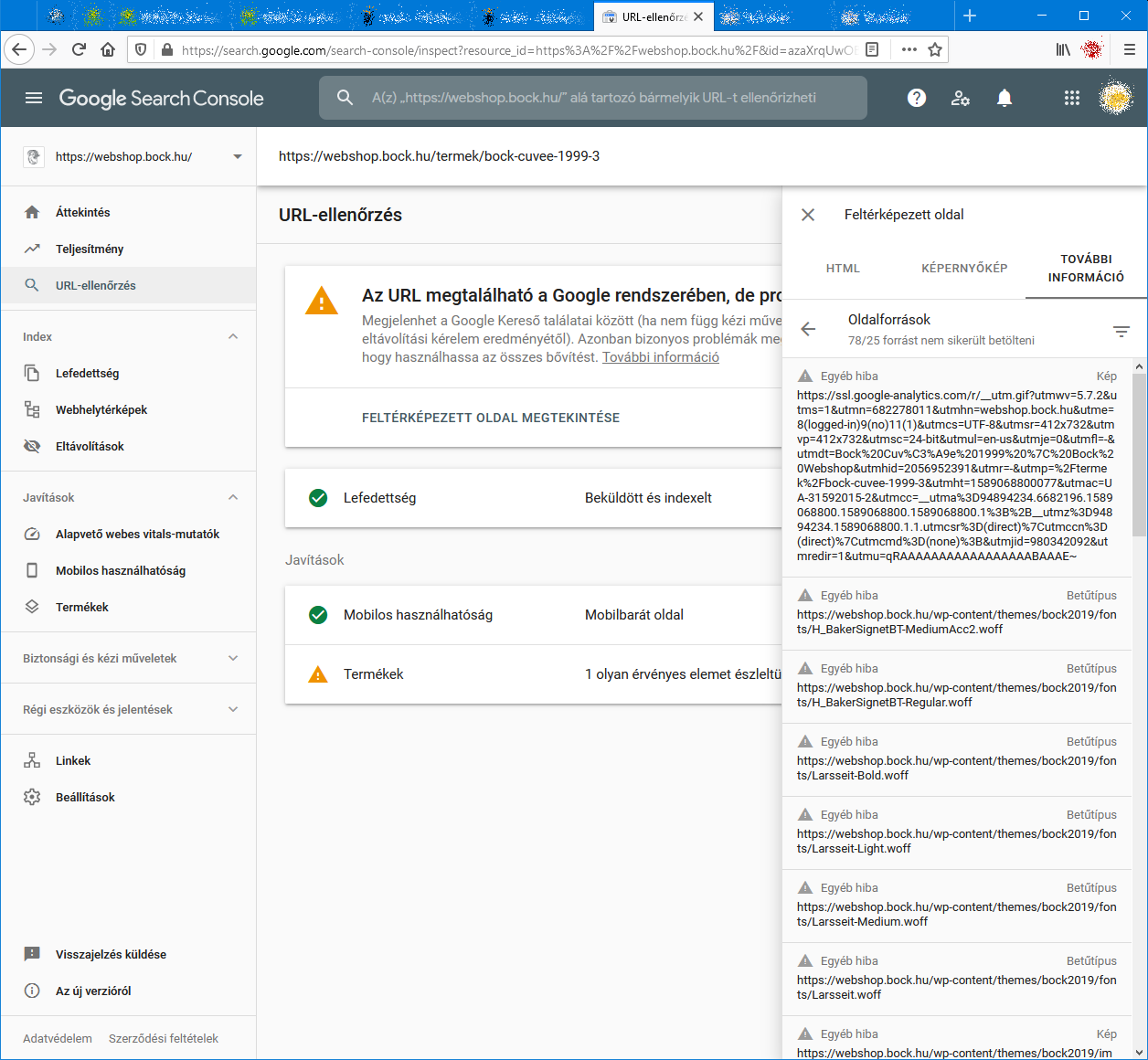
When I check an URL with Search Console it cannot load some page resources, even from other domains (like: ssl.google-analytics.com, www.facebook.com and www.google-analytics.com).
Have any of you experienced this issue?
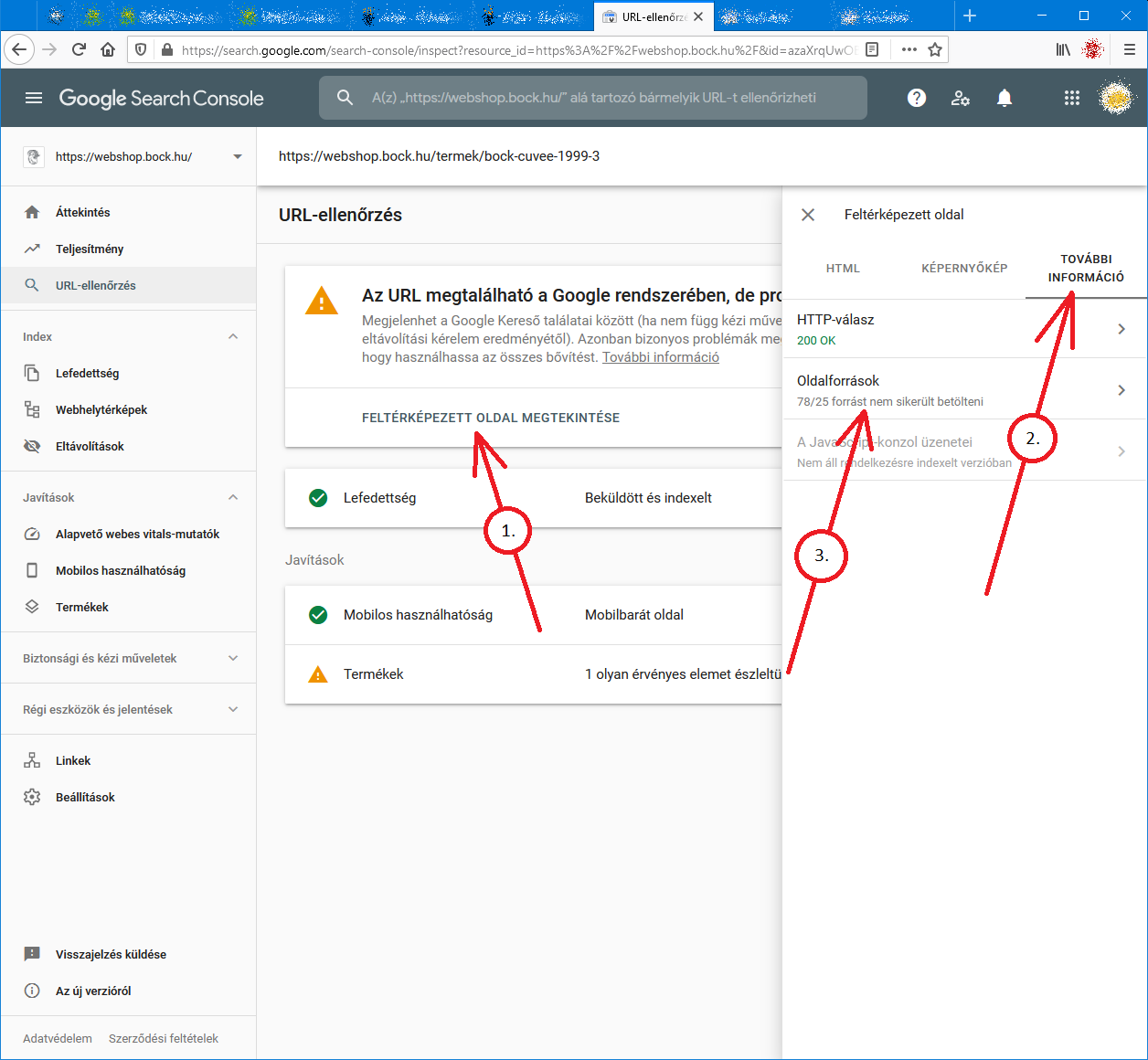
Steps to reproduce:- open Google Search Console
- check an URL
- click "View crawled page" link
- select "More info" tab
- click "Page resources" {?}/{?} couldn't be loaded
When I check the listed resources, all of them can be loaded from a web browser.
So I do not understand why Google cannot load them.
And there is no additional info why the resources could not be loaded.
Any ideas?google-search-console-other-error-1.png google-search-console-other-error-2.png
-
I am facing issue for my https://jobdekho247.com site, web stories are not loading in search console, Refused to load the stylesheet. How can i fix it?
Currently I am using premium version of GeneratePress theme.
-
Google Search Console Pages Not Loading properly since a week
Google search console for my two websites is taking too much time to load. Although I have very good internet connection. When I reload the same page 2nd time then it loads quickly. What is this issue and how to resolve this?
- Can someone help?

-
I also facing this issue, for my https://www.uaeadvise.com/ site, Google Search Index Tool isn't showing for my website. Does anyone know how to fix it? - Thanks in Advance!!
-
I am also facing the issue, for my https://www.darsaal.com/ site, Google Search Index Tool isn't showing for my website. Does anyone know how to fix it?
-
The internal resources are not disallowed.
The other resources are very important. Google Analytics has to work.
The original question is still unanswered. -
While I can't read the language in your screenshots, I can recommend that if those resources are on your own domain, make sure they are not disallowed by the robots.txt file. If they are on external domains, ones which you don't control, then there's really not anything for you to do, and you may as well ignore.






Got a burning SEO question?
Subscribe to Moz Pro to gain full access to Q&A, answer questions, and ask your own.
Browse Questions
Explore more categories
-
Moz Tools
Chat with the community about the Moz tools.
-
SEO Tactics
Discuss the SEO process with fellow marketers
-
Community
Discuss industry events, jobs, and news!
-
Digital Marketing
Chat about tactics outside of SEO
-
Research & Trends
Dive into research and trends in the search industry.
-
Support
Connect on product support and feature requests.
Related Questions
-

Fire a tag when element is loaded on page (Google Tag Manager)
I'm using an Element Visibility trigger to track a value that appears on a page. However, I want to track this value even when the user doesn't scroll to the area of the page where the element is (i.e. when the page is loaded, and the value is displayed below the fold, but the user doesn't scroll down there). Is there a way of doing this
Reporting & Analytics | | RWesley0 -

How to Diagnose "Crawled - Currently Not Indexed" in Google Search Console
The new Google Search Console gives a ton of information about which pages were excluded and why, but one that I'm struggling with is "crawled - currently not indexed". I have some clients that have fallen into this pit and I've identified one reason why it's occurring on some of them - they have multiple websites covering the same information (local businesses) - but others I'm completely flummoxed. Does anyone have any experience figuring this one out?
Reporting & Analytics | | brettmandoes2 -

Google Search Console (new GWT) - Does a language specific sub folder need its own GSC profile
HI I've got a clients site set which targets 3 language/countries: English via the main site on the domain.com Turkish via a Turkish language site on a subfolder domain.com/tr/ And German via domain.de The devs have set up .com and .de in GSC and is reporting data in both However there's no data in the domain/com/tr GSC profile ! Is that because its on a subfolder so data pertaining to it is being reported in the main domain.com GSC account ? Or does something more need to be done to set up the Turkish subfolder in GSC ? If so what ? All Best Dan
Reporting & Analytics | | Dan-Lawrence0 -

Google Search Console - Why is my average mobile position better than my average desktop position?
I'm wondering why my average mobile position is much better than my average desktop position. I'm wondering if Google is comparing the same queries for both mobile vs desktop or if they're only showing me the top ranked for each type of search. Is it example 1 or 2? Example 1: Desktop may have 5,000 ranking queries that average to 21.6
Reporting & Analytics | | Pauly_Gigs
Mobile may have 1,500 ranking queries that average to 8.5 OR Example 2: example.com has 5,000 total ranking keywords, those queries' average ranking in a desktop search 21.6 and mobile search 8.5. I'm curious to know exactly what I'm seeing in Google's Search Console. https://08875344305734164866.googlegroups.com/attach/777ae98664ed418f/Mobile%20VS%20Desktop.png?part=0.1&view=1&vt=ANaJVrEHOjRLlPH43i00NnC8PxaG3ct7bsHum_TWnUoa7xVamCpRp8jrvRQJL-gz4n7Q0otqKcKxcAJA5z1VySs2naQU_Zy5tDps6bJhUSZsLRQq4uU-tJQ0 -

Is it possible to use Google Tag Manager to pass a user’s text input into a form field to Google analytics?
Hey Everyone, I finally figured out how to use auto event tracking with Google Tag Manager, but didn't get the data I wanted. I want to see what users are typing into the search field on my site (the URL structure of my site isn't set up properly to use GA's built-in site search tracking). So, I set up the form submit event tracking in Google Tag Manager and used the following as my event tracking parameters: Category: Search Action: Search Value When I test and look in Google Analytics I just see: "search" and "search value." I wanted to see the text that I searched on my site. Not just the Action and Category of the event.... Is what I'm trying to do even possible? Do I need to set up a different event tracking parameter? Thanks everyone!
Reporting & Analytics | | DaveGuyMan0 -

Easiest way to get out of Google local results?
Odd one this, but what's the easiest way to remove a website from the Google local listings? Would removing all the Google map listings do the job? A client of ours is suffering massively since the Google update in the middle of last month. Previously they would appear no1 or no2 in the local results and normally 1 or 2 in the organic results. However, since the middle of last month any time they rank on the first page for a local result, their organic result has dropped massively to at least page 4. If I set my location as something different in google, say 100 miles away, they then rank well for the organic listings (obviously not appearing for local searches). When I change it back to my current location the organic listing is gone and they are back to ranking for the local. Since the middle of July the traffic from search engines has dropped about 65%. All the organic rankings remain as strong as ever just not in the areas where they want to get customers from!! The idea is to remove the local listing and get the organics reranking as the ctr on those is much much higher. On a side note, anyone else notice very poor ctr on google local listings? Maybe users feel they are adverts thanks
Reporting & Analytics | | ccgale0 -

Comparing % Change, Google Analytics
Hey Mozzers, Is there a simple way to compare the "% Change" in traffic when comparing two separate time periods in a single Google Analytics report? When comparing data from two separate time periods, an exported CSV doesn't include the % Change (booo!), and there's no option to sort by % Change within the GA report, essentially forcing you to scroll through all the results to pinpoint the major movers and shakers. I'm not averse to using spreadsheets to sort this data, but I'm thinking that I'd likely need a macro to make this work, something like this. However, none of the macros on that page are working (possibly because they were designed for a previous version of Analytics). All suggestions are appreciated. Thanks!
Reporting & Analytics | | dangaul0 -

Setting up Google Analytics default URL
If someone has set: the default url in Google Analytics to a non-www address (http://mysite.com) then placed the UA tracking script from that GA account within the CMS framework of the website... ... and then set the permanent 301 redirect in the htaccess file to redirect to the www address (http://www.mysite.com). How less accurrate will my GA analytics measurements be considering the default url within GA is non-www and the permanent 301 redirect in htacess is to the www-address? Anyone know how reliable GA reports are until the default url in GA analytics is changed to match what is the redirected url in htaccess file? _Cindy
Reporting & Analytics | | CeCeBar0