Moz Q&A is closed.
After more than 13 years, and tens of thousands of questions, Moz Q&A closed on 12th December 2024. Whilst we’re not completely removing the content - many posts will still be possible to view - we have locked both new posts and new replies. More details here.
Google Search Console not loading some resources
-
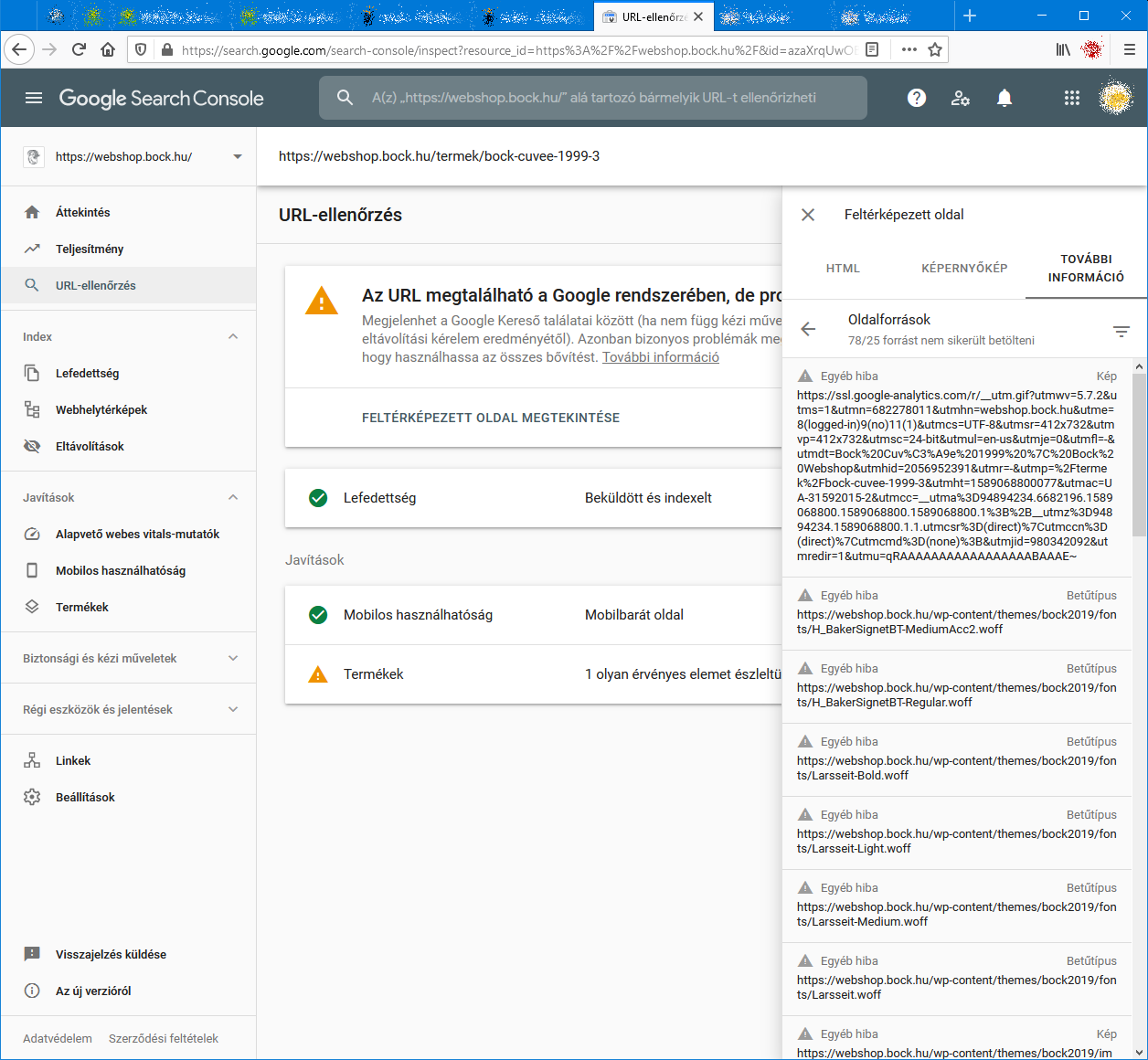
When I check an URL with Search Console it cannot load some page resources, even from other domains (like: ssl.google-analytics.com, www.facebook.com and www.google-analytics.com).
Have any of you experienced this issue?
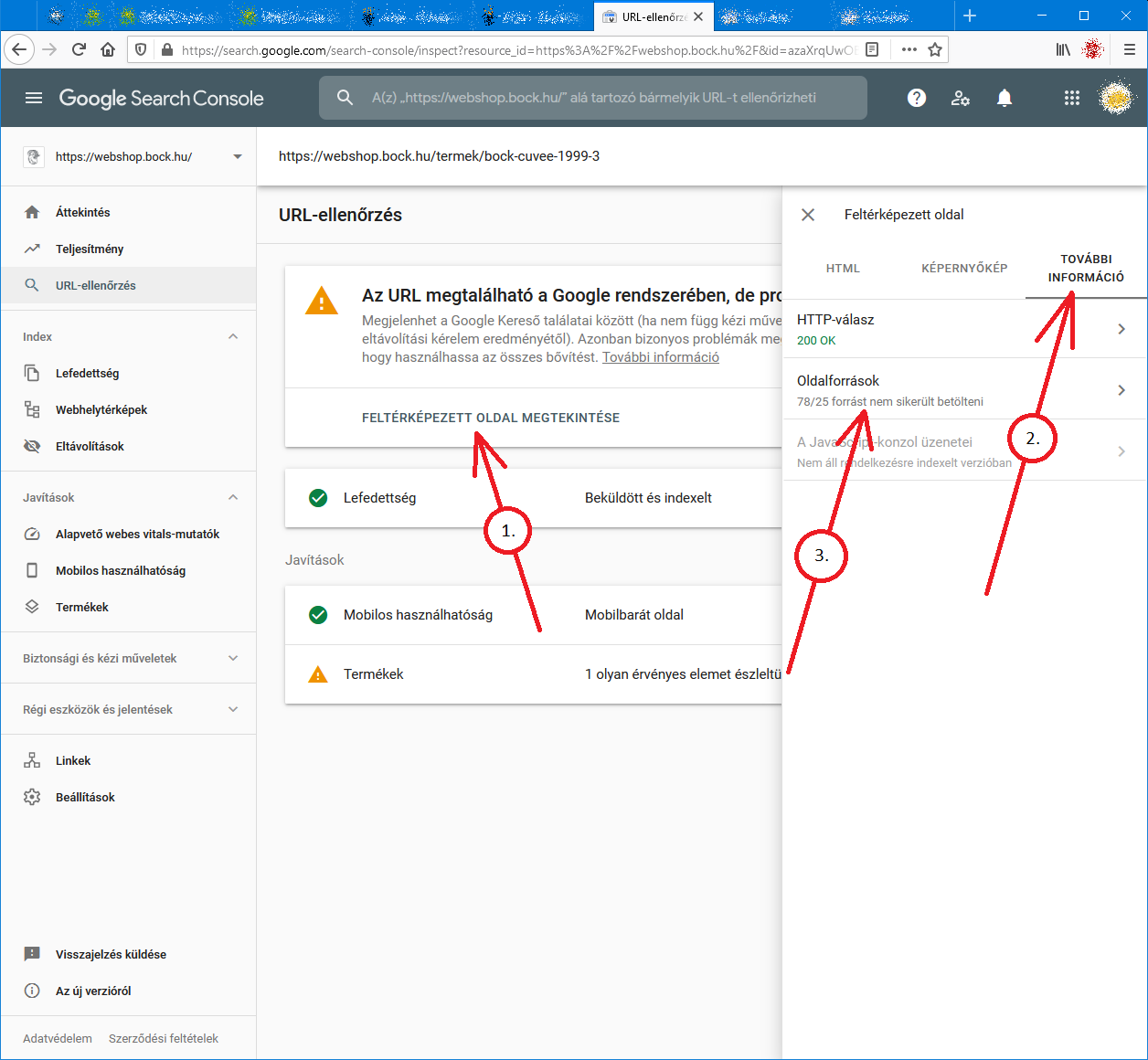
Steps to reproduce:- open Google Search Console
- check an URL
- click "View crawled page" link
- select "More info" tab
- click "Page resources" {?}/{?} couldn't be loaded
When I check the listed resources, all of them can be loaded from a web browser.
So I do not understand why Google cannot load them.
And there is no additional info why the resources could not be loaded.
Any ideas?google-search-console-other-error-1.png google-search-console-other-error-2.png
-
I am facing issue for my https://jobdekho247.com site, web stories are not loading in search console, Refused to load the stylesheet. How can i fix it?
Currently I am using premium version of GeneratePress theme.
-
Google Search Console Pages Not Loading properly since a week
Google search console for my two websites is taking too much time to load. Although I have very good internet connection. When I reload the same page 2nd time then it loads quickly. What is this issue and how to resolve this?
- Can someone help?

-
I also facing this issue, for my https://www.uaeadvise.com/ site, Google Search Index Tool isn't showing for my website. Does anyone know how to fix it? - Thanks in Advance!!
-
I am also facing the issue, for my https://www.darsaal.com/ site, Google Search Index Tool isn't showing for my website. Does anyone know how to fix it?
-
The internal resources are not disallowed.
The other resources are very important. Google Analytics has to work.
The original question is still unanswered. -
While I can't read the language in your screenshots, I can recommend that if those resources are on your own domain, make sure they are not disallowed by the robots.txt file. If they are on external domains, ones which you don't control, then there's really not anything for you to do, and you may as well ignore.






Got a burning SEO question?
Subscribe to Moz Pro to gain full access to Q&A, answer questions, and ask your own.
Browse Questions
Explore more categories
-
Moz Tools
Chat with the community about the Moz tools.
-
SEO Tactics
Discuss the SEO process with fellow marketers
-
Community
Discuss industry events, jobs, and news!
-
Digital Marketing
Chat about tactics outside of SEO
-
Research & Trends
Dive into research and trends in the search industry.
-
Support
Connect on product support and feature requests.
Related Questions
-

Whatstuffwherebot user agent messing up Google Analytics
Starting yesterday, Aug 26, 2020, I noticed a new bot crawling our site with user agent whatstuffwherebot. Google Analytics is counting these hits as human traffic, completely throwing off my numbers - yesterday, Analytics reported nearly triple my typical number of visitors. As of now, Search Console only shows data through Aug 25 so I don't know if Search Console is also affected. Is anybody else seeing something similar? Does anybody know what the whatstuffwherebot bot is? I don't get any results when I search on Google or Bing. For what it's worth, the traffic is coming from Columbus, OH, running over Amazon AWS via 278 different IP addresses so far. Also, WordFence (my WordPress security plugin) correctly identifies these hits as bot traffic.
Reporting & Analytics | | ahirai0 -

How to track google auto search suggestion click?
Hello Guys, In google.co.uk when I search SEL and google gives me option of different different sites and when I click on any one site then that click tracking I need. I have attached the screenshot to understand easily. Is it possible to track such things or possible via server logs etc? TV99h
Reporting & Analytics | | micey1231 -

Tasks for Google Analytics training
Hi Mozzers, I'm delivering some Google Analytics (Fundamentals level) training, and trying to make it was fun and as interesting as possible... which is quite a challenge when it comes to GA. I was just wondering if you're aware of training tasks, or interactions, I could bring into this kind of training session? The group are particularly interested in user journeys and the effectiveness of content. Thanks!
Reporting & Analytics | | A_Q0 -

Should Google Trends Match Organic Traffic to My Site?
When looking at Google Trends and my Organic Traffic (using GA) as percentages of their total yearly values I have a correlation of .47. This correlation doesn't seem right when you consider that Google Trends (which is showing relative search traffic data) should match up pretty strongly to your Organic Traffic. Any thoughts on what might be going on? Why isn't Google Trends correlating with Organic Traffic? Shouldn't they be pulling from the same data set? Thanks, Jacob
Reporting & Analytics | | jacob.young.cricut0 -

% Change - Google analytics - how to calculate?
Hi All,
Reporting & Analytics | | JohnPalmer
I have two dates with two different numbers I want to calculate the "% Change" like google analytics, The numbers of June 2015 - 127,931 sessions
The numbers of June 2014 - 90914 sessions please tell me what is the %Change. Best. J0 -

How can I see what Google sees when it crawls my page?
In other words, how can see the text and what not it sees from start to finish on each page. I know there was a site, but I can't remember it.
Reporting & Analytics | | tiffany11030 -

Is it possible to use Google Tag Manager to pass a user’s text input into a form field to Google analytics?
Hey Everyone, I finally figured out how to use auto event tracking with Google Tag Manager, but didn't get the data I wanted. I want to see what users are typing into the search field on my site (the URL structure of my site isn't set up properly to use GA's built-in site search tracking). So, I set up the form submit event tracking in Google Tag Manager and used the following as my event tracking parameters: Category: Search Action: Search Value When I test and look in Google Analytics I just see: "search" and "search value." I wanted to see the text that I searched on my site. Not just the Action and Category of the event.... Is what I'm trying to do even possible? Do I need to set up a different event tracking parameter? Thanks everyone!
Reporting & Analytics | | DaveGuyMan0 -

Setting Up Google Analytic with Sub Folder Sites
What is the best way of setting up Google Analytic for a website that has many sub folders? The main site is example.com and it has 40 sub folder sites like example.com/uk example.com/France etc etc Would it be advised to track a single domain in Google Analytic then create filters for the sub folder sites. Filters > Include traffic from > Sub directories Also with this method is it possible to view overall incoming website stats for everything? Previous experience would be great with this thanks 🙂
Reporting & Analytics | | daracreative0