Moz Q&A is closed.
After more than 13 years, and tens of thousands of questions, Moz Q&A closed on 12th December 2024. Whilst we’re not completely removing the content - many posts will still be possible to view - we have locked both new posts and new replies. More details here.
Sudden Drop in Mobile Core Web Vitals
-
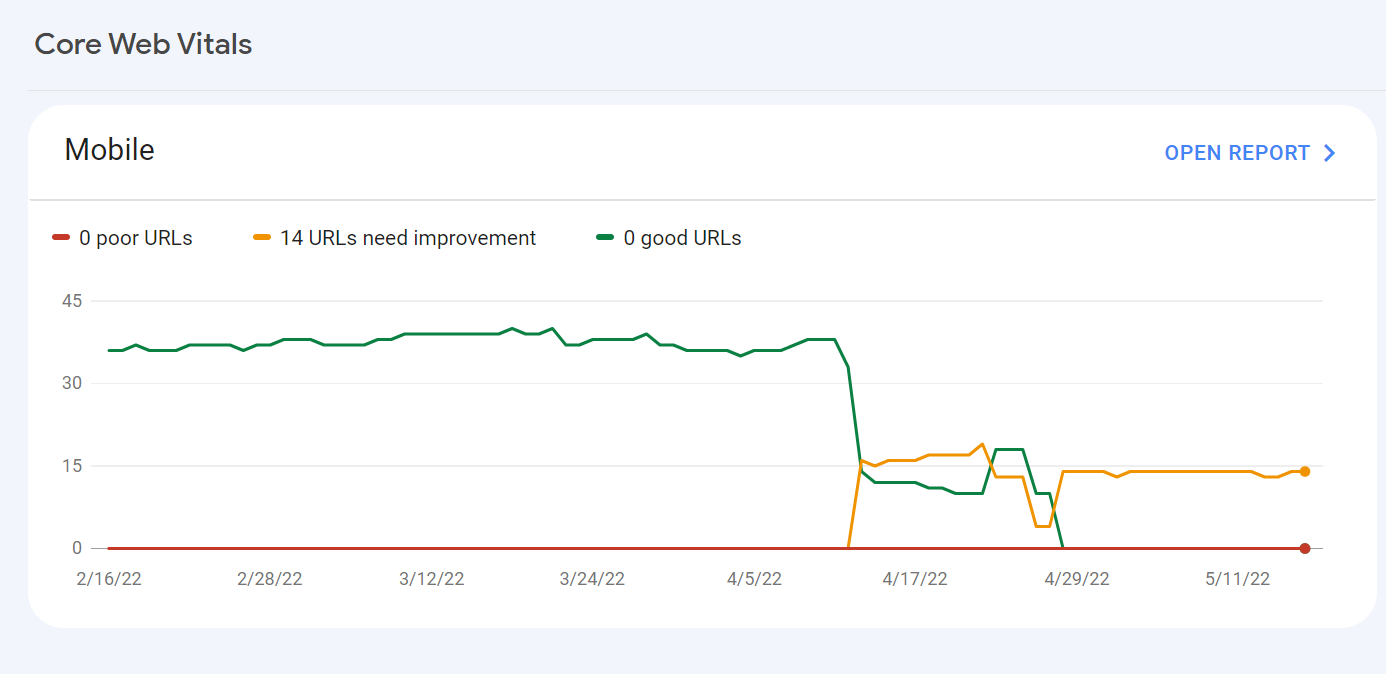
For some reason, after all URLs being previously classified as Good, our Mobile Web Vitals report suddenly shifted to the above, and it doesn't correspond with any site changes on our end.
Has anyone else experience something similar or have any idea what might have caused such a shift?
Curiously I'm not seeing a drop in session duration, conversion rate etc. for mobile traffic despite the seemingly sudden change.
-
I can’t understand their algorithm for core web vitals. I have made some technical updates to our website for speed optimization, but the thing that happened in the search console is very confusing for my site.
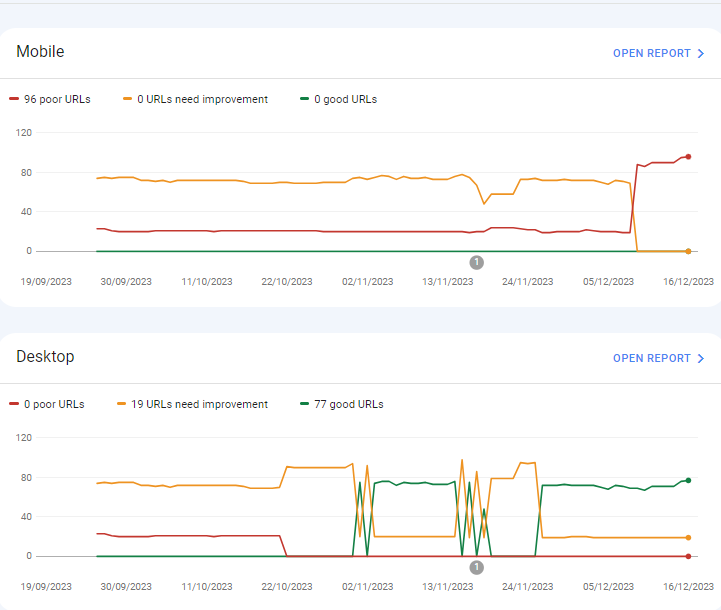
For desktops, pages are indexed as good URLs
while mobile-indexed URLs are displayed as poor URLs.
Our website is the collective material for people looking for Canada immigration (PAIC), and 70% of the portion is filled with text only. We are using webp images for optimization, still it is not passing Core Web Vitals.I am looking forward to the expert’s suggestion to overcome this problem.
-
I can’t understand their algorithm for core web vitals. I have made some technical updates to our website for speed optimization, but the thing that happened in the search console is very confusing for my site.
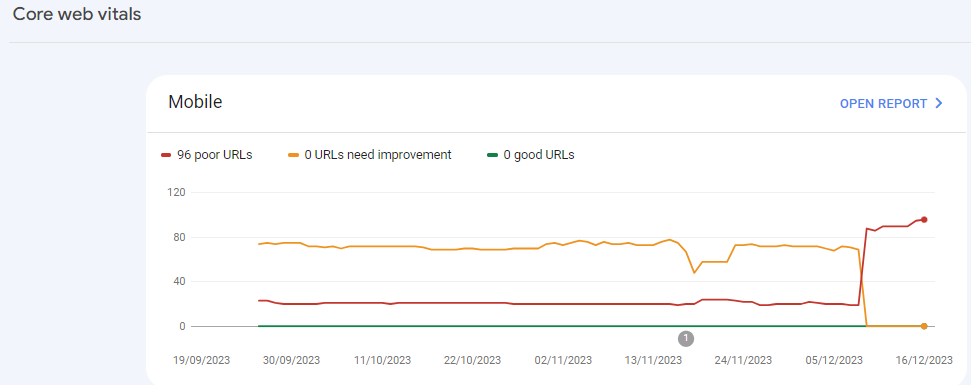
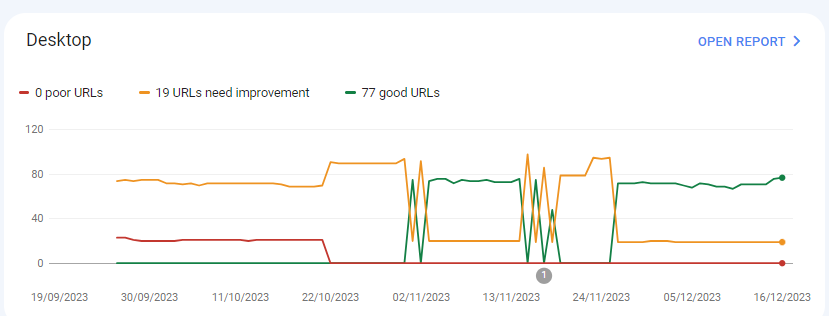
For desktops, pages are indexed as good URLs
while mobile-indexed URLs are displayed as poor URLs.
Our website is the collective material for people looking for Canadian immigration (PAIC), and 70% of the portion is filled with text only. We are using webp images for optimization, still it is not passing Core Web Vitals.I am looking forward to the expert’s suggestion to overcome this problem.
-
@rwat Hi, did you find a solution?
-
Yes, I am also experiencing the same for one of my websites, but most of them are blog posts and I am using a lot of images without proper optimization, so that could be the reason. but not sure.
It is also quite possible that Google maybe adding some more parameters to their main web critical score.



Got a burning SEO question?
Subscribe to Moz Pro to gain full access to Q&A, answer questions, and ask your own.
Browse Questions
Explore more categories
-
Moz Tools
Chat with the community about the Moz tools.
-
SEO Tactics
Discuss the SEO process with fellow marketers
-
Community
Discuss industry events, jobs, and news!
-
Digital Marketing
Chat about tactics outside of SEO
-
Research & Trends
Dive into research and trends in the search industry.
-
Support
Connect on product support and feature requests.
Related Questions
-

Why have my positions dropped after implementing recommended changes?
Hello! I have taken a Moz free trial and am really enjoying using this service. But, after implementing the recommended changes by Moz my rankings have really dropped. Is this normal? I was averaging around 17 but now averaging 40. Here is my website if anyone has any ideas of what I might be doing wrong, I would greatly appreciate any help.
Technical SEO | | NicoleChambers
Thank you
Nicole1 -

Best redirect destination for 18k highly-linked pages
Technical SEO question regarding redirects; I appreciate any insights on best way to handle. Situation: We're decommissioning several major content sections on a website, comprising ~18k webpages. This is a well established site (10+ years) and many of the pages within these sections have high-quality inbound links from .orgs and .edus. Challenge: We're trying to determine the best place to redirect these 18k pages. For user experience, we believe best option is the homepage, which has a statement about the changes to the site and links to the most important remaining sections of the site. It's also the most important page on site, so the bolster of 301 redirected links doesn't seem bad. However, someone on our team is concerned that that many new redirected pages and links going to our homepage will trigger a negative SEO flag for the homepage, and recommends instead that they all go to our custom 404 page (which also includes links to important remaining sections). What's the right approach here to preserve remaining SEO value of these soon-to-be-redirected pages without triggering Google penalties?
Technical SEO | | davidvogel1 -

Backlinks on Moz not on Google Search Console
Moz is showing thousands of backlinks to my site that are not showing up on Google Search Console - which is good because those links were created by some spammer in Pakistan somewhere. I haven't yet submitted a disavow report to Google of well over 10K links because the list keeps growing every day with new backlinks that have been rerouted to a 404 page. I have asked Google to clarify and they put my question on their forum for an answer, which I'm still waiting for - so I thought I'd try my luck here. My question... If Moz does not match Google Search Console, and backlinks are important to results, how valid is the ranking that Moz creates to let me know how I'm doing in this competition and if I'm improving or not. If the goal is to get Google to pay attention and I use Moz to help me figure out how to do this, how can I do that if the backlink information isn't the same - by literally over 10 000 backlinks created by some spammer doing odd things... They've included the url from their deleted profile on my site with 100s of other urls, including Moz.com and are posting them everywhere with their preferred anchor text. Moz ranking considers the thousands of spam backlinks I can't get rid of and Google ignores them or disavows them. So isn't the rankings, data, and graphs apples and bananas? How can I know what my site's strength really is and if I'm improving or not if the data doesn't match? Complete SEO Novice Shannon Peel
Link Building | | MarketAPeel
Brand Storyteller
MarketAPeel0 -

Best Web-site Structure/ SEO Strategy for an online travel agency?
Dear Experts! I need your help with pointing me in the right direction. So far I have found scattered tips around the Internet but it's hard to make a full picture with all these bits and pieces of information without a professional advice. My primary goal is to understand how I should build my online travel agency web-site’s (https://qualistay.com) structure, so that I target my keywords on correct pages and do not create a duplicate content. In my particular case I have very similar properties in similar locations in Tenerife. Many of them are located in the same villa or apartment complex, thus, it is very hard to come up with the unique description for each of them. Not speaking of amenities and pricing blocks, which are standard and almost identical (I don’t know if Google sees it as a duplicate content). From what I have read so far, it’s better to target archive pages rather than every single property. At the moment my archive pages are: all properties (includes all property types and locations), a page for each location (includes all property types). Does it make sense adding archive pages by property type in addition OR in stead of the location ones if I, for instance, target separate keywords like 'villas costa adeje' and 'apartments costa adeje'? At the moment, the title of the respective archive page "Properties to rent in costa adeje: villas, apartments" in principle targets both keywords... Does using the same keyword in a single property listing cannibalize archive page ranking it is linking back to? Or not, unless Google specifically identifies this as a duplicate content, which one can see in Google Search Console under HTML Improvements and/or archive page has more incoming links than a single property? If targeting only archive pages, how should I optimize them in such a way that they stay user-friendly. I have created (though, not yet fully optimized) descriptions for each archive page just below the main header. But I have them partially hidden (collapsible) using a JS in order to keep visitors’ focus on the properties. I know that Google does not rank hidden content high, at least at the moment, but since there is a new algorithm Mobile First coming up in the near future, they promise not to punish mobile sites for a collapsible content and will use mobile version to rate desktop one. Does this mean I should not worry about hidden content anymore or should I move the descirption to the bottom of the page and make it fully visible? Your feedback will be highly appreciated! Thank you! Dmitry
Technical SEO | | qualistay1 -

Duda Mobile no_redirect=true
Hi Guys, Just need some clarification if it's okay. I have a client who has the dudamobile software installed for a mobile friendly version of the site.Now I know that it put's on some JS to check if the user is visiting from a desktop or a mobile and then redirects. ?no_redirect=true https://azwa.1clkaccess.in/community/q/duplicate-content-resulting-from-js-redirect This is creating duplicate page issues when I run a deepcrawl of the site. I understand I can just exclude the URL's in Google's Search Console but I just wanted to double check though that this won't stop Google from indexing the mobile site? Sorry if it's a stupid question Kind Regards Neil
Technical SEO | | nezona1 -

Crawl rate dropped to zero
Hello, I recently moved my site in godaddy from cpanel to managed wordpress. I bought this transfer directly from GoDaddy customer service. in this process they accidentally changed my domain from www to non www. I changed it back after the migration, but as a result of this sites craw rate from search console fell to zero and has not risen at all since then. In addition to this website does not display any other errors, i can ask google manually fetch my pages and it works as before, only the crawl rates seems to be dropped permanently. GoDaddy customer service also claims that do not see any errors but I think, however, that in some way they caused this during the migration when the url changed since the timing match perfectly. also when they accidentally removed the www, crawl rate of my sites non www version got up but fell back to zero when I changed it back to www version. Now the crawl rate of both www and non www version is zero. How do I get it to rise again? Customer service also said that the problem may be related to ftp-data of search console? But they were not able to help any more than .Would someone from here be able to help me with this in anyway please?
Technical SEO | | pok3rplay3r0 -

Fixing a website redirect situation that resulted in drop in traffic
Hi, I'm trying to help someone fix the following situation: they had a website, www.domain.com, that was generating a steady amount of traffic for three years. They then redesigned the website a couple of months ago, and the website developer redirected the site to domain.com but did not set up analytics on domain.com. We noticed that there was a drop in traffic to www.domain.com but have no idea if domain.com is generating any traffic since analytics wasn't installed. To fix this situation, I was going to find out from the developer if there was a good reason to redirect the site. What would have prompted the developer to do this if www.domain.com had been used already for three years? Then, unless there was a good reason, I would change the redirect back to what it was before - domain.com redirecting to www.domain.com. Presumably this would allow us to regain the traffic to the site www.domain.com that was lost when the redirect was put in place. Does this sound like a reasonable course of action? Is there anything that I'm missing, or anything else that I should do in this situation? Thanks in advance! Carolina
Technical SEO | | csmm0 -

Mobile SERPS: how to optimize for call button
Hi, I have 2 questions about the "call" button on mobile google serps when doing a business name search: -since when is this button available in SERPS -is there anything specific you can do to actually have google display that call button (schema.org, ...) Kind regards Pieter
Technical SEO | | TruvoDirectories0