Moz Q&A is closed.
After more than 13 years, and tens of thousands of questions, Moz Q&A closed on 12th December 2024. Whilst we’re not completely removing the content - many posts will still be possible to view - we have locked both new posts and new replies. More details here.
Sudden Drop in Mobile Core Web Vitals
-
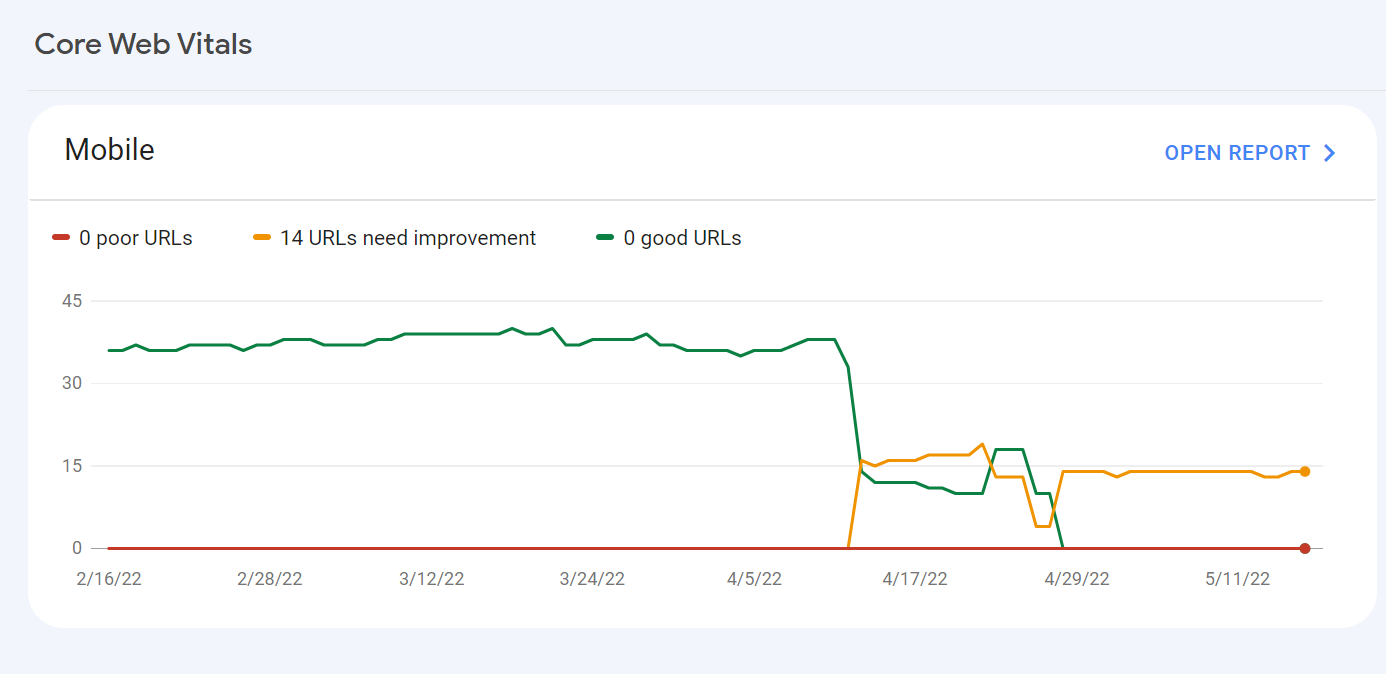
For some reason, after all URLs being previously classified as Good, our Mobile Web Vitals report suddenly shifted to the above, and it doesn't correspond with any site changes on our end.
Has anyone else experience something similar or have any idea what might have caused such a shift?
Curiously I'm not seeing a drop in session duration, conversion rate etc. for mobile traffic despite the seemingly sudden change.
-
I can’t understand their algorithm for core web vitals. I have made some technical updates to our website for speed optimization, but the thing that happened in the search console is very confusing for my site.
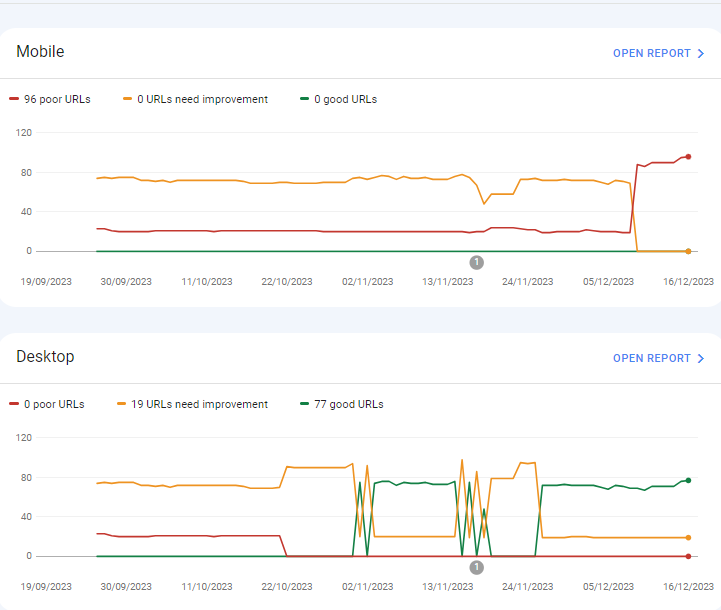
For desktops, pages are indexed as good URLs
while mobile-indexed URLs are displayed as poor URLs.
Our website is the collective material for people looking for Canada immigration (PAIC), and 70% of the portion is filled with text only. We are using webp images for optimization, still it is not passing Core Web Vitals.I am looking forward to the expert’s suggestion to overcome this problem.
-
I can’t understand their algorithm for core web vitals. I have made some technical updates to our website for speed optimization, but the thing that happened in the search console is very confusing for my site.
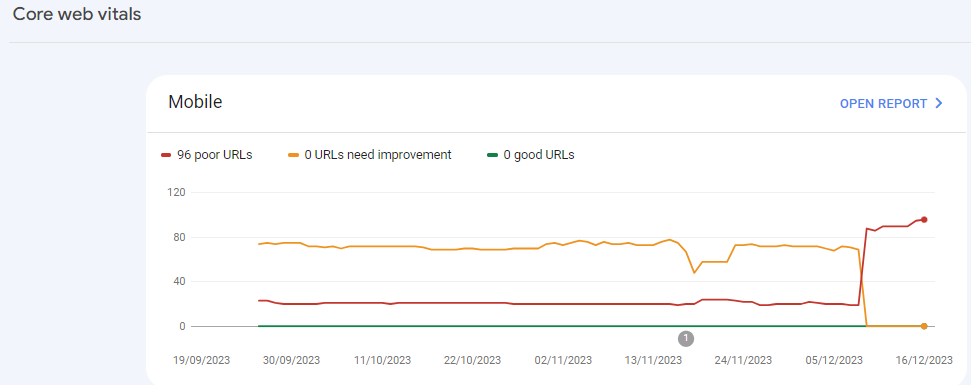
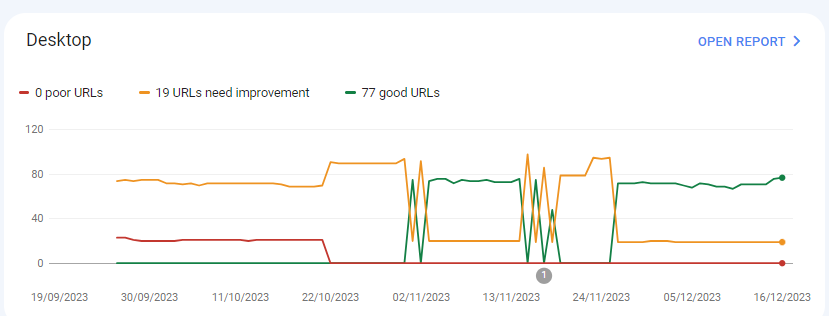
For desktops, pages are indexed as good URLs
while mobile-indexed URLs are displayed as poor URLs.
Our website is the collective material for people looking for Canadian immigration (PAIC), and 70% of the portion is filled with text only. We are using webp images for optimization, still it is not passing Core Web Vitals.I am looking forward to the expert’s suggestion to overcome this problem.
-
@rwat Hi, did you find a solution?
-
Yes, I am also experiencing the same for one of my websites, but most of them are blog posts and I am using a lot of images without proper optimization, so that could be the reason. but not sure.
It is also quite possible that Google maybe adding some more parameters to their main web critical score.



Got a burning SEO question?
Subscribe to Moz Pro to gain full access to Q&A, answer questions, and ask your own.
Browse Questions
Explore more categories
-
Moz Tools
Chat with the community about the Moz tools.
-
SEO Tactics
Discuss the SEO process with fellow marketers
-
Community
Discuss industry events, jobs, and news!
-
Digital Marketing
Chat about tactics outside of SEO
-
Research & Trends
Dive into research and trends in the search industry.
-
Support
Connect on product support and feature requests.
Related Questions
-

Unsolved Why My site pages getting video index viewport issue?
Hello, I have been publishing a good number of blogs on my site Flooring Flow. Though, there's been an error of the video viewport on some of my articles. I have tried fixing it but the error is still showing in Google Search Console. Can anyone help me fix it out?
Technical SEO | | mitty270 -

Backlinks on Moz not on Google Search Console
Moz is showing thousands of backlinks to my site that are not showing up on Google Search Console - which is good because those links were created by some spammer in Pakistan somewhere. I haven't yet submitted a disavow report to Google of well over 10K links because the list keeps growing every day with new backlinks that have been rerouted to a 404 page. I have asked Google to clarify and they put my question on their forum for an answer, which I'm still waiting for - so I thought I'd try my luck here. My question... If Moz does not match Google Search Console, and backlinks are important to results, how valid is the ranking that Moz creates to let me know how I'm doing in this competition and if I'm improving or not. If the goal is to get Google to pay attention and I use Moz to help me figure out how to do this, how can I do that if the backlink information isn't the same - by literally over 10 000 backlinks created by some spammer doing odd things... They've included the url from their deleted profile on my site with 100s of other urls, including Moz.com and are posting them everywhere with their preferred anchor text. Moz ranking considers the thousands of spam backlinks I can't get rid of and Google ignores them or disavows them. So isn't the rankings, data, and graphs apples and bananas? How can I know what my site's strength really is and if I'm improving or not if the data doesn't match? Complete SEO Novice Shannon Peel
Link Building | | MarketAPeel
Brand Storyteller
MarketAPeel0 -

Unsolved Duplicate LocalBusiness Schema Markup
Hello! I've been having a hard time finding an answer to this specific question so I figured I'd drop it here. I always add custom LocalBusiness markup to clients' homepages, but sometimes the client's website provider will include their own automated LocalBusiness markup. The codes I create often include more information. Assuming the website provider is unwilling to remove their markup, is it a bad idea to include my code as well? It seems like it could potentially be read as spammy by Google. Do the pros of having more detailed markup outweigh that potential negative impact?
Local Website Optimization | | GoogleAlgoServant0 -

Google News and Discover down by a lot
Hi,
Technical SEO | | SolenneGINX
Could you help me understand why my website's Google News and Discover Performance dropped suddenly and drastically all of a sudden in November? numbers seem to pick up a little bit again but nowhere close what we used to see before then0 -

Reducing cumulative layout shift for responsive images - core web vitals
In preparation for Core Web Vitals becoming a ranking factor in May 2021, we are making efforts to reduce our Cumulative Layout Shift (CLS) on pages where the shift is being caused by images loading. The general recommendation is to specify both height and width attributes in the html, in addition to the CSS formatting which is applied when the images load. However, this is problematic in situations where responsive images are being used with different aspect ratios for mobile vs desktop. And where a CMS is being used to manage the pages with images, where width and height may change each time new images are used, as well as aspect ratios for the mobile and desktop versions of those. So, I'm posting this inquiry here to see what kinds of approaches others are taking to reduce CLS in these situations (where responsive images are used, with differing aspect ratios for desktop and mobile, and where a CMS allows the business users to utilize any dimension of images they desire).
Web Design | | seoelevated3 -

Sudden jump in the number of 302 redirects on my Squarespace Site
My Squarespace site www.thephysiocompany.com has seen a sudden jump in 302 redirects in the past 30 days. Gone from 0-302 (ironically). They are not detectable using generic link redirect testing sites and Squarespace have not explanation. Any help would be appreciated.
Technical SEO | | Jcoley0 -

How can I block incoming links from a bad web site ?
Hello all, We got a new client recently who had a warning from Google Webmasters tools for manual soft penalty. I did a lot of search and I found out one particular site that sounds roughly 100k links to one page and has been potentialy a high risk site. I wish to block those links from coming in to my site but their webmaster is nowhere to be seen and I do not want to use the disavow tool. Is there a way I can use code to our htaccess file or any other method? Would appreciate anyone's immediate response. Kind Regards
Technical SEO | | artdivision0 -

Mobile site ranking instead of/as well as desktop site in desktop SERPS
I have just noticed that the mobile version of my site is sometimes ranking in the desktop serps either instead of as well as the desktop site. It is not something that I have noticed in the past as it doesn't happen with the keywords that I track, which are highly competitive. It is happening for results that include our brand name, e.g '[brand name][search term]'. The mobile site is served with mobile optimised content from another URL. e.g wwww.domain.com/productpage redirects to m.domain.com/productpage for mobile. Sometimes I am only seen the mobile URL in the desktop SERPS, other times I am seeing both the desktop and mobile URL for the same product. My understanding is that the mobile URL should not be ranking at all in desktop SERPS, could we be being penalised for either bad redirects or duplicate content? Any ideas as to how I could further diagnose and solve the problem if you do believe that it could be harming rankings?
Technical SEO | | pugh0