Moz Q&A is closed.
After more than 13 years, and tens of thousands of questions, Moz Q&A closed on 12th December 2024. Whilst we’re not completely removing the content - many posts will still be possible to view - we have locked both new posts and new replies. More details here.
Bingplaces.com wanting access to google account
-
Hello, we have a google my business account. On bingplaces.com it is saying they would like access to our google account. Is that normal for bing to share access with the google my business account? Thanks.
-
Bingplaces.com may additionally request get right of entry to a Google account for verifying enterprise possession or managing online listings throughout more than one platform, bettering enterprise visibility and reach. This gets admission to lets in Bingplaces.com to synchronize enterprise information, such as contact small print and working hours, between Bing and Google structures for seamless online presence management. It streamlines the procedure for businesses, making sure regular and correct records throughout search engines.
-
@NaeemGari Yes - it is normal. Also, they can also look up duplicate listings etc.
-
Yes, this is a normal process. After providing the access to bing places to access your GMB page you can also import GMB data into bing places easily. There would also be an option to define the frequency with which bing places should check for updates to your GMB page and automatically sync/update bing places listing. This way both touch points have consistency.
-
@meritinsurancegroup Yes, it's normal not only for them to ask but to also verify your Bingplaces account without you having to wait for a post card with a pin number.





Got a burning SEO question?
Subscribe to Moz Pro to gain full access to Q&A, answer questions, and ask your own.
Browse Questions
Explore more categories
-
Moz Tools
Chat with the community about the Moz tools.
-
SEO Tactics
Discuss the SEO process with fellow marketers
-
Community
Discuss industry events, jobs, and news!
-
Digital Marketing
Chat about tactics outside of SEO
-
Research & Trends
Dive into research and trends in the search industry.
-
Support
Connect on product support and feature requests.
Related Questions
-

Unsolved strange backlinks being from neustar/localeze
I have a client that I used Moz Local services for, and I'm seeing lots of urls such as https://www.omegalab.neustarlocaleze.biz/directory/us/?after=2020-09-05T01:52:28.343352Z&count=50 being shown as follow backlinks in other software. Anyone else seeing this and think it might be an issue?
Local Listings | | JustinMurray1 -

Verifying Google My Business After An Address Change
Hello,
Local Listings | | Ben-R
We are trying to verify our Google My Business listing, however, the current unverified listing is using an old address we no longer have access to. The only option for verification is through the mail. We tried requesting an edit but it didn’t go through. Would the best option be to create a new one and try to have the old (unverified) listing removed? Any insight would be appreciated. Thank you in advance.
Best,0 -
Google My Business -Choosing Multiple Categories
Hi friends, I'm trying to work out what would the practice be for a business who is operating in different categories in terms of displaying those categories in Google My Business account. We have a client who is supplying both catering and cleaning products (both categories are core). In this case, listing those two categories in GMB would be alright or should I expect a negative impact on results related to both categories as we have chosen multiple categories? Any advice would be appreciated greatly!
Local Listings | | bbop331 -

Google Business Listing with no physical office location
Hey, everyone! As a business owner who works from home and doesn't have a physical office location. Is setting up a Google business listing without location going to hurt my local search ranking? Should I get a virtual office so I have a physical location? Thank you!! 😃
Local Listings | | ichorstudios0 -

Improve Google Business ranking
While my client's websites have been ranking well in SERP for their keyterms I'm at a lost on what I can do to improve their Google business/map presence. I'm referring to their listing where the top three come up or when you search on Google Maps.
Local Listings | | FPK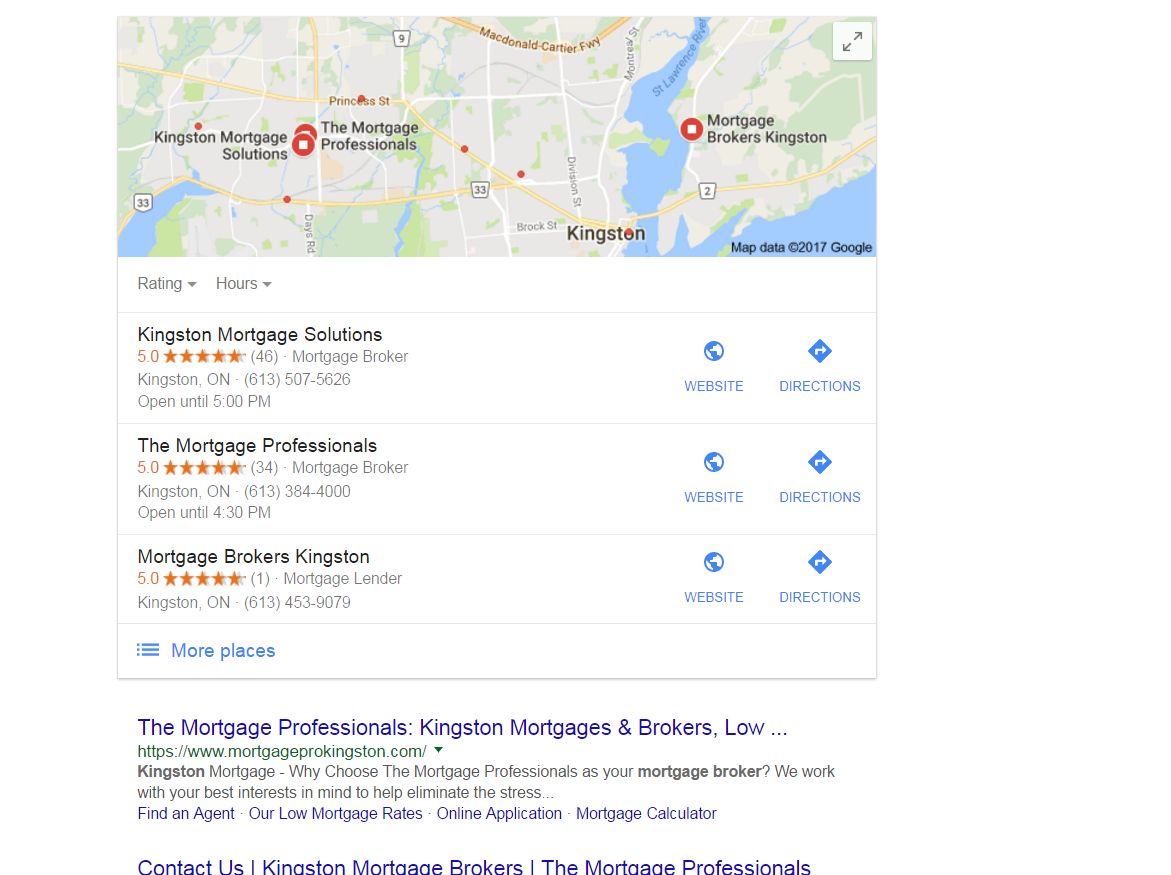
https://gyazo.com/26ec78ed7f712157ec72492199545431 Ex 1. Several months ago my client was ranked #1 both for SERP and maps until they dropped to 2nd on maps. Now they're ranked 1st in search yet 2nd for local business rankings as you can see from the screenshot above. At one point my client's business did have more reviews than the 1st ranking business yet they still weren't 1st. Ex. 2. Client(s) is ranked 4th in search and doesn't show in the top 3 map listings for their search term. If you click on More places to view Google Maps they're listed all the way down as the 15th listing or worse can't even be found when searching by their main SEO key term . Of course they are found by searching for their business name so it's not like there is a problem with the listing. I make sure to: Completely fill out their Google Business profile(NAP, hours and add pictures) Have my client try to gain positive reviews Manage and respond to reviews(mainly the negative ones) Add map and Google business link to their website Can anyone offer any other insight on what else can be done to improve their local presence on maps that I might be missing?0 -

Google My Business for 2 Websites With the Same Location
Hi,
Local Listings | | alihus
My client has two separate websites with different business names but under one location and phone number. The websites are for two separate services that he offers.
My question is that if creating two Google+ for business pages for the two businesses bad for their SEO or local ranks?
And what about creating local listings for both?(This does not seem logical to me personally!!)
Thank you for the kind answers in advance.0 -

1800 number for google local
Hi A client with a local business has a 1800 number on their google plus page and most citations. How important is it to use the local number and not a 1800 one for google local? Should we change the phone number to the local number and update all listings? Or should we just continue with the 1800 number and stay consistent? I have added the local number as a second number on the google plus page.
Local Listings | | henya1 -

My Evernote Notes showing up on Google Search page ?
I may just be living under a rock here in Reno, but tonight while doing a search (on desktop) for a phone number of a restaurant in Tahoe, Google served me a bunch of my Evernote notes along with my SERPS After the initial "WTFriday" moment, I realized that there was an "Evernote" bar above a series of images of what Google must think are related notes --- for example in a few weeks I am planning to take friends to Bliss & Rubicon - and I had saved the map in Evernote. Next to the map image were two notes related to daughters upcoming swim meet in South Tahoe. I did a similar search and this time a listing for hours at a local pool (near Tahoe) and two other documents came up. Since I live in Reno I thought it was odd to get all those Tahoe activities - but the fact that my Evernote on "Tahoe" things was there caught me off guard. The results were locate on the right hand where local business maps usually are -- the map and business info about the restaurant I was looking for appeared below that. ... while the left hand column features traditionals SERPs. . I am just trying to find out if I am late to the party on this ... or if serving data saved in my Evernote files is new... If anyone else has seen this, let me know. I could just be late to this. ...
Local Listings | | AJFanter0