Moz Q&A is closed.
After more than 13 years, and tens of thousands of questions, Moz Q&A closed on 12th December 2024. Whilst we’re not completely removing the content - many posts will still be possible to view - we have locked both new posts and new replies. More details here.
Improve Google Business ranking
-
While my client's websites have been ranking well in SERP for their keyterms I'm at a lost on what I can do to improve their Google business/map presence. I'm referring to their listing where the top three come up or when you search on Google Maps.
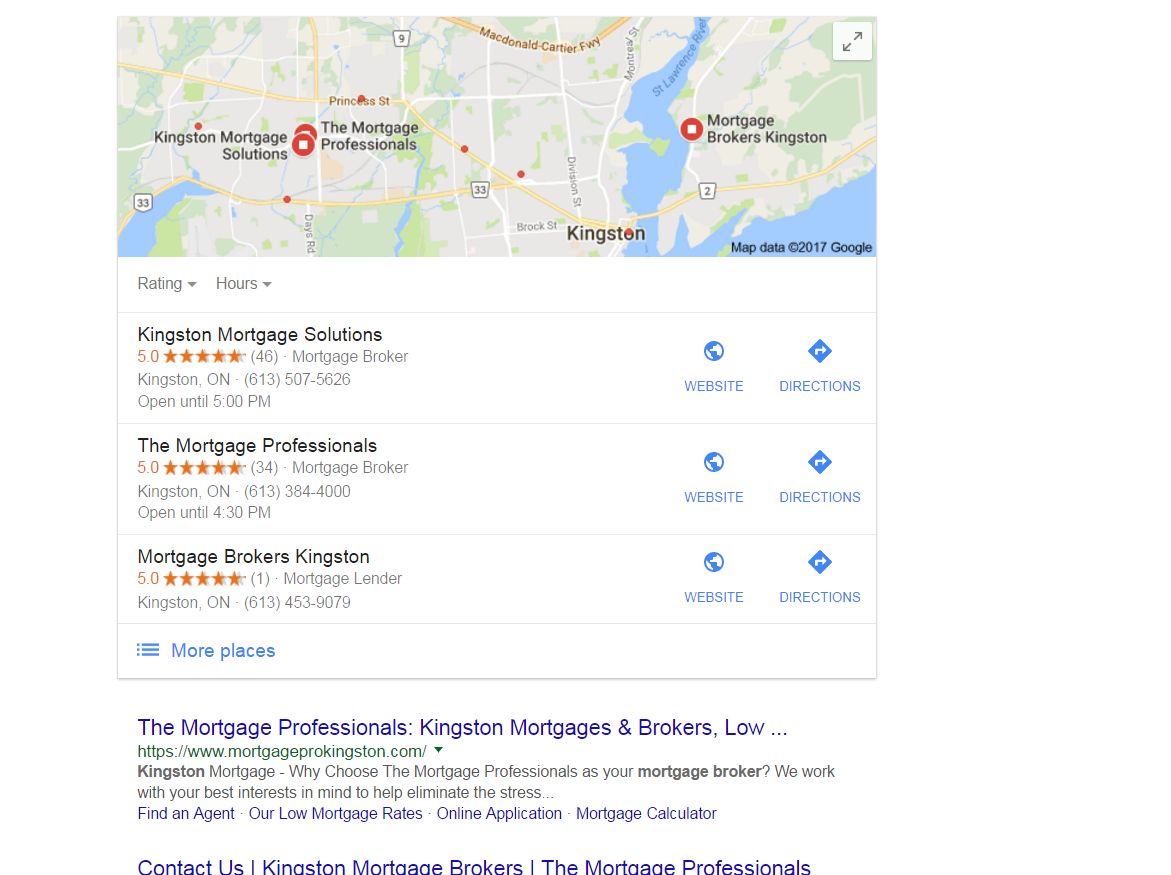
https://gyazo.com/26ec78ed7f712157ec72492199545431Ex 1. Several months ago my client was ranked #1 both for SERP and maps until they dropped to 2nd on maps. Now they're ranked 1st in search yet 2nd for local business rankings as you can see from the screenshot above. At one point my client's business did have more reviews than the 1st ranking business yet they still weren't 1st.
Ex. 2. Client(s) is ranked 4th in search and doesn't show in the top 3 map listings for their search term. If you click on More places to view Google Maps they're listed all the way down as the 15th listing or worse can't even be found when searching by their main SEO key term . Of course they are found by searching for their business name so it's not like there is a problem with the listing.
I make sure to:
-
Completely fill out their Google Business profile(NAP, hours and add pictures)
-
Have my client try to gain positive reviews
-
Manage and respond to reviews(mainly the negative ones)
-
Add map and Google business link to their website
Can anyone offer any other insight on what else can be done to improve their local presence on maps that I might be missing?
-
-
Those pesky duplicate, Joy!
FPK - has our community helped you? Do you have any further questions?
-
Hey There.
I actually see something different than you but I'm searching from the Toronto area which is 3-4 hours from Kingston. I actually see this which shows the duplicate Miriam mentioned as ranking 4th and the listing you showed is actually filtered because it's using the exact same phone # and address.
Having this duplicate is doing you a huge injustice because it's not linking to the website that is ranking high organically like you mentioned and it's splitting their reviews which just results in 2 profiles not ranking as well as they would if all the reviews were on 1 listing. Plus, since it's a violation of Google's guidelines, one of them could get removed and then you would lose the reviews on it.
I'd suggest consolidating them. This duplicate is verified so if you don't know who created it, you'll need to get access to the listing first. The naming convention it's using on the listing is also a violation of the guidelines.
The listing that ranks 2nd is doing some serious keyword stuffing so I would suggest you level the playing field by editing the listing and removing the keywords.
The listing that ranks 3rd and is above you should also look into as the name is keyword-stuffed, she already has another listing with her name, and the address she used on this listing actually belongs to a Re/Max agent as seen here and in Street View.
As for your 2nd question, it's hard to offer suggestions without knowing specifics

-
Hi FPK,
Glad to have you here. So, your client is #2 in the screenshot (I believe I'm understanding that correctly, but please let me know if I've misunderstood). If I'm correct, here are a few things to remember:
-
Local rankings are not static. What you see is not what your client or his customers will necessarily see, depending on your and their locations at the time of making the search. For more on this, read Phil Rozek's recent article: http://www.localvisibilitysystem.com/2017/05/24/did-your-local-rankings-really-sink-or-are-you-just-looking-at-them-wrong/
-
Reviews are just one factor of several hundred. To do a complete audit for any client, we recommend assessing all of the top Local Search Ranking Factors mentioned here: https://azwa.1clkaccess.in/local-search-ranking-factors. You need to audit both your client and any competitor who is outranking him to discover what the higher ranking businesses are getting right that your client may not be excelling at. The breadth of factors is wide: age of domain, age of listing, links, domain authority, topical authority, citation accuracy, authority and scope ... there is so much to consider here, so it's important to avoid oversimplifying this to something like "X is outranking Y because X has more reviews."
-
Definitely dive deep into the effects of Google's Possum filter, which has caused many businesses that share a category and building or street with competitors to experience extreme ranking changes. It looks like Kingston Mortgage Solutions is right across the street from you. To see if Possum may be at work in what your client is experiencing, read Joy Hawkins' article: http://searchengineland.com/everything-need-know-googles-possum-algorithm-update-258900
-
It looks like the client is well within Google's borders for the city of Kingston, so no worries on that score.
-
I'm concerned that I'm seeing duplicate GMB listings for your client. They appear to have listed themselves twice with the identical address and phone number but with two different names: The Mortgage Professionals and Mortgage Pro Team (The Mortgage Professionals). This would be a violation of Google's guidelines (see: <cite class="_Rm">https://support.google.com/business/answer/3038177?hl=en</cite>) and needs to be investigated swiftly. I am also seeing at least 3 practitioner listings at this same address that need to be investigated to ensure that they are guideline-compliant and not being viewed by Google as duplicates. None of the names on these listings meet Google's guidelines, unfortunately. So, we've hit on a real problem here and one that your agency will want to research fully and make every effort to resolve for the client.
-
Moz Local now supports Canada, and a good thing to do would be to look up the client in our free Check Listing tool to begin to assess how widespread this issue is with duplicates. With the full, paid version of the tool, you'll be able to add alternate info, as well, to find as many duplicates as possible.
This is a start, but isn't a genuine substitute for a professional audit, which it looks like this client definitely needs. I hope this quick glance of mine provides a good starting point!
-



Got a burning SEO question?
Subscribe to Moz Pro to gain full access to Q&A, answer questions, and ask your own.
Browse Questions
Explore more categories
-
Moz Tools
Chat with the community about the Moz tools.
-
SEO Tactics
Discuss the SEO process with fellow marketers
-
Community
Discuss industry events, jobs, and news!
-
Digital Marketing
Chat about tactics outside of SEO
-
Research & Trends
Dive into research and trends in the search industry.
-
Support
Connect on product support and feature requests.
Related Questions
-

Adding Multiple Country Locations for Google Business Listings
Hi Moz community, I hope everyone is well. I would like to ask for your advice on how to show a Google Business listing in both the UK and US for our brand. I understand that you can add multiple locations to your Google listing under the 'Manage Locations' tab but I wasn't quite sure how it worked in practice. I have a couple of questions below: If we have 2 registered locations/offices (one in the UK and one in the US) are we able to create 2 separate locations that will show our business listing correctly in the right-hand margin when people search for our brand in the US and UK respectively? If so, when a user finds our business listing in the US, are we able to serve them our US website version when they click the 'Website' button, as opposed to showing them our UK website? Our US website has been created as a sub-directory from our main UK site and can be seen as: www.example.com/us/ I hope someone is able to help, and thank you in advance.
Local Listings | | Katarina-Borovska
Katarina0 -

Why is a Google Listing Showing Up in a Different Town Than Its Address?
I have a client who runs a dental office on the outskirts of Racine, WI. His address specifically shows up as being in Racine, however, his GMB profile has always showed with the category of "Dentist in Mount Pleasant, WI" displaying below the photos. (Mount Pleasant is the next town over and his office straddles the line between the two towns in Google's overlay map of the town.) Obviously this is frustrating and I'm concerned that his location is hurting his ability to rank in the larger, more populous town of Racine. Have any other SEOs ever encountered this? And if so, how have you approached the issue? Location pages? Mentions of the location more often on the pages? tsLvH2B
Local Listings | | formandfunctionagency1 -

How to Rank in Yelp
Hello everyone! I manage SEO for a pretty large brand that has close to 100 office locations nationwide. In the last year we have completely revamped our Yelp pages. This has been a great secondary source of traffic and conversions for us because of the type of industry we are in. The problem is, it can be exponentially better if we were more visible. We have done almost everything we can to make our pages as good if not better than almost any competitor regardless of geographic location. We even have the enhanced profiles (extortion) that remove competitors ads from appearing on our listings. Here is what we have done in the last year to each listing: Uploaded tons of photos Increased reviews Added proper categories Fine-tuned all of our CTAs Added in a unique and optimized business description ( Available with enhanced profiles) Set the proper service area range on their map Increased our review response rate ( both negative and positive) to 100% Still, even after months and months have gone by we struggle to rank on the first page for our service category. Doing manual searches often turn up competitors, who do not even have their listing claimed, have no photos, little reviews will rank higher than us. Even though we have an account rep because of our business size, bringing this issue up to them is about as useful as talking to a blanket. They push CPC so hard that its the last thing they are willing to help with. It has gotten to the point where I am honestly starting to believe in a self-curated conspiracy theory that they purposely hold larger brands back in organic to sell CPC harder. Obviously certain brands that hold the branding clout like a "Best Buy" would be hard to get away with. But still, we do all the right things and we are getting very minimal results compared to where we should be. Has anyone else had issues with Yelp or have any ideas on some steps we could take to appease their particular algorithm? Thanks! -Ben
Local Listings | | Davey_Tree1 -

How do I rank inside the knowledge panel in the "people also search for" section?
Hello fellow Mozzers, In Google's knowledge panel there is a section at the bottom that says "people also search for" and a list of competitors is displayed. I'm hoping to get some information I can use to get my client listed there on top of the local organic results. The more SERP presence, the better. Attached image should provide clarity to those who are confused. I suspect I know the answer to this question, but since I can't find a source to verify my beliefs, I'm crowdsourcing. Thanks in advance! NhoihY1
Local Listings | | brettmandoes0 -

How do I treat multiple buildings on the same college campus on Google for local SEO?
Should I delete them? Simply give them a different address like "City, State, Zip"? I see the benefit of having key buildings on campus in Google Maps, but I don't want those to affect my accuracy score and, thus, my local rankings for SEO.
Local Listings | | GabeGibitz1 -

Google Business - Adding location into business name
Hello, I've a client that has many services in different locations and addresses with the same website and phone number. But the thing is they want me to involve location name to business name. Is there a way to add and verify as bulk ?
Local Listings | | omeryamac0 -

Removing Unverified Listing From Google
We have an old unverified listing that has our information on it, but we can't get it off google. I told them months ago it was closed, and it is marked as closed in Google...but it still shows up. Moz Local is telling me this is an inconsistency that hurts our local rankings. I went to delete the page from our Google Business/Place, but if I did that, the warning said that I would just not have access to the page, and that the listing would still show up on google. How do I permanently get rid of those thing, so it's not longer an inconsistent listing? Ruben
Local Listings | | KempRugeLawGroup0 -

Google is associating the wrong address with my website in SERPs
I've dealt with submitting address change information to Google (and Yelp, YP, etc.) when they have somehow scraped the wrong address or phone number. This is a little different. I work for the parent company with multiple companies of similar names making up the family of companies. What's happening is that people are searching for one of our companies (Lynden Transport) and getting the correct website results to pop up, but the address/phone # shown below the URL and in the local results screen is for one of our other companies (LTI, Inc.). Customers should be seeing a Fife, WA address but instead are seeing one for Lynden, WA. I've attached a marked up screenshot to better those what is happening. At least customers are generally finding their way to our company but it's causing quite a headache for our customer service reps and customers as they get transferred back and forth on the phone, and confusion for customers unfamiliar with our office locations. I've clicked on the "Send Feedback" link at the bottom of Google and explained what was happening, but beyond that I'm not sure what to do. The information presented isn't wrong, it's just being associated with the wrong company. It seems like a Google logic error and not something I can control or edit. Any ideas? moz-ltia.jpg
Local Listings | | RyanD.0