Moz Q&A is closed.
After more than 13 years, and tens of thousands of questions, Moz Q&A closed on 12th December 2024. Whilst we’re not completely removing the content - many posts will still be possible to view - we have locked both new posts and new replies. More details here.
Does Bing ignore robots txt files?
-
Bonjour from "Its a miracle is not raining" Wetherby Uk

Ok here goes... Why despite a robots text file excluding indexing to site
http://lewispr.netconstruct-preview.co.uk/ is the site url being indexed in Bing bit not Google?
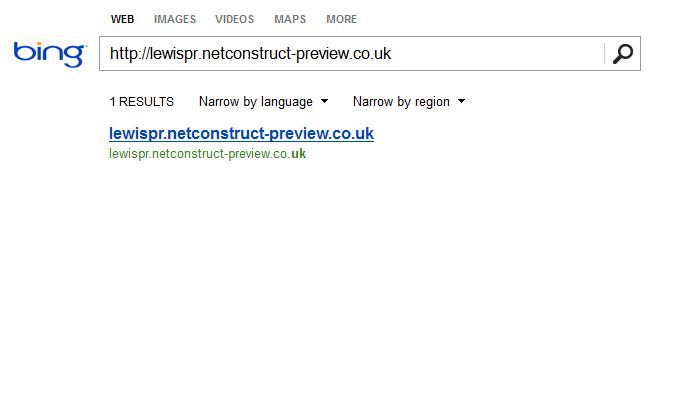
Does bing ignore robots text files or is there something missing from http://lewispr.netconstruct-preview.co.uk/robots.txt I need to add to stop bing indexing a preview site as illustrated below.
http://i216.photobucket.com/albums/cc53/zymurgy_bucket/preview-bing-indexed.jpg
Any insights welcome
-
Thanks Clever PHD - we are now adding your recommendations to our preview sites
-
I know this does not sound related, but Matt Cutts explains this same situation on Google. It is probably the same reasoning for Bing.
http://www.mattcutts.com/blog/robots-txt-remove-url/
Looking at your screen shot, it looks as if all that is being shown in Bing is just the URL, no title tag, description, no other information.
What Matt says is that they did not technically crawl the url, but they are aware that it exists. Example, there is another page linking to it with related content or the anchor tag on the link relates to the keyword search you are performing.
You are searching for the URL specifically and so it makes sense that they would show the URL as it relates to that search, but they are not showing any information from the page as they do not have it as they did not spider it, again, they are just aware of the URL. Kind of like talking to a lawyer eh?
If you search for any other keywords does this excluded site show up? Probably not. If the do, then they are probably only showing the URL like in the example above.
The video has more details. Here are the solutions he gives, I will outline them as well
-
Use the Bing URL removal tool - bing bang boom. Done.
-
(my new favorite) Let the page / site be indexed but then show an noindex nofollow meta tag on the page / site. There is a subtle but important difference in the meta tag vs the robot.txt file. The spiders have to be able to crawl the page to be able to see what they are supposed to do with it.
http://support.google.com/webmasters/bin/answer.py?hl=en&answer=93710
"When we see the noindex meta tag on a page, Google will completely drop the page from our search results, even if other pages link to it."
The thing is, if you have a robots.txt file that says don't crawl the site, then the spider never gets to the noindex meta tag to know to delete the page from the index. It sounds a little backwards, but when the page is already in the search index, you have to let the spider crawl it to then see the noindex tag so that the search engine will know to remove it from the index.
Here is what you can do as this seems to only be an issue with Bing and just with the home page. Open up the robots.txt to allow Bing to crawl the site. Restrict the crawling to the home page only and exclude all the other pages from the crawl.
On the home page that you allow Bing to crawl, add the noindex no follow meta tag and you should be set.
All of that said.
If you have a single URL listed in bing with no meta data, it may not be worth all the above effort as you are not ranking for any valuable key words, but that is your call It is always interesting to see how the spiders and engines think so I wanted to pass this along.
Cheers!
PS - If you have a ton of pages like this - then you just would allow Bing to crawl them all and add the noindex nofollow tag to all of them.
-


Got a burning SEO question?
Subscribe to Moz Pro to gain full access to Q&A, answer questions, and ask your own.
Browse Questions
Explore more categories
-
Moz Tools
Chat with the community about the Moz tools.
-
SEO Tactics
Discuss the SEO process with fellow marketers
-
Community
Discuss industry events, jobs, and news!
-
Digital Marketing
Chat about tactics outside of SEO
-
Research & Trends
Dive into research and trends in the search industry.
-
Support
Connect on product support and feature requests.
Related Questions
-

Japanese URL-structured sitemap (pages) not being indexed by Bing Webmaster Tools
Hello everyone, I am facing an issue with the sitemap submission feature in Bing Webmaster Tools for a Japanese language subdirectory domain project. Just to outline the key points: The website is based on a subdirectory URL ( example.com/ja/ ) The Japanese URLs (when pages are published in WordPress) are not being encoded. They are entered in pure Kanji. Google Webmaster Tools, for instance, has no issues reading and indexing the page's URLs in its sitemap submission area (all pages are being indexed). When it comes to Bing Webmaster Tools it's a different story, though. Basically, after the sitemap has been submitted ( example.com/ja/sitemap.xml ), it does report an error that it failed to download this part of the sitemap: "page-sitemap.xml" (basically the sitemap featuring all the sites pages). That means that no URLs have been submitted to Bing either. My apprehension is that Bing Webmaster Tools does not understand the Japanese URLs (or the Kanji for that matter). Therefore, I generally wonder what the correct way is to go on about this. When viewing the sitemap ( example.com/ja/page-sitemap.xml ) in a web browser, though, the Japanese URL's characters are already displayed as encoded. I am not sure if submitting the Kanji style URLs separately is a solution. In Bing Webmaster Tools this can only be done on the root domain level ( example.com ). However, surely there must be a way to make Bing's sitemap submission understand Japanese style sitemaps? Many thanks everyone for any advice!
Technical SEO | | Hermski0 -

Problems with Meta Title on Bing
On the Bing search engine, it isn't showing the actual meta title we have for a website. It's showing something different. However, the correct meta title is showing on the Google search engine. Has anyone had the same issue? Has anyone been able to fix this issue? Thanks for your help!
Technical SEO | | Harrison.Stickboy0 -

Robots txt. in page with 301 redirect
We currently have a a series of help pages that we would like to disallow from our robots txt. The thing is that these help pages are located in our old website, which now has a 301 redirect to current site. Which is the proper way to go around? 1- Add the pages we want to disallow to the robots.txt of the new website? 2- Break the redirect momentarily and add the pages to the robots.txt of the old one? Thanks
Technical SEO | | Kilgray0 -

Log in, sign up, user registration and robots
Hi all, We have an accommodation site that asks users only to register when they want to book a room, in the last step. Though this is the ideal situation when you have tons of users, nowadays we are having around 1500 - 2000 per day and making tests we found out that if we ask for a registration (simple, 1 click FB) we mail them all and through a good customer service we are increasing our sales. That is why, we would like to ask users to register right after the home page ie Home/accommodation or and all the rest. I am not sure how can I make to make that content still visible to robots.
Technical SEO | | Eurasmus.com
Will the authentication process block google crawling it? Maybe something we can do? We are not completely sure how to proceed so any tip would be appreciated. Thank you all for answering.3 -

Guys & Gals anyone know if urllist.txt is still used?
I'm using a tool which generates urllist.txt and looking on the SEO Forums it seems that Yahoo used to use this. What I'd like to know is is it still used anywhere and should we have it on the site?
Technical SEO | | danwebman0 -

Staging & Development areas should be not indexable (i.e. no followed/no index in meta robots etc)
Hi I take it if theres a staging or development area on a subdomain for a site, who's content is hence usually duplicate then this should not be indexable i.e. (no-indexed & nofollowed in metarobots) ? In order to prevent dupe content probs as well as non project related people seeing work in progress or finding accidentally in search engine listings ? Also if theres no such info in meta robots is there any other way it may have been made non-indexable, or at least dupe content prob removed by canonicalising the page to the equivalent page on the live site ? In the case in question i am finding it listed in serps when i search for the staging/dev area url, so i presume this needs urgent attention ? Cheers Dan
Technical SEO | | Dan-Lawrence0 -
No indexing url including query string with Robots txt
Dear all, how can I block url/pages with query strings like page.html?dir=asc&order=name with robots txt? Thanks!
Technical SEO | | HMK-NL0 -

Robots.txt file getting a 500 error - is this a problem?
Hello all! While doing some routine health checks on a few of our client sites, I spotted that a new client of ours - who's website was not designed built by us - is returning a 500 internal server error when I try to look at the robots.txt file. As we don't host / maintain their site, I would have to go through their head office to get this changed, which isn't a problem but I just wanted to check whether this error will actually be having a negative effect on their site / whether there's a benefit to getting this changed? Thanks in advance!
Technical SEO | | themegroup0