Moz Q&A is closed.
After more than 13 years, and tens of thousands of questions, Moz Q&A closed on 12th December 2024. Whilst we’re not completely removing the content - many posts will still be possible to view - we have locked both new posts and new replies. More details here.
Screaming From occurences and canonicals what does it all mean
-
Bonjourno from Wetherby UK...
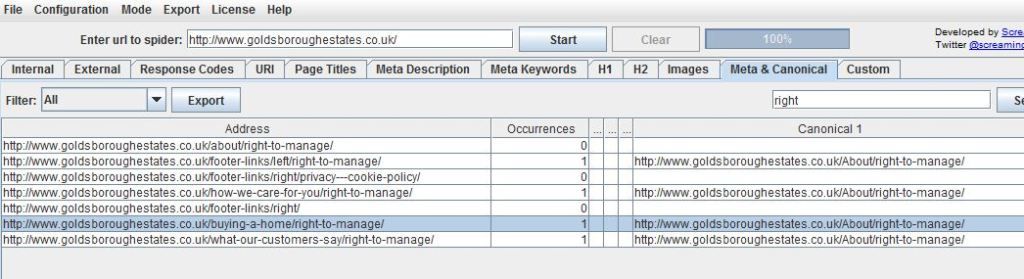
Ive used a package called screamong frog to diagnose canonical errors but can anyone tell me what this means? http://i216.photobucket.com/albums/cc53/zymurgy_bucket/understand-occurances-canonical.jpg
Thanks in advance.
David
-
Thank you for all your replies this was bugging me but the pain of not knowing has vanished like the morning mist as the warming glow of sunshine illumunates truth

-
David
Looks like you may have an issue there. The "address" and "canonical 1" should match about 99% of the time. Right now you're telling Google to index all those different address pages as a single URL (About/right-to-manage)... something to look at - and the suggestions below are both good as well.
-Dan
-
I agree with what Streamline Metrics said, I just want to add to this by linking you to a great SEOmoz post on canonicalization which may help you clear things up more.
In your case, having 1 rel="canonical" tag per page is what you want, so you should be fine with that, just make sure that the canonical tags (listed under canonical 1 in Screaming Frog) is the actual URL that you want.
Hope this helps
Zach -
It simply means how many canonical tags are found on that specific page. So if you had two rel=canonical tags on a page, it would say 2 occurrences. For more info, check out http://www.screamingfrog.co.uk/seo-spider/user-guide/tabs/





Got a burning SEO question?
Subscribe to Moz Pro to gain full access to Q&A, answer questions, and ask your own.
Browse Questions
Explore more categories
-
Moz Tools
Chat with the community about the Moz tools.
-
SEO Tactics
Discuss the SEO process with fellow marketers
-
Community
Discuss industry events, jobs, and news!
-
Digital Marketing
Chat about tactics outside of SEO
-
Research & Trends
Dive into research and trends in the search industry.
-
Support
Connect on product support and feature requests.
Related Questions
-

Rel=Canonical For Landing Pages
We have PPC landing pages that are also ranking in organic search. We've decided to create new landing pages that have been improved to rank better in natural search. The PPC team however wants to use their original landing pages so we are unable to 301 these pages to the new pages being created. We need to block the old PPC pages from search. Any idea if we can use rel=canonical? The difference between old PPC page and new landing page is much more content to support keyword targeting and provide value to users. Google says it's OK to use rel=canonical if pages are similar but not sure if this applies to us. The old PPC pages have 1 paragraph of content followed by featured products for sale. The new pages have 4-5 paragraphs of content and many more products for sale. The other option would be to add meta noindex to the old PPC landing pages. Curious as to what you guys think. Thanks.
Technical SEO | | SoulSurfer80 -

Canonical homepage link uses trailing slash while default homepage uses no trailing slash, will this be an issue?
Hello, 1st off, let me explain my client in this case uses BigCommerce, and I don't have access to the backend like most other situations. So I have to rely on BG to handle certain issues. I'm curious if there is much of a difference using domain.com/ as the canonical url while BG currently is redirecting our domain to domain.com. I've been using domain.com/ consistently for the last 6 months, and since we switches stores on Friday, this issue has popped up and has me a bit worried that we'll loose somehow via link juice or overall indexing since this could confuse crawlers. Now some say that the domain url is fine using / or not, as per - https://azwa.1clkaccess.in/community/q/trailing-slash-and-rel-canonical But I also wanted to see what you all felt about this. What says you?
Technical SEO | | Deacyde0 -

Link rel="prev" AND canonical
Hi guys, When you have several tabs on your website with products, you can most likely navigate to page 2, 3, 4 etc...
Technical SEO | | AdenaSEO
You can add the link rel="prev" and link rel="next" tags to make sure that 1 page get's indexed / ranked by Google. am I correct? However this still means that all the pages can get indexed, right? For example a webshop makes use of the link rel="prev" and ="next" tags. In the Google results page though, all the seperate tabs pages are still visible/indexed..
http://www.domain.nl/watches/?tab=1
http://www.domain.nl/watches/?tab=24
http://www.domain.nl/watches/?tab=19
etc..... Can we prevent this, and make sure only the main page get's indexed and ranked, by adding a canonical link on every 'tab page' to the main page --> www.domain.nl/watches/ I hope I explained it well and I'm looking forward to hearing from you. Regards, Tom1 -
how to set rel canonical on wordpress.com sites
I know how to do this with a wordpress.org site but I have a client that does not want to switch and without a plugin I am lost. any help would be greatly appreciated. Jeremy Wood
Technical SEO | | SOtBOrlando0 -

Do canonical tags pass all of the link juice onto the URL they point to?
I have an ecommerce website where the category pages have various sorting and paging options which add a suffix to the URLs. My site is setup so the root category URL, domain.com/category-name, has a canonical tag pointing to domain.com/category-name/page1/price however all links, both interner & external, point to the former (i.e. domain.com/category-name). I would like to know whether all of the link juice is being passed onto the canonical tag URL? Otherwise should I change the canonical tag to point the other way? Thanks!
Technical SEO | | tjhossy0 -

Duplicate title-tags with pagination and canonical
Some time back we implemented the Google recommendation for pagination (the rel="next/prev"). GWMT now reports 17K pages with duplicate title-tags (we have about 1,1m products on our site and about 50m pages indexed in Google) As an example we have properties listed in various states and the category title would be "Properties for Sale in [state-name]". A paginated search page or browsing a category (see also http://searchengineland.com/implementing-pagination-attributes-correctly-for-google-114970) would then include the following: The title for each page is the same - so to avoid the duplicate title-tags issue, I would think one would have the following options: Ignore what Google says Change the canonical to http://www.site.com/property/state.html (which would then only show the first XX results) Append a page number to the title "Properties for Sale in [state-name] | Page XX" Have all paginated pages use noindex,follow - this would then result in no category page being indexed Would you have the canonical point to the individual paginated page or the base page?
Technical SEO | | MagicDude4Eva2 -

Trailing Slashes In Url use Canonical Url or 301 Redirect?
I was thinking of using 301 redirects for trailing slahes to no trailing slashes for my urls. EG: www.url.com/page1/ 301 redirect to www.url.com/page1 Already got a redirect for non-www to www already. Just wondering in my case would it be best to continue using htacces for the trailing slash redirect or just go with Canonical URLs?
Technical SEO | | upick-1623910 -

Duplicate canonical URLs in WordPress
Hi everyone, I'm driving myself insane trying to figure this one out and am hoping someone has more technical chops than I do. Here's the situation... I'm getting duplicate canonical tags on my pages and posts, one is inside of the WordPress SEO (plugin) commented section, and the other is elsewhere in the header. I am running the latest version of WordPress 3.1.3 and the Genesis framework. After doing some testing and adding the following filters to my functions.php: <code>remove_action('wp_head', 'genesis_canonical'); remove_action('wp_head', 'rel_canonical');</code> ... what I get is this: With the plugin active + NO "remove action" - duplicate canonical tags
Technical SEO | | robertdempsey
With the plugin disabled + NO "remove action" - a single canonical tag
With the plugin disabled + A "remove action" - no canonical tag I have tried using only one of these remove_actions at a time, and then combining them both. Regardless, as long as I have the plugin active I get duplicate canonical tags. Is this a bug in the plugin, perhaps somehow enabling the canonical functionality of WordPress? Thanks for your help everyone. Robert Dempsey0