Moz Q&A is closed.
After more than 13 years, and tens of thousands of questions, Moz Q&A closed on 12th December 2024. Whilst we’re not completely removing the content - many posts will still be possible to view - we have locked both new posts and new replies. More details here.
Screaming From occurences and canonicals what does it all mean
-
Bonjourno from Wetherby UK...
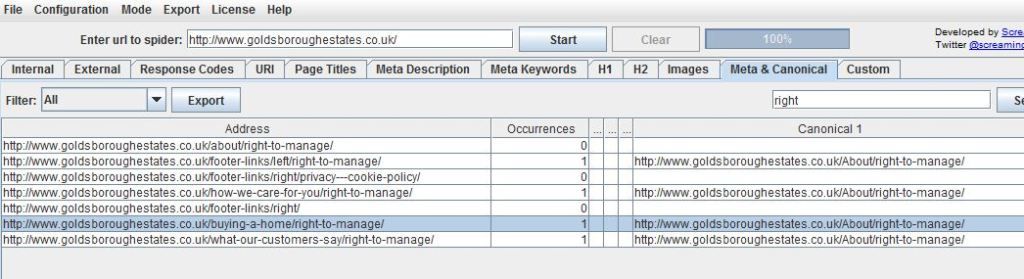
Ive used a package called screamong frog to diagnose canonical errors but can anyone tell me what this means? http://i216.photobucket.com/albums/cc53/zymurgy_bucket/understand-occurances-canonical.jpg
Thanks in advance.
David
-
Thank you for all your replies this was bugging me but the pain of not knowing has vanished like the morning mist as the warming glow of sunshine illumunates truth

-
David
Looks like you may have an issue there. The "address" and "canonical 1" should match about 99% of the time. Right now you're telling Google to index all those different address pages as a single URL (About/right-to-manage)... something to look at - and the suggestions below are both good as well.
-Dan
-
I agree with what Streamline Metrics said, I just want to add to this by linking you to a great SEOmoz post on canonicalization which may help you clear things up more.
In your case, having 1 rel="canonical" tag per page is what you want, so you should be fine with that, just make sure that the canonical tags (listed under canonical 1 in Screaming Frog) is the actual URL that you want.
Hope this helps
Zach -
It simply means how many canonical tags are found on that specific page. So if you had two rel=canonical tags on a page, it would say 2 occurrences. For more info, check out http://www.screamingfrog.co.uk/seo-spider/user-guide/tabs/





Got a burning SEO question?
Subscribe to Moz Pro to gain full access to Q&A, answer questions, and ask your own.
Browse Questions
Explore more categories
-
Moz Tools
Chat with the community about the Moz tools.
-
SEO Tactics
Discuss the SEO process with fellow marketers
-
Community
Discuss industry events, jobs, and news!
-
Digital Marketing
Chat about tactics outside of SEO
-
Research & Trends
Dive into research and trends in the search industry.
-
Support
Connect on product support and feature requests.
Related Questions
-

Google displays multiple titles for same article. What does this mean?
I've linked to some screenshots so that it what I'm talking about makes more sense. Sometimes, when I perform a search, I see an article with the correct article title listed as the page title in the SERPs. Other times, I see the wrong page title – it's a generic somethin' or other done by my client's web design company with a bunch of keywords thrown in. The latter (not the correct article title) also appears at the top of the browser tab for every article on my client's site. I know this is bad, but what can be done about it? This would never happen if my client used Wordpress or some easily modifiable CMS, but they're using a proprietary one maintained by the group that designed the website. open?id=0BxB_dYL1ylGgVVF1dHlwdXp2dFU open?id=0BxB_dYL1ylGgdWJjdlJoRlRIR00
Technical SEO | | Greenery0 -

URL has caps, but canonical does not. Now what?
Hi, Just started working with a site that has the occasional url with a capital, but then the url in the canonical as lower case. Neither, when entered in a browser, resolves to the other. It's a Shopify site. What do you think I should do?
Technical SEO | | 945010 -

Canonical issues using Screaming Frog and other tools?
In the Directives tab within Screaming Frog, can anyone tell me what the difference between "canonicalised", "canonical", and "no canonical" means? They're found in the filter box. I see the data but am not sure how to interpret them. Which one of these would I check to find canonical issues within a website? Are there any other easy ways to identify canonical issues?
Technical SEO | | Flock.Media0 -

Set Canonical for Paginated Content
Hi Guys, This is a follow up on this thread: http://azwa.1clkaccess.in/community/q/dynamic-url-parameters-woocommerce-create-404-errors# I would like to know how I can set a canonical link in Wordpress/Woocommerce which points to "View All" on category pages on our webshop.
Technical SEO | | jeeyer
The categories on my website can be viewed as 24/48 or All products but because the quanity constantly changes viewing 24 or 48 products isn't always possible. To point Google in the right direction I want to let them know that "View All" is the best way to go.
I've read that Google's crawler tries to do this automatically but not sure if this is the case on on my website. Here is some more info on the issue: https://support.google.com/webmasters/answer/1663744?hl=en
Thanks for the help! Joost0 -

Rel=canonical Weebly
My problem is with my website as it says I have duplicate page titles and contents because of a /index.html. It says the duplicate content is due to the fact that my homepage on my website is www.seacandytackle.com but it is also www.seacandytackle.com/index.html because I use weebly. How can I use the tag to fix this? It won't let me do a 301 redirect because it is a home page. How can I fix this? What code would I have to use and which url? Also it says that I have duplicate page content between http://www.seacandytackle.com/index.html and http://www.seacandytackle.comhttp://www.seacandytackle.com but I don't recall having any page that looks like http://www.seacandytackle.com http://www.seacandytackle.com from weebly. How can I fix this issue as well? Thank you for any help. Step by step implementation would be particularly helpful in using the rel= tags to fix these duplicate issues.
Technical SEO | | SeaCandyTackle0 -

301 redirect: canonical or non canonical?
Hi, Newbie alert! I need to set up 301 redirects for changed URLs on a database driven site that is to be redeveloped shortly. The current site uses canonical header tags. The new site will also use canonical tags. Should the 301 redirects map the canonical URL on the old site to the corresponding canonical for the new design . . . or should they map the non canonical database URLs old and new? Given that the purpose of canonicals is to indicate our preferred URL, then my guess is that's what I should use. However, how can I be sure that Google (for example) has indexed the canonical in every case? Thx in anticipation.
Technical SEO | | ztalk1120 -

Internal search : rel=canonical vs noindex vs robots.txt
Hi everyone, I have a website with a lot of internal search results pages indexed. I'm not asking if they should be indexed or not, I know they should not according to Google's guidelines. And they make a bunch of duplicated pages so I want to solve this problem. The thing is, if I noindex them, the site is gonna lose a non-negligible chunk of traffic : nearly 13% according to google analytics !!! I thought of blocking them in robots.txt. This solution would not keep them out of the index. But the pages appearing in GG SERPS would then look empty (no title, no description), thus their CTR would plummet and I would lose a bit of traffic too... The last idea I had was to use a rel=canonical tag pointing to the original search page (that is empty, without results), but it would probably have the same effect as noindexing them, wouldn't it ? (never tried so I'm not sure of this) Of course I did some research on the subject, but each of my finding recommanded one of the 3 methods only ! One even recommanded noindex+robots.txt block which is stupid because the noindex would then be useless... Is there somebody who can tell me which option is the best to keep this traffic ? Thanks a million
Technical SEO | | JohannCR0 -

URL query strings and canonical tag
Hi, I have recently been getting my comparison website redesigned and developed onto wordpress and the site is now 90% complete. Part of the redesign has meant that there are now dynamic urls in the format: http://www.mywebsite.com/10-pounds-productss/?display=cost&value=10 I have other pages similar to this but with different content for the different price ranges and these are linked to from the menus: http://www.mywebsite.com/20-pounds-products/?display=cost&value=20 Now my questions are: 1. I am using Joost's All-in-one SEO plugin and this adds a canonical tag to the page that is pointing to http://www.mywebsite.com/10-pounds-products/ which is the permalink. Is this OK as it is or should i change this to http://www.mywebsite.com/10-pounds-products/?display=cost&value=10 2. Which URL will get indexed, what gets shown as the display URL in the SERPs and what page will users land on? I'm a bit confused so apologies if these seem like silly questions. Thanks
Technical SEO | | bizarro10000