Moz Q&A is closed.
After more than 13 years, and tens of thousands of questions, Moz Q&A closed on 12th December 2024. Whilst we’re not completely removing the content - many posts will still be possible to view - we have locked both new posts and new replies. More details here.
How to index e-commerce marketplace product pages
-
Hello!
We are an online marketplace that submitted our sitemap through Google Search Console 2 weeks ago. Although the sitemap has been submitted successfully, out of ~10000 links (we have ~10000 product pages), we only have 25 that have been indexed.
I've attached images of the reasons given for not indexing the platform.
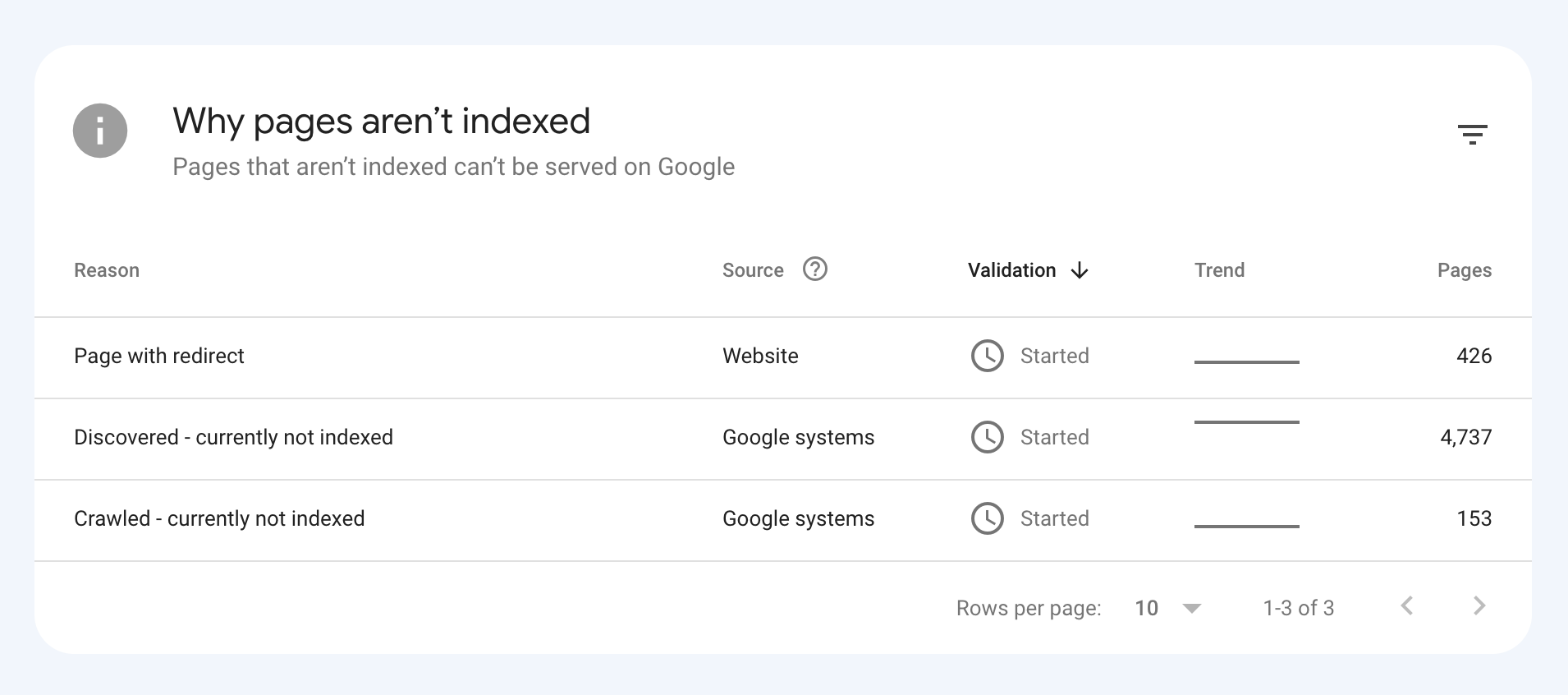
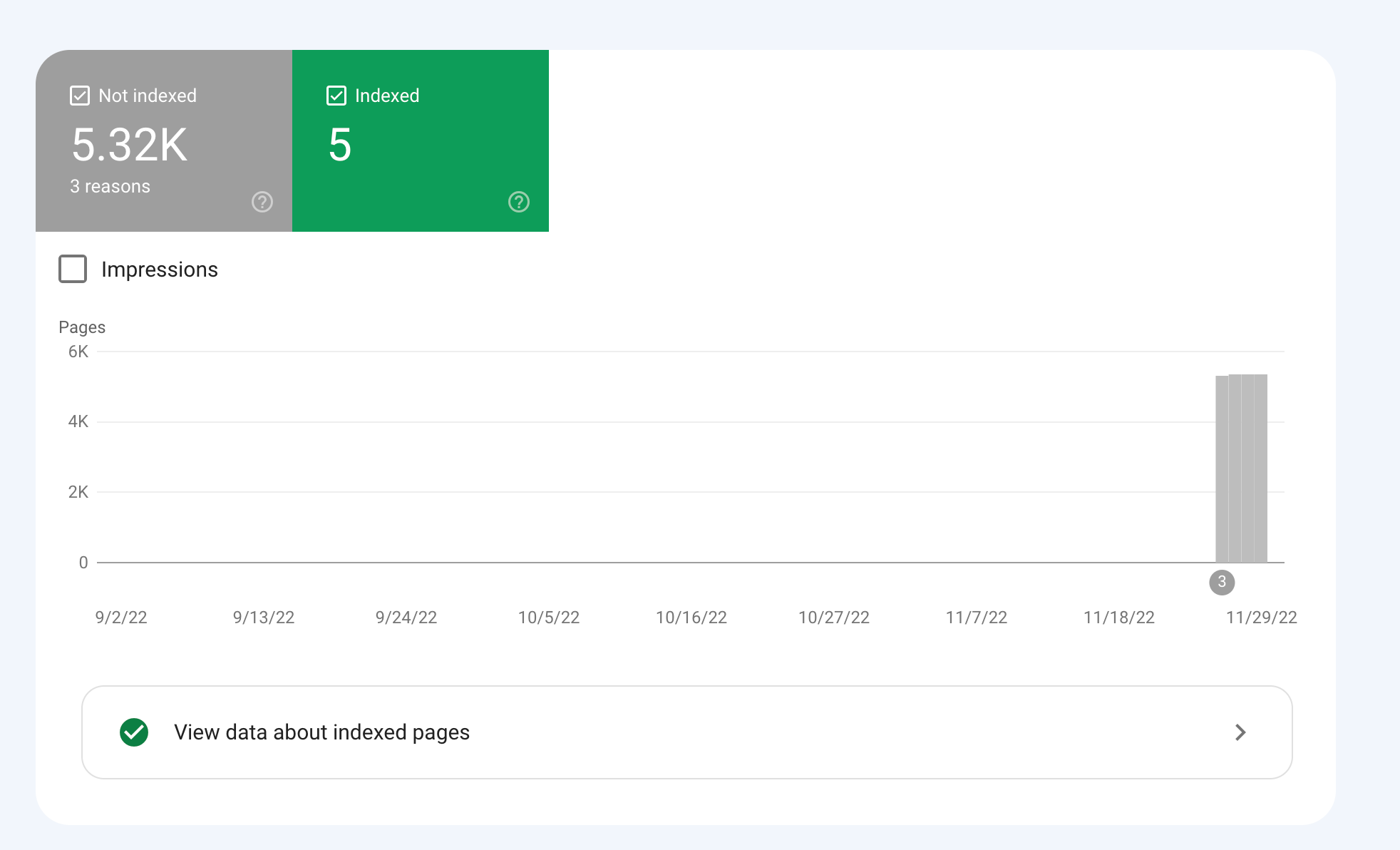
How would we go about fixing this?
-
To get your e-commerce marketplace product pages indexed, make sure your pages include unique and descriptive titles, meta descriptions, relevant keywords, and high-quality images. Additionally, optimize your URLs, leverage schema markup, and prioritize user experience for increased search engine visibility.
-
@fbcosta i hve this problem but its so less in my site
پوشاک پاپیون -
I'd appreciate if someone who faced the same indexing issue comes forward and share the case study with fellow members. Pin points steps a sufferer should do to overcome indexing dilemma. What actionable steps to do to enable quick product indexing? How we can get Google's attention so it can start indexing pages at a quick pace? Actionable advice please.
-
There could be several reasons why only 25 out of approximately 10,000 links have been indexed by Google, despite successfully submitting your sitemap through Google Search Console:
Timing: It is not uncommon for indexing to take some time, especially for larger sites with many pages. Although your sitemap has been submitted, it may take several days or even weeks for Google to crawl and index all of your pages. It's worth noting that not all pages on a site may be considered important or relevant enough to be indexed by Google.
Quality of Content: Google may not index pages that it considers low-quality, thin or duplicate content. If a significant number of your product pages have similar or duplicate content, they may not be indexed. To avoid this issue, make sure your product pages have unique, high-quality content that provides value to users.
Technical issues: Your site may have technical issues that are preventing Google from crawling and indexing your pages. These issues could include problems with your site's architecture, duplicate content, or other issues that may impact crawling and indexing.
Inaccurate Sitemap: There is also a possibility that there are errors in the sitemap you submitted to Google. Check the sitemap to ensure that all the URLs are valid, the sitemap is up to date and correctly formatted.
To troubleshoot this issue, you can check your site's coverage report on Google Search Console, which will show you which pages have been indexed and which ones haven't. You can also check your site's crawl report to see if there are any technical issues that may be preventing Google from crawling your pages. Finally, you can also run a site audit to identify and fix any technical issues that may be impacting indexing.
-
@fbcosta As per my experience, if your site is new it will take some time to index all of the URLs, and the second thing is, if you have Hundreds of URLs, it doesn't mean Google will index all of them.
You can try these steps which will help in fast indexing:
- Sharing on Social Media
- Interlinking from already indexed Pages
- Sitemap
- Share the link on the verified Google My Business Profile (Best way to index fast). You can add by-products or create a post and link it to the website.
- Guest post
I am writing here for the first time, I hope it will help






Got a burning SEO question?
Subscribe to Moz Pro to gain full access to Q&A, answer questions, and ask your own.
Browse Questions
Explore more categories
-
Moz Tools
Chat with the community about the Moz tools.
-
SEO Tactics
Discuss the SEO process with fellow marketers
-
Community
Discuss industry events, jobs, and news!
-
Digital Marketing
Chat about tactics outside of SEO
-
Research & Trends
Dive into research and trends in the search industry.
-
Support
Connect on product support and feature requests.
Related Questions
-

Best redirect destination for 18k highly-linked pages
Technical SEO question regarding redirects; I appreciate any insights on best way to handle. Situation: We're decommissioning several major content sections on a website, comprising ~18k webpages. This is a well established site (10+ years) and many of the pages within these sections have high-quality inbound links from .orgs and .edus. Challenge: We're trying to determine the best place to redirect these 18k pages. For user experience, we believe best option is the homepage, which has a statement about the changes to the site and links to the most important remaining sections of the site. It's also the most important page on site, so the bolster of 301 redirected links doesn't seem bad. However, someone on our team is concerned that that many new redirected pages and links going to our homepage will trigger a negative SEO flag for the homepage, and recommends instead that they all go to our custom 404 page (which also includes links to important remaining sections). What's the right approach here to preserve remaining SEO value of these soon-to-be-redirected pages without triggering Google penalties?
Technical SEO | | davidvogel1 -

How to Boost Your WordPress Website Speed to 95+ (Without Premium Plugins)
I'm reaching out for some advice on improving my WordPress website's speed. I'm currently using a free theme for this fusion magazine and aiming for a score of 95+ on Google PageSpeed Insights. I'm aware that premium plugins can significantly enhance performance, but I'm hoping to achieve similar results using primarily free solutions and manual optimizations.
Technical SEO | | mohammadrehanseo0 -

Unsolved Crawling only the Home of my website
Hello,
Product Support | | Azurius
I don't understand why MOZ crawl only the homepage of our webiste https://www.modelos-de-curriculum.com We add the website correctly, and we asked for crawling all the pages. But the tool find only the homepage. Why? We are testing the tool before to suscribe. But we need to be sure that the tool is working for our website. If you can please help us.0 -

Safety Data Sheet PDFs are Showing Higher in Search Results than Product Pages
I have a client who just launched an updated website that has WooCommerce added to it. The website also has a page of Safety Data Sheets that are PDFs that contain information about some of the products. When we do a Google search for many of the products the Safety Data Sheets show up first in the search results instead of the product pages. Has anyone had this happen and know how to solve the issue?
Technical SEO | | teamodea0 -

Unsolved Capturing Source Dynamically for UTM Parameters
Does anyone have a tutorial on how to dynamically capture the referring source to be populated in UTM parameters for Google Analytics? We want to syndicate content and be able to see all of the websites that provided referral traffic for this specific objective. We want to set a specific utm_medium and utm_campaign but have the utm_source be dynamic and capture the referring website. If we set a permanent utm_source, it would appear the same for all incoming traffic. Thanks in advance!
Technical SEO | | peteboyd0 -

Pages are Indexed but not Cached by Google. Why?
Hello, We have magento 2 extensions website mageants.com since 1 years google every 15 days cached my all pages but suddenly last 15 days my websites pages not cached by google showing me 404 error so go search console check error but din't find any error so I have cached manually fetch and render but still most of pages have same 404 error example page : - https://www.mageants.com/free-gift-for-magento-2.html error :- http://webcache.googleusercontent.com/search?q=cache%3Ahttps%3A%2F%2Fwww.mageants.com%2Ffree-gift-for-magento-2.html&rlz=1C1CHBD_enIN803IN804&oq=cache%3Ahttps%3A%2F%2Fwww.mageants.com%2Ffree-gift-for-magento-2.html&aqs=chrome..69i57j69i58.1569j0j4&sourceid=chrome&ie=UTF-8 so have any one solutions for this issues
Technical SEO | | vikrantrathore0 -

How to stop my webmail pages not to be indexed on Google ??
when i did a search in google for Site:mywebsite.com , for a list of pages indexed. Surprisingly the following come up " Webmail - Login " Although this is associated with the domain , this is a completely different server , this the rackspace email server browser interface I am sure that there is nothing on the website that links or points to this.
Technical SEO | | UIPL
So why is Google indexing it ? & how do I get it out of there. I tried in webmaster tool but I could not , as it seems like a sub-domain. Any ideas ? Thanks Naresh Sadasivan0 -

Ecommerce website: Product page setup & SKU's
I manage an E-commerce website and we are looking to make some changes to our product pages to try and optimise them for search purposes and to try and improve the customer buying experience. This is where my head starts to hurt! Now, let's say I am selling a T shirt that comes in 4 sizes and 6 different colours. At the moment my website would have 24 products, each with pretty much the same content (maybe differing references to the colour & size). My idea is to change this and have 1 main product page for the T-shirt, but to have 24 product SKU's/variations that exist to give the exact product details. Some different ways I have been considering to do this: a) have drop-down fields on the product page that ask the customer to select their Tshirt size and colour. The image & price then changes on the page. b) All product 24 product SKUs sre listed under the main product with the 'Add to Cart' open next to each one. Each one would be clickable so a page it its own right. Would I need to set up a canonical links for each SKU that point to the top level product page? I'm obviously looking to minimise duplicate content but Im not exactly sure on how to set this up - its a big decision so I need to be 100% clear before signing off on anything. . Any other tips on how to do this or examples of good e-commerce websites that use product SKus well? Kind regards Tom
Technical SEO | | DHS_SH0