Moz Q&A is closed.
After more than 13 years, and tens of thousands of questions, Moz Q&A closed on 12th December 2024. Whilst we’re not completely removing the content - many posts will still be possible to view - we have locked both new posts and new replies. More details here.
How to index e-commerce marketplace product pages
-
Hello!
We are an online marketplace that submitted our sitemap through Google Search Console 2 weeks ago. Although the sitemap has been submitted successfully, out of ~10000 links (we have ~10000 product pages), we only have 25 that have been indexed.
I've attached images of the reasons given for not indexing the platform.
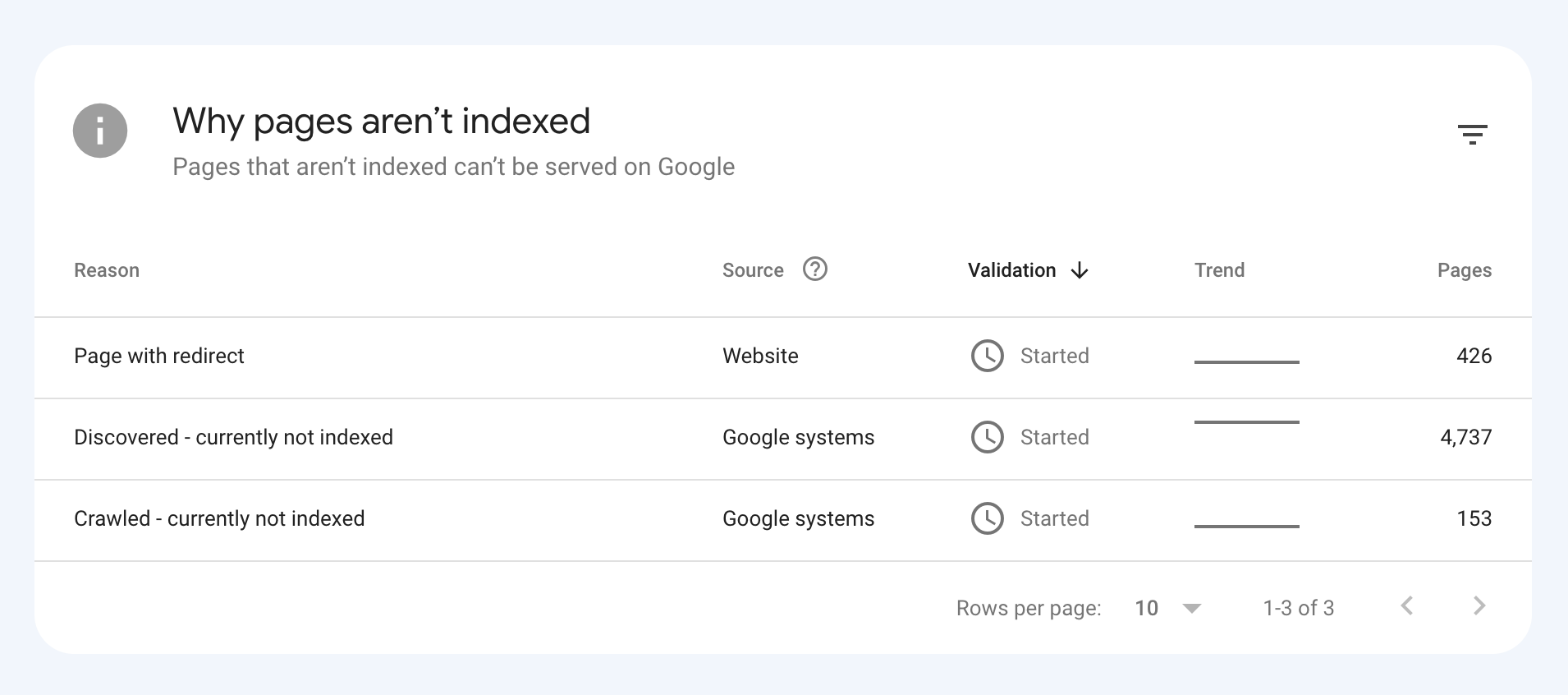
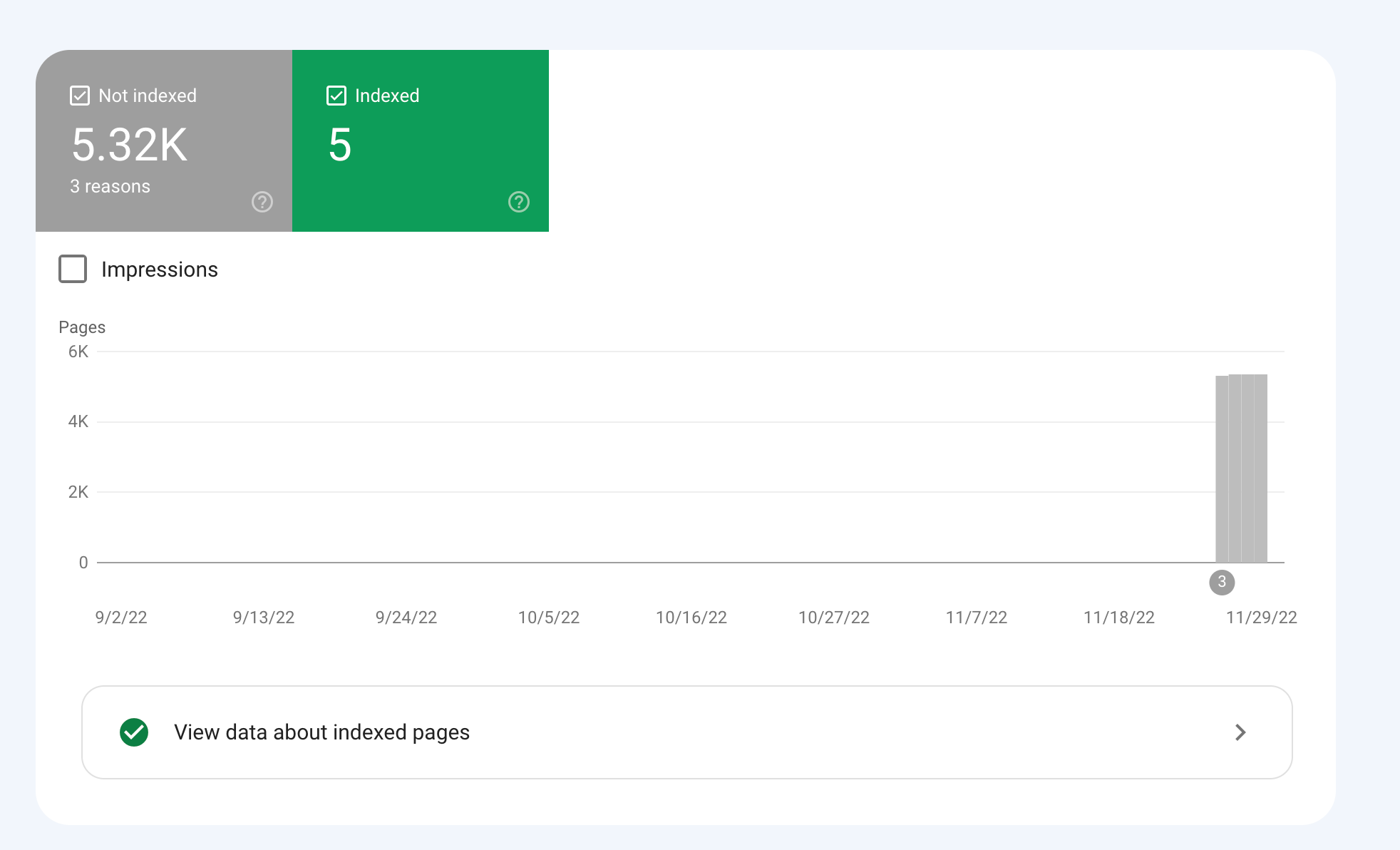
How would we go about fixing this?
-
To get your e-commerce marketplace product pages indexed, make sure your pages include unique and descriptive titles, meta descriptions, relevant keywords, and high-quality images. Additionally, optimize your URLs, leverage schema markup, and prioritize user experience for increased search engine visibility.
-
@fbcosta i hve this problem but its so less in my site
پوشاک پاپیون -
I'd appreciate if someone who faced the same indexing issue comes forward and share the case study with fellow members. Pin points steps a sufferer should do to overcome indexing dilemma. What actionable steps to do to enable quick product indexing? How we can get Google's attention so it can start indexing pages at a quick pace? Actionable advice please.
-
There could be several reasons why only 25 out of approximately 10,000 links have been indexed by Google, despite successfully submitting your sitemap through Google Search Console:
Timing: It is not uncommon for indexing to take some time, especially for larger sites with many pages. Although your sitemap has been submitted, it may take several days or even weeks for Google to crawl and index all of your pages. It's worth noting that not all pages on a site may be considered important or relevant enough to be indexed by Google.
Quality of Content: Google may not index pages that it considers low-quality, thin or duplicate content. If a significant number of your product pages have similar or duplicate content, they may not be indexed. To avoid this issue, make sure your product pages have unique, high-quality content that provides value to users.
Technical issues: Your site may have technical issues that are preventing Google from crawling and indexing your pages. These issues could include problems with your site's architecture, duplicate content, or other issues that may impact crawling and indexing.
Inaccurate Sitemap: There is also a possibility that there are errors in the sitemap you submitted to Google. Check the sitemap to ensure that all the URLs are valid, the sitemap is up to date and correctly formatted.
To troubleshoot this issue, you can check your site's coverage report on Google Search Console, which will show you which pages have been indexed and which ones haven't. You can also check your site's crawl report to see if there are any technical issues that may be preventing Google from crawling your pages. Finally, you can also run a site audit to identify and fix any technical issues that may be impacting indexing.
-
@fbcosta As per my experience, if your site is new it will take some time to index all of the URLs, and the second thing is, if you have Hundreds of URLs, it doesn't mean Google will index all of them.
You can try these steps which will help in fast indexing:
- Sharing on Social Media
- Interlinking from already indexed Pages
- Sitemap
- Share the link on the verified Google My Business Profile (Best way to index fast). You can add by-products or create a post and link it to the website.
- Guest post
I am writing here for the first time, I hope it will help







Got a burning SEO question?
Subscribe to Moz Pro to gain full access to Q&A, answer questions, and ask your own.
Browse Questions
Explore more categories
-
Moz Tools
Chat with the community about the Moz tools.
-
SEO Tactics
Discuss the SEO process with fellow marketers
-
Community
Discuss industry events, jobs, and news!
-
Digital Marketing
Chat about tactics outside of SEO
-
Research & Trends
Dive into research and trends in the search industry.
-
Support
Connect on product support and feature requests.
Related Questions
-

Why Product pages are throwing Missing field "image" and Missing field "price" in Wordpress Woocommerce
I have a wordpress wocommerce website where I have uploaded 100s of products but it's giving me error in GSC under merchant listing tab. When I tested it show missing field image and missing field price. I have done everything according to https://developers.google.com/search/docs/appearance/structured-data/product#merchant-listing-experiences and applied fixed i.e. images are 800x800 and price range is also there. What else can be done here?!merchant listing.jpg
Technical SEO | | Ravi_Rana0 -

Need some help understanding SEO - Please help before I lose [pull out] all my hair
I'm new to SEO, and am stubbornly trying to educate myself. I have a telescope shop in Canada, it's a small business that we run on the side. We're driving lots of traffic through FB and our outreach programs but I really want to increase our presence on search. We released a new website back in January and it killed some of our rankings. We're working our way back with a very specific set of efforts on regular SEO: Metadata and titles, although it seems that's not super relevant Building high quality backlinks and eliminating any spammy backlinks Rewriting product listings so that they are original content though I'm not sure how important this is in e-commerce Writing high quality articles and blog posts Working relevant keywords into our product pages and titles I understand that good SEO is about pushing on all the levers, and trying to make sure that your site is as valuable to the end user as possible. We're making some good progress, but I'm puzzled by the #1 shop in Canada. They don't put any apparent effort into SEO and they still rank #1 on every key product we compete with them on. I've worked with two separate, highly ranked and regarded SEO firms on this and neither has been able to tell my why this other site ranks so highly. Here's a specific example on a popular product that we both sell, the Celestron NexStar 8SE. Here’s the link to Telescope Canada’s page for their Celestron 8SE: https://telescopescanada.ca/products/celestron-nexstar-8se-computerized-telescope-11069 Here’s a link to the Celestron 8SE page from the manufacturer website: https://www.celestron.com/products/nexstar-8se-computerized-telescope Telescopes Canada has just copied and pasted. There is no original content aside from adding the shipping and return policy to the tab, and having some options for selecting accessories on the page. Here is our page: https://all-startelescope.com/products/celestron-nexstar-8se We have higher page authority, higher domain authority, and they keyword analyzer in moz says that our page is higher quality than the Telescopes Canada page. I can’t find a single metric on any tool (ubbersuggest, Moz, ahrefs, semrush) that says Telescopes Canada is a better site, or has a better NexStar 8SE product page. But they keep ranking ahead of us, and right at the top of google search. Our titles are good, our metadata is good (but I don’t think that’s been a serious ranking factor for about ten years). Our text is original, it’s relevant, we have healthy internal links to the page. According to Moz's page ranker it's 20 points higher than Telescope Canada's page. We have invensted in some excellent blog content, we’re adding new products to the website so that we rank for more keywords. All of those things are helping, but I fundamentally don’t understand why Telescopes Canada is #1 almost across the board on every key product in our market. There is something that I’m not seeing here. Can you see any metric, any tool in your toolbox that indicates why they rank at the top, or even higher than we do for in these search terms specific to that product: Celestron NexStar 8SE
Intermediate & Advanced SEO | | nkennett
NexStar 8SE
Celestron NexStar 8SE Canada
NexStar 8SE Canada I have a feeling it's something technical that I'm missing, but I'm not sure how obvious it is with two 'professional' firms not finding it. I'd really appreciate any help or insight that you can offer.0 -

Unsolved Duplicate LocalBusiness Schema Markup
Hello! I've been having a hard time finding an answer to this specific question so I figured I'd drop it here. I always add custom LocalBusiness markup to clients' homepages, but sometimes the client's website provider will include their own automated LocalBusiness markup. The codes I create often include more information. Assuming the website provider is unwilling to remove their markup, is it a bad idea to include my code as well? It seems like it could potentially be read as spammy by Google. Do the pros of having more detailed markup outweigh that potential negative impact?
Local Website Optimization | | GoogleAlgoServant0 -

Product Schema Markup for All Products
Hi Team, Google search console used to allow you to use their structured data markup helperhttps://www.google.com/webmasters/markup-helper/u/0/ to markup multiple product pages at once that were similar. I do not see this feature anymore with the new search console. Does anyone have a recommendation for marking up multiple product pages without having to have schema markup firing in GTM for each product page?
Technical SEO | | agrier0 -

Indexing Issue of Dynamic Pages
Hi All, I have a query for which i am struggling to find out the answer. I unable to retrieve URL using "site:" query on Google SERP. However, when i enter the direct URL or with "info:" query then a snippet appears. I am not able to understand why google is not showing URL with "site:" query. Whether the page is indexed or not? Or it's soon going to be deindexed. Secondly, I would like to mention that this is a dynamic URL. The index file which we are using to generate this URL is not available to Google Bot. For instance, There are two different URL's. http://www.abc.com/browse/ --- It's a parent page.
Technical SEO | | SameerBhatia
http://www.abc.com/browse/?q=123 --- This is the URL, generated at run time using browse index file. Google unable to crawl index file of browse page as it is unable to run independently until some value will get passed in the parameter and is not indexed by Google. Earlier the dynamic URL's were indexed and was showing up in Google for "site:" query but now it is not showing up. Can anyone help me what is happening here? Please advise. Thanks0 -

Canonical for duplicate pages in ecommerce site and the product out of stock
I’m an SEO for an ecommerce site that sells shoes I have duplicate pages for different colors of the same product (unique URL for each color), Conventionally I have added canonical tags for each page, which direct to a specific product URL My question is what happens when a product which the googlbot is direct to, is out of stock but is still listed in the canonical tag ?
Technical SEO | | shoesonline0 -

Does Google index internal anchors as separate pages?
Hi, Back in September, I added a function that sets an anchor on each subheading (h[2-6]) and creates a Table of content that links to each of those anchors. These anchors did show up in the SERPs as JumpTo Links. Fine. Back then I also changed the canonicals to a slightly different structur and meanwhile there was some massive increase in the number of indexed pages - WAY over the top - which has since been fixed by removing (410) a complete section of the site. However ... there are still ~34.000 pages indexed to what really are more like 4.000 plus (all properly canonicalised). Naturally I am wondering, what google thinks it is indexing. The number is just way of and quite inexplainable. So I was wondering: Does Google save JumpTo links as unique pages? Also, does anybody know any method of actually getting all the pages in the google index? (Not actually existing sites via Screaming Frog etc, but actual pages in the index - all methods I found sadly do not work.) Finally: Does somebody have any other explanation for the incongruency in indexed vs. actual pages? Thanks for your replies! Nico
Technical SEO | | netzkern_AG0 -

Investigating a huge spike in indexed pages
I've noticed an enormous spike in pages indexed through WMT in the last week. Now I know WMT can be a bit (OK, a lot) off base in its reporting but this was pretty hard to explain. See, we're in the middle of a huge campaign against dupe content and we've put a number of measures in place to fight it. For example: Implemented a strong canonicalization effort NOINDEX'd content we know to be duplicate programatically Are currently fixing true duplicate content issues through rewriting titles, desc etc. So I was pretty surprised to see the blow-up. Any ideas as to what else might cause such a counter intuitive trend? Has anyone else see Google do something that suddenly gloms onto a bunch of phantom pages?
Technical SEO | | farbeseo0