Moz Q&A is closed.
After more than 13 years, and tens of thousands of questions, Moz Q&A closed on 12th December 2024. Whilst we’re not completely removing the content - many posts will still be possible to view - we have locked both new posts and new replies. More details here.
How to index e-commerce marketplace product pages
-
Hello!
We are an online marketplace that submitted our sitemap through Google Search Console 2 weeks ago. Although the sitemap has been submitted successfully, out of ~10000 links (we have ~10000 product pages), we only have 25 that have been indexed.
I've attached images of the reasons given for not indexing the platform.
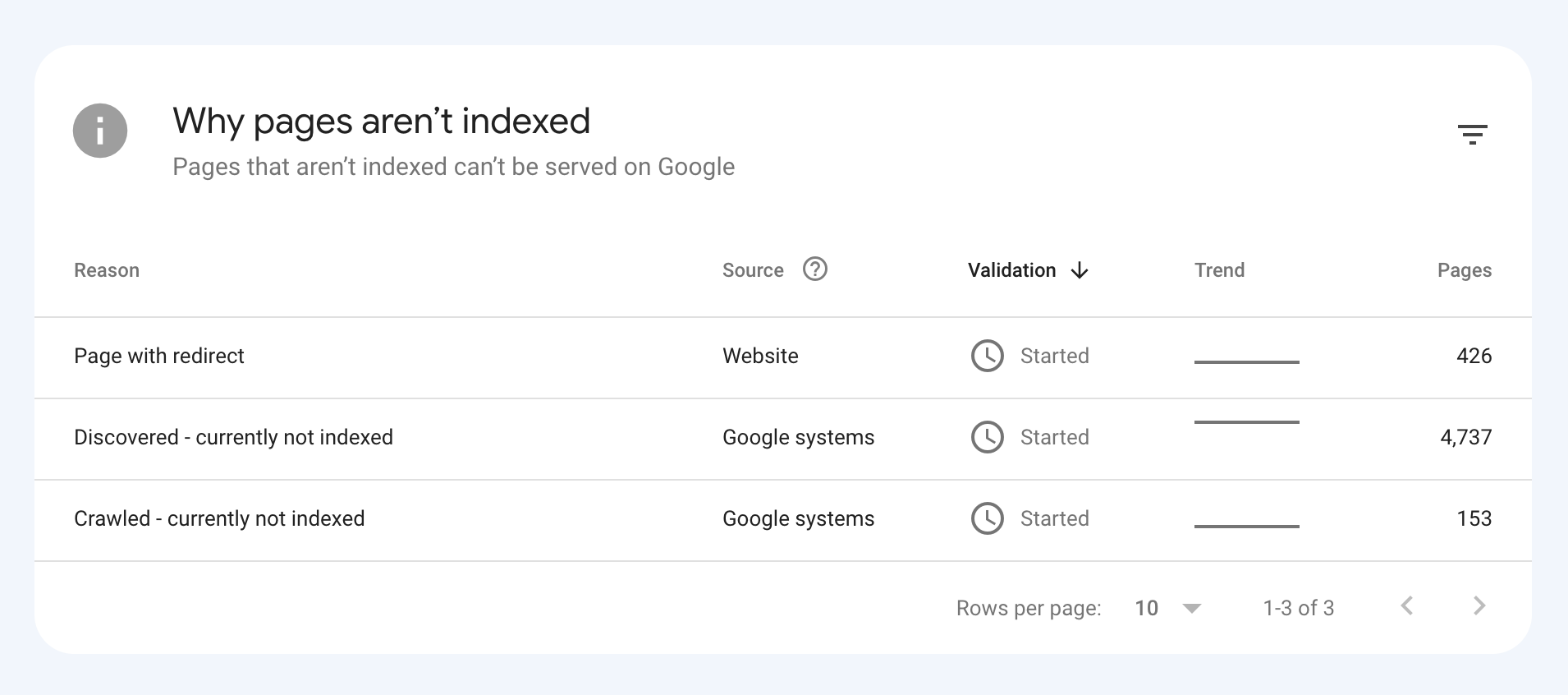
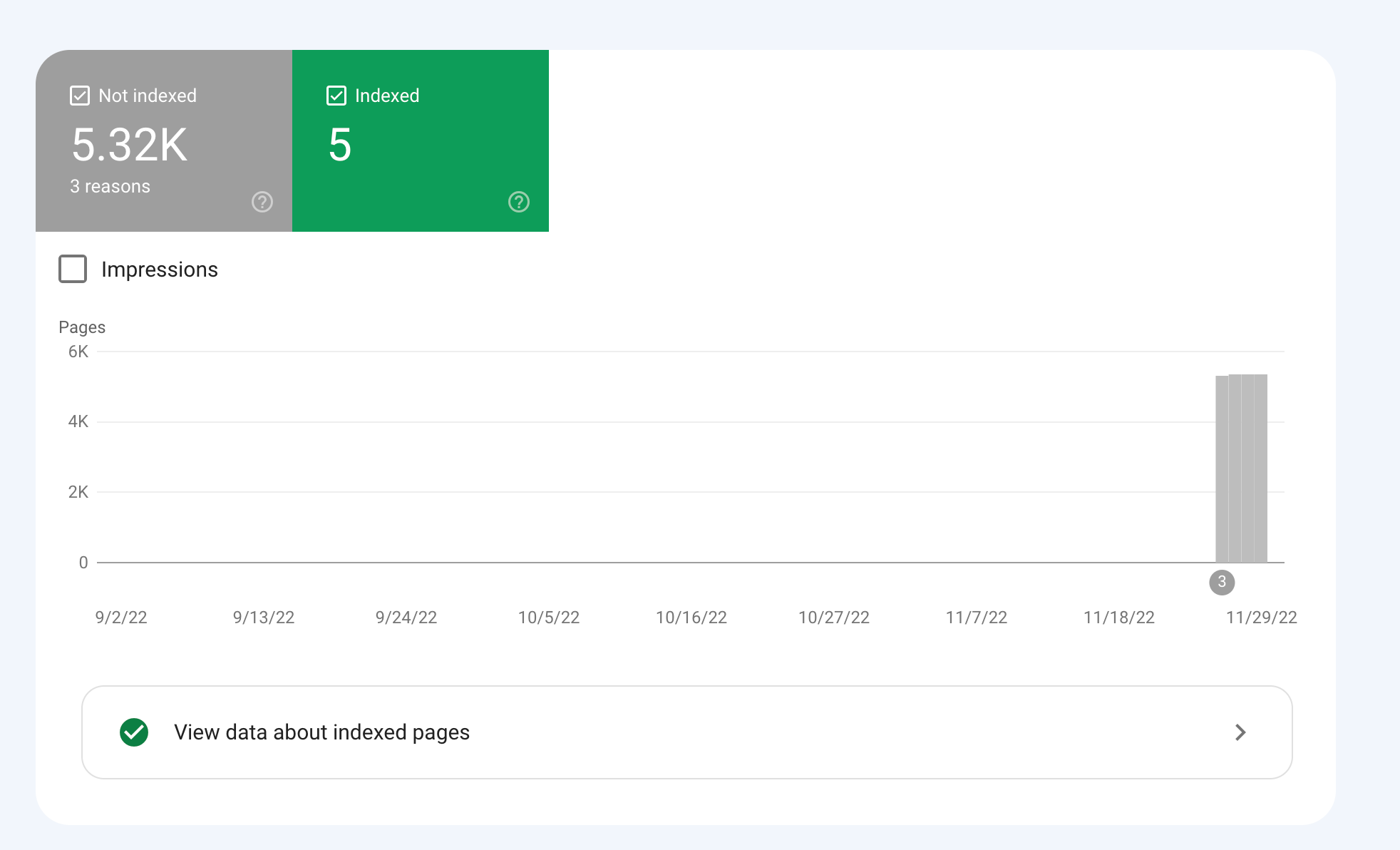
How would we go about fixing this?
-
To get your e-commerce marketplace product pages indexed, make sure your pages include unique and descriptive titles, meta descriptions, relevant keywords, and high-quality images. Additionally, optimize your URLs, leverage schema markup, and prioritize user experience for increased search engine visibility.
-
@fbcosta i hve this problem but its so less in my site
پوشاک پاپیون -
I'd appreciate if someone who faced the same indexing issue comes forward and share the case study with fellow members. Pin points steps a sufferer should do to overcome indexing dilemma. What actionable steps to do to enable quick product indexing? How we can get Google's attention so it can start indexing pages at a quick pace? Actionable advice please.
-
There could be several reasons why only 25 out of approximately 10,000 links have been indexed by Google, despite successfully submitting your sitemap through Google Search Console:
Timing: It is not uncommon for indexing to take some time, especially for larger sites with many pages. Although your sitemap has been submitted, it may take several days or even weeks for Google to crawl and index all of your pages. It's worth noting that not all pages on a site may be considered important or relevant enough to be indexed by Google.
Quality of Content: Google may not index pages that it considers low-quality, thin or duplicate content. If a significant number of your product pages have similar or duplicate content, they may not be indexed. To avoid this issue, make sure your product pages have unique, high-quality content that provides value to users.
Technical issues: Your site may have technical issues that are preventing Google from crawling and indexing your pages. These issues could include problems with your site's architecture, duplicate content, or other issues that may impact crawling and indexing.
Inaccurate Sitemap: There is also a possibility that there are errors in the sitemap you submitted to Google. Check the sitemap to ensure that all the URLs are valid, the sitemap is up to date and correctly formatted.
To troubleshoot this issue, you can check your site's coverage report on Google Search Console, which will show you which pages have been indexed and which ones haven't. You can also check your site's crawl report to see if there are any technical issues that may be preventing Google from crawling your pages. Finally, you can also run a site audit to identify and fix any technical issues that may be impacting indexing.
-
@fbcosta As per my experience, if your site is new it will take some time to index all of the URLs, and the second thing is, if you have Hundreds of URLs, it doesn't mean Google will index all of them.
You can try these steps which will help in fast indexing:
- Sharing on Social Media
- Interlinking from already indexed Pages
- Sitemap
- Share the link on the verified Google My Business Profile (Best way to index fast). You can add by-products or create a post and link it to the website.
- Guest post
I am writing here for the first time, I hope it will help






Got a burning SEO question?
Subscribe to Moz Pro to gain full access to Q&A, answer questions, and ask your own.
Browse Questions
Explore more categories
-
Moz Tools
Chat with the community about the Moz tools.
-
SEO Tactics
Discuss the SEO process with fellow marketers
-
Community
Discuss industry events, jobs, and news!
-
Digital Marketing
Chat about tactics outside of SEO
-
Research & Trends
Dive into research and trends in the search industry.
-
Support
Connect on product support and feature requests.
Related Questions
-

Why MOZ just index some of the links?
hello everyone i've been using moz pro for a while and found a lot of backlink oppertunites as checking my competitor's backlink profile.
Link Building | | seogod123234
i'm doing the same way as my competitors but moz does not see and index lots of them, maybe just index 10% of them. though my backlinks are commenly from sites with +80 and +90 DA like Github, Pinterest, Tripadvisor and .... and the strange point is that 10% are almost from EDU sites with high DA. i go to EDU sites and place a comment and in lots of case, MOZ index them in just 2-3 days!! with maybe just 10 links like this, my DA is incresead from 15 to 19 in less than one month! so, how does this "SEO TOOL" work?? is there anyway to force it to crawl a page?0 -

How to Increase Website Visibility on Google and Bing?
I am working on an e-commerce niche website and I aim to rank higher on Google to drive more traffic to my website. Any suggestions?
Link Building | | digitalenginehub0 -

Unsolved Crawling only the Home of my website
Hello,
Product Support | | Azurius
I don't understand why MOZ crawl only the homepage of our webiste https://www.modelos-de-curriculum.com We add the website correctly, and we asked for crawling all the pages. But the tool find only the homepage. Why? We are testing the tool before to suscribe. But we need to be sure that the tool is working for our website. If you can please help us.0 -

Unsolved Question about a Screaming Frog crawling issue
Hello, I have a very peculiar question about an issue I'm having when working on a website. It's a WordPress site and I'm using a generic plug in for title and meta updates. When I go to crawl the site through screaming frog, however, there seems to be a hard coded title tag that I can't find anywhere and the plug in updates don't get crawled. If anyone has any suggestions, thatd be great. Thanks!
Technical SEO | | KyleSennikoff0 -

Collections or blog posts for Shopify ecommerce seo?
Hi, hope you guys can help as I am going down a rabbit hole with this one! We have a solid-ranking sports nutrition site and are building a new SEO keyword strategy on our Shopify built store. We are using collections (categories) for much of the key product-based seo. This is because, as we understand it, Google prioritises collection/category pages over product pages. Should we then build additional collection pages to rank for secondary product search terms that could fit a collection page structure (eg 'vegan sports nutrition'), or should we use blog posts to do this? We have a quality blog with good unique content and reasonable domain authority so both options are open to us. But while the collection/category option may be best for SEO, too many collections/categories could upset our UX. We have a very small product range (10 products) so want to keep navigation fast and easy. Our 7 lead keyword collection pages do this already. More run the risk of upsetting ease/speed of site navigation. On the other hand, conversion rate from collection pages is historically much better than blog pages. We have made major technical upgrades to the blog to improve this but these are yet to be tested in anger. So at the heart of it all - do you guys recommend favouring blog posts or collection/category pages for secondary high sales intent keywords? All help gratefully received - thanks!
SEO Tactics | | WP332 -

Japanese URL-structured sitemap (pages) not being indexed by Bing Webmaster Tools
Hello everyone, I am facing an issue with the sitemap submission feature in Bing Webmaster Tools for a Japanese language subdirectory domain project. Just to outline the key points: The website is based on a subdirectory URL ( example.com/ja/ ) The Japanese URLs (when pages are published in WordPress) are not being encoded. They are entered in pure Kanji. Google Webmaster Tools, for instance, has no issues reading and indexing the page's URLs in its sitemap submission area (all pages are being indexed). When it comes to Bing Webmaster Tools it's a different story, though. Basically, after the sitemap has been submitted ( example.com/ja/sitemap.xml ), it does report an error that it failed to download this part of the sitemap: "page-sitemap.xml" (basically the sitemap featuring all the sites pages). That means that no URLs have been submitted to Bing either. My apprehension is that Bing Webmaster Tools does not understand the Japanese URLs (or the Kanji for that matter). Therefore, I generally wonder what the correct way is to go on about this. When viewing the sitemap ( example.com/ja/page-sitemap.xml ) in a web browser, though, the Japanese URL's characters are already displayed as encoded. I am not sure if submitting the Kanji style URLs separately is a solution. In Bing Webmaster Tools this can only be done on the root domain level ( example.com ). However, surely there must be a way to make Bing's sitemap submission understand Japanese style sitemaps? Many thanks everyone for any advice!
Technical SEO | | Hermski0 -

Should search pages be indexed?
Hey guys, I've always believed that search pages should be no-indexed but now I'm wondering if there is an argument to index them? Appreciate any thoughts!
Technical SEO | | RebekahVP0 -

How to stop my webmail pages not to be indexed on Google ??
when i did a search in google for Site:mywebsite.com , for a list of pages indexed. Surprisingly the following come up " Webmail - Login " Although this is associated with the domain , this is a completely different server , this the rackspace email server browser interface I am sure that there is nothing on the website that links or points to this.
Technical SEO | | UIPL
So why is Google indexing it ? & how do I get it out of there. I tried in webmaster tool but I could not , as it seems like a sub-domain. Any ideas ? Thanks Naresh Sadasivan0