Skip to content
    Moz logo Menu open Menu close
    • Products
      • Moz Pro
      • Moz Pro Home
      • Moz Local
      • Moz Local Home
      • STAT
      • Moz API
      • Moz API Home
      • Compare SEO Products
      • Moz Data
    • Free SEO Tools
      • Domain Analysis
      • Keyword Explorer
      • Link Explorer
      • Competitive Research
      • MozBar
      • More Free SEO Tools
    • Learn SEO
      • Beginner's Guide to SEO
      • SEO Learning Center
      • Moz Academy
      • MozCon
      • Webinars, Whitepapers, & Guides
    • Blog
    • Why Moz
      • Digital Marketers
      • Agency Solutions
      • Enterprise Solutions
      • Small Business Solutions
      • The Moz Story
      • New Releases
    • Log in
    • Log out
    • Products
      • Moz Pro

        Your all-in-one suite of SEO essentials.

      • Moz Local

        Raise your local SEO visibility with complete local SEO management.

      • STAT

        SERP tracking and analytics for enterprise SEO experts.

      • Moz API

        Power your SEO with our index of over 44 trillion links.

      • Compare SEO Products

        See which Moz SEO solution best meets your business needs.

      • Moz Data

        Power your SEO strategy & AI models with custom data solutions.

      Turn SEO data into actionable content briefs

      Turn SEO data into actionable content briefs

      Learn more
    • Free SEO Tools
      • Domain Analysis

        Get top competitive SEO metrics like DA, top pages and more.

      • Keyword Explorer

        Find traffic-driving keywords with our 1.25 billion+ keyword index.

      • Link Explorer

        Explore over 40 trillion links for powerful backlink data.

      • Competitive Research

        Uncover valuable insights on your organic search competitors.

      • MozBar

        See top SEO metrics for free as you browse the web.

      • More Free SEO Tools

        Explore all the free SEO tools Moz has to offer.

      Let your business shine with Listings AI

      Let your business shine with Listings AI

      Get found
    • Learn SEO
      • Beginner's Guide to SEO

        The #1 most popular introduction to SEO, trusted by millions.

      • SEO Learning Center

        Broaden your knowledge with SEO resources for all skill levels.

      • On-Demand Webinars

        Learn modern SEO best practices from industry experts.

      • How-To Guides

        Step-by-step guides to search success from the authority on SEO.

      • Moz Academy

        Upskill and get certified with on-demand courses & certifications.

      • MozCon

        Save on Early Bird tickets and join us in London or New York City

      Access 20 years of data with flexible pricing
      Moz API

      Access 20 years of data with flexible pricing

      Find your plan
    • Blog
    • Why Moz
      • Digital Marketers

        Simplify SEO tasks to save time and grow your traffic.

      • Small Business Solutions

        Uncover insights to make smarter marketing decisions in less time.

      • Agency Solutions

        Earn & keep valuable clients with unparalleled data & insights.

      • Enterprise Solutions

        Gain a competitive edge in the ever-changing world of search.

      • The Moz Story

        Moz was the first & remains the most trusted SEO company.

      • New Releases

        Get the scoop on the latest and greatest from Moz.

      Surface actionable competitive intel
      New Feature

      Surface actionable competitive intel

      Learn More
    • Log in
      • Moz Pro
      • Moz Local
      • Moz Local Dashboard
      • Moz API
      • Moz API Dashboard
      • Moz Academy
    • Avatar
      • Moz Home
      • Notifications
      • Account & Billing
      • Manage Users
      • Community Profile
      • My Q&A
      • My Videos
      • Log Out

    The Moz Q&A Forum

    • Forum
    • Questions
    • Users
    • Ask the Community

    Welcome to the Q&A Forum

    Browse the forum for helpful insights and fresh discussions about all things SEO.

    1. Home
    2. SEO Tactics
    3. Technical SEO
    4. Meta name Author

    Moz Q&A is closed.

    After more than 13 years, and tens of thousands of questions, Moz Q&A closed on 12th December 2024. Whilst we’re not completely removing the content - many posts will still be possible to view - we have locked both new posts and new replies. More details here.

    Meta name Author

    Technical SEO
    wordpress technical seo meta data
    9
    9
    1133
    Loading More Posts
    • Oldest to Newest
    • Newest to Oldest
    • Most Votes
    Reply
    • Reply as question
    Log in to reply
    This topic has been deleted. Only users with question management privileges can see it.
    • WayneM.
      WayneM. Subscriber last edited by

      Hello!

      I have a problem. I'm using Rank Math for WordPress. But I can’t configure a basic thing such as <meta name="author" content="" />. I had to insert this code manually using the hook. Does anyone know a normal way to do this markup?

      Example page: https://b-shoes.com/foot-shaped-shoes/

      Thank you!

      Victor345 Suryansh_ Shivanshi0613 henryyy23 4 Replies Last reply Reply Quote 0
      • henryyy23
        henryyy23 @WayneM. last edited by

        @WayneM said in Meta name Author:

        Hello!
        I have a problem. I'm using Rank Math for WordPress. But I can’t configure a basic thing such as <meta name="author" content="" />. I had to insert this code manually using the hook. Does anyone know a normal way to do this markup?
        Example page: https://b-shoes.com/foot-shaped-shoes/
        Thank you!

        Certainly! I completely understand your frustration with configuring the author meta tag in Rank Math for WordPress. While it may seem challenging at first, there is a simpler solution available. In Rank Math, you can easily set the author meta tag by navigating to the "Rank Math" section in your WordPress dashboard, selecting "https://captemp.pro/," and then updating the necessary fields. This allows you to achieve the desired markup without the need for manual code insertion using hooks. I hope this helps simplify the process for you!

        1 Reply Last reply Reply Quote 0
        • Menakart
          Menakart last edited by

          @WayneM said in Meta name Author:

          Hello!
          I have a problem. I'm using Rank Math for WordPress. But I can’t configure a basic thing such as <meta name="author" content="" />. I had to insert this code manually using the hook. Does anyone know a normal way to do this markup?
          Example page: https://b-shoes.com/foot-shaped-shoes/
          Thank you!

          Hello @WayneM
          Try the Following Solution :

          Temporarily Deactivate Plugins: Deactivate other plugins one by one to see if any conflict with Rank Math's author meta functionality. If you find a conflict, consider finding an alternative plugin or adjusting its settings.

          Switch to a Default Theme: Switch to a default WordPress theme like Twenty Twenty-Three to rule out theme-related issues. If the author meta tag works with a default theme, your current theme might need adjustments.

          We are Happy To Help you.

          1 Reply Last reply Reply Quote 0
          • Shivanshi0613
            Shivanshi0613 @WayneM. last edited by

            @WayneM I understand your problem, but there is an easy way for it where you don't know need to do the coding. You can try HFCM plugin, it is in wordpress. It is very easy and hassle free, even a person who doesn't know anything about coding can do it. It is that easy.
            Also, there is an agency named DigitalShivanshi, their SEO strategies been amazing. Hope that helps!

            1 Reply Last reply Reply Quote 0
            • scofeild618
              scofeild618 last edited by

              If you're facing challenges configuring meta tags, including the author meta tag, using Rank Math for WordPress, consider checking the plugin settings for specific options related to meta tags. In your WordPress dashboard, navigate to Rank Math > Titles & Meta > Posts/Pages. Look for an option to set the author meta tag and input the desired value.

              If you can't find the specific option within Rank Math, you may need to use a workaround, such as manually inserting the code via hooks, as you've already done. Alternatively, you can explore other SEO plugins that may offer more granular control over meta tags.

              Ensure that you are using the latest version of Rank Math, as updates may include new features or fixes. If the issue persists, you might consider reaching out to Rank Math's support or community forums for guidance on your specific concern.

              Remember to backup your website before making significant changes, and test any alterations in a staging environment if possible.

              1 Reply Last reply Reply Quote 0
              • HabibullahMARI
                HabibullahMARI last edited by

                Hi Everyone I Don't Know but my website https://techshaky.com
                It's DA has increased overnight can someone check it why this happened?

                1 Reply Last reply Reply Quote 0
                • Suryansh_
                  Suryansh_ @WayneM. last edited by

                  @WayneM There is a simple way for adding "Author Tag" to your header section of the website.
                  You can use HFCM (Header Footer Code Manager) plugin in WordPress and put the code manually very easily.

                  And one more thing, HFCM plugin is safe and reliable. You can use it without any worry.

                  Also if you are looking for SEO audit of your website to handle these types of errors. Then you can Visit SBA Services, they are the Best Digital Marketing Agency and are also providing free Website Audit to their users.
                  Thanks!

                  1 Reply Last reply Reply Quote 0
                  • myabrownn
                    myabrownn last edited by

                    No worries, I can assist you. To set the author meta tag in Rank Math for WordPress without manual coding, follow these steps:

                    Navigate to your WordPress dashboard.
                    Go to "Rank Math" in the sidebar.
                    Click on "Titles & Meta" and then the "Other" tab.
                    Find "Author Meta" and input the desired content.
                    Save changes.
                    Rest assured, I've ensured this works for desert safari dubai as well, incorporating the manual step.

                    1 Reply Last reply Reply Quote 0
                    • Victor345
                      Victor345 @WayneM. last edited by

                      @WayneM Navigate to the "General Settings" and then access "Titles & Meta." Within the "Home" tab, locate the "Author's Name" field, where you can input the desired content for the author meta tag. Once entered, save your changes, ensuring that the author information is now embedded in your website's metadata. i applied same method you can on that page "https://topfollowapkdownload.in/" if you didn't got any results you can knock me again

                      1 Reply Last reply Reply Quote 0
                      • 1 / 1
                      • First post
                        Last post

                      Got a burning SEO question?

                      Subscribe to Moz Pro to gain full access to Q&A, answer questions, and ask your own.


                      Start my free trial


                      Browse Questions

                      Explore more categories

                      • Moz Tools

                        Chat with the community about the Moz tools.

                      • SEO Tactics

                        Discuss the SEO process with fellow marketers

                      • Community

                        Discuss industry events, jobs, and news!

                      • Digital Marketing

                        Chat about tactics outside of SEO

                      • Research & Trends

                        Dive into research and trends in the search industry.

                      • Support

                        Connect on product support and feature requests.

                      • See all categories

                      Related Questions

                      • RejinKayastha

                        Moz API Spam Score - Backlinks

                        wordpress backlinks website optimization

                        Hi, everyone I am trying to get my website DA up. I have analyzed my competitors and thanks to Moz I have idea and insights of how my competitors get backlinks. But, some of them are old school techniques. Also my website has some PBNs no follow backlinks does it affect my website ranking? Their spam score is 10-40. But other competitors has them as well. Does anyone know indepth on this topic?

                        Link Building | | RejinKayastha
                        1
                      • Ravi_Rana

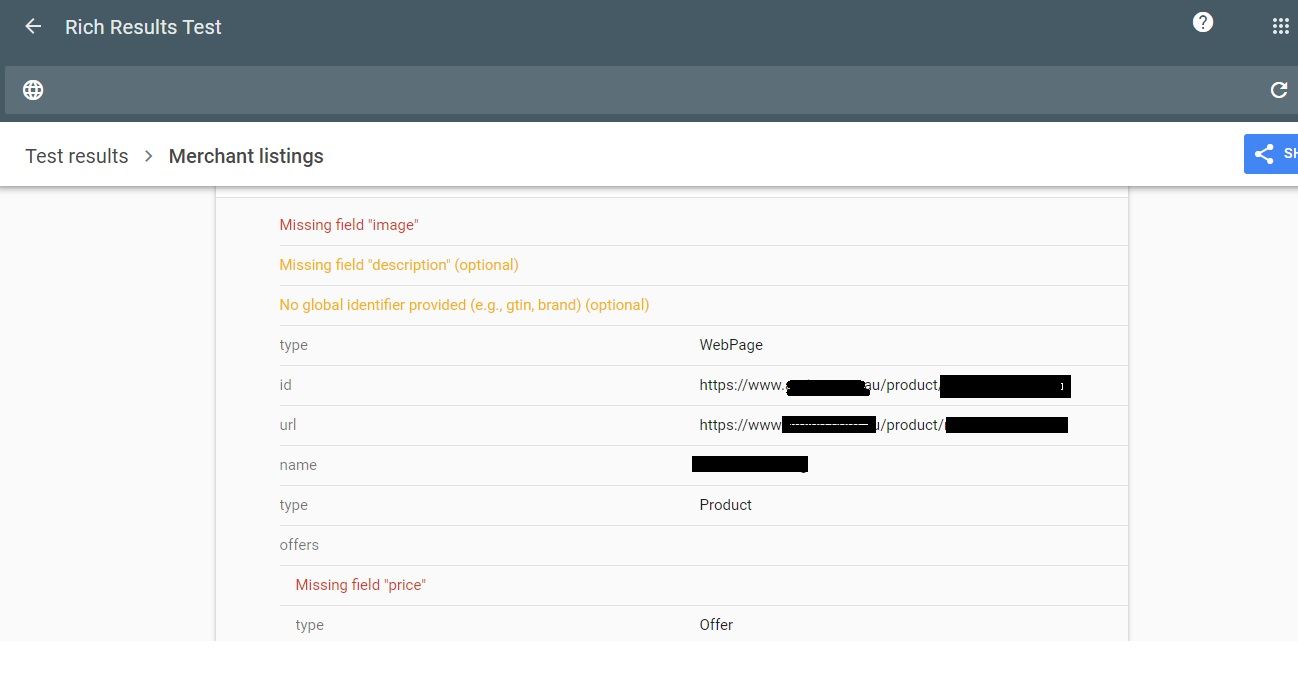
                        Why Product pages are throwing Missing field "image" and Missing field "price" in Wordpress Woocommerce

                        technical seo structured data woocommerce wordpress seo

                        I have a wordpress wocommerce website where I have uploaded 100s of products but it's giving me error in GSC under merchant listing tab. When I tested it show missing field image and missing field price. I have done everything according to https://developers.google.com/search/docs/appearance/structured-data/product#merchant-listing-experiences and applied fixed i.e. images are 800x800 and price range is also there. What else can be done here?!merchant listing.jpg

                        Technical SEO | | Ravi_Rana
                        0
                      • peteboyd

                        Unsolved Capturing Source Dynamically for UTM Parameters

                        technical seo google analytics utm parameters

                        Does anyone have a tutorial on how to dynamically capture the referring source to be populated in UTM parameters for Google Analytics? We want to syndicate content and be able to see all of the websites that provided referral traffic for this specific objective. We want to set a specific utm_medium and utm_campaign but have the utm_source be dynamic and capture the referring website. If we set a permanent utm_source, it would appear the same for all incoming traffic. Thanks in advance!

                        Technical SEO | | peteboyd
                        0
                      • SO_UK

                        Company name ranking

                        Hi all, I hope somebody can share their thoughts on the below. A web designer launched my client's new website and I have been tasked with the SEO. I was approached with an immediate problem, www.clientswebsite.co.uk was ranking 9th for their company name after being indexed by Google. The search results above www.clientswebsite.co.uk were related to my client but not all, for example a direct competitor was also ranking. I have been working on the SEO for 2-3 weeks and I just managed to get to 3rd position for the company name, and then www.clientswebsite.co.uk disappeared from page 1! And now instead, an irelevant sub page is now ranking for the company name on page 2 (a contact page). I have checked and the home page is still indexed (did a site: check). The only problem software picks up is a redirect chain (http://homepage -> http://www.homepage  -> https://homepage) the web developers said it wouldn't impact rankings (when I asked them to edit the htaccess file to fix it) I've listed below the SEO tasks I completed whilst attempting to rank the company name: I set up analytics and webmaster tools, in which I set up preferred domain (www) Added a sitemap Edited meta data making sure company name was included I contacted the websites above www.clientswebsite.co.uk that were relevant and asked them to place a link linking to their new website, I was successful with a couple of these. I placed www.clientswebsite.co.uk on all of their social media profiles I reformatted headers on their home page, making sure the H1 included my client's company name I found 2 extra versions of my client's home page (not exact copies, but very similar content) that had been published, so I decided to 301 redirect these to the correct home page Activated SSL and forced to HTTPS I would really appreciate it if anyone could share their thoughts here, whether it be explanations or possible solutions Adam

                        Technical SEO | | SO_UK
                        0
                      • Rignite

                        Should I noindex my blog's tag, category, and author pages

                        Hi there, Is it a good idea to no index tag, category, and author pages on blogs? The tag pages sometimes have duplicate content.  And the category and author pages aren't really optimized for any search term. Just curious what others think. Thanks!

                        Technical SEO | | Rignite
                        0
                      • SEOisSEO

                        LSI keywords logic - enter in meta and bold in text?

                        Hello, In the lack of good info about this on the Internet, let me try here. I know that it is a good idea to put LSI keywords in natural flow in the body text of the article. But shall I also put LSI keywords as a meta? In the same manner as doing with non-LSI keywords? Or shall I only reserve meta for non-LSI keywords? In body text, shall I emphasize LSI keywords in bold? As non-LSI keywords already does. This is a bit confusing as I don't wan't LSI keywords to take over show from my long tail (phrase) keyword. I will appreciate if someone could share a bit light over this. Thanks in advance!

                        Technical SEO | | SEOisSEO
                        0
                      • danielpett

                        SEO plugin by Yoast messing up my title/meta description

                        Hey guys, I'm having some issues with my wordpress blog, and I believe SEO plugin by Yoast could be the one causing it. I have set a title for my wordpress blog, and a tagline. This was set in dashboard > settings > general Under "titles and metas" > home in the plugin it says, title: %%sitename%% %%page%% %%sep%% %%sitedesc%%, and meta description is blank. The reports on seomoz says my title is title+meta description - making it to long (to many characters). What could be the issue here? Thanks in advance!

                        Technical SEO | | danielpett
                        0
                      • NetPicks

                        How do I add meta descriptions to Archives in Wordpress?

                        My most recent crawl returned a number of 'missing meta description' errors, and when I checked individual URLs, it turned out they were Wordpress Archived pages - for individual months and days (e.g. http:// .../2011/01). What's the best way to go about adding descriptions to these pages, if at all? Or should I have these pages not be indexed? I am using the All in One SEO plugin, so maybe there is an easy fix through this plugin, or it may be the cause of these errors? Any help is appreciated, thanks in advance! **EDIT After looking it up further, I have decided to use noindex for Archives, which should solve my problem right? Or is there a benefit to having those archived pages?

                        Technical SEO | | NetPicks
                        0

                      Get started with Moz Pro!

                      Unlock the power of advanced SEO tools and data-driven insights.

                      Start my free trial
                      Products
                      • Moz Pro
                      • Moz Local
                      • Moz API
                      • Moz Data
                      • STAT
                      • Product Updates
                      Moz Solutions
                      • SMB Solutions
                      • Agency Solutions
                      • Enterprise Solutions
                      • Digital Marketers
                      Free SEO Tools
                      • Domain Authority Checker
                      • Link Explorer
                      • Keyword Explorer
                      • Competitive Research
                      • Brand Authority Checker
                      • Local Citation Checker
                      • MozBar Extension
                      • MozCast
                      Resources
                      • Blog
                      • SEO Learning Center
                      • Help Hub
                      • Beginner's Guide to SEO
                      • How-to Guides
                      • Moz Academy
                      • API Docs
                      About Moz
                      • About
                      • Team
                      • Careers
                      • Contact
                      Why Moz
                      • Case Studies
                      • Testimonials
                      Get Involved
                      • Become an Affiliate
                      • MozCon
                      • Webinars
                      • Practical Marketer Series
                      • MozPod
                      Connect with us

                      Contact the Help team

                      Join our newsletter
                      Moz logo
                      © 2021 - 2026 SEOMoz, Inc., a Ziff Davis company. All rights reserved. Moz is a registered trademark of SEOMoz, Inc.
                      • Accessibility
                      • Terms of Use
                      • Privacy

                      Looks like your connection to Moz was lost, please wait while we try to reconnect.