Moz Q&A is closed.
After more than 13 years, and tens of thousands of questions, Moz Q&A closed on 12th December 2024. Whilst we’re not completely removing the content - many posts will still be possible to view - we have locked both new posts and new replies. More details here.
Sudden Drop in Mobile Core Web Vitals
-
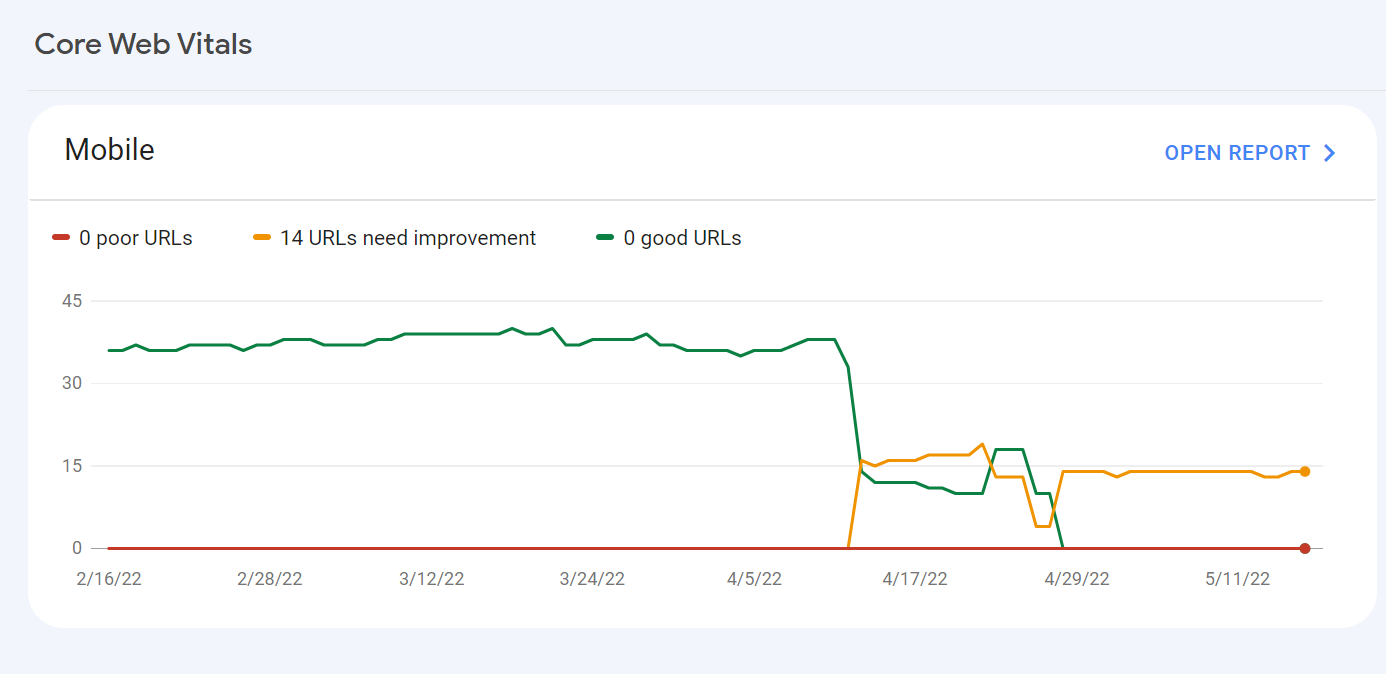
For some reason, after all URLs being previously classified as Good, our Mobile Web Vitals report suddenly shifted to the above, and it doesn't correspond with any site changes on our end.
Has anyone else experience something similar or have any idea what might have caused such a shift?
Curiously I'm not seeing a drop in session duration, conversion rate etc. for mobile traffic despite the seemingly sudden change.
-
I can’t understand their algorithm for core web vitals. I have made some technical updates to our website for speed optimization, but the thing that happened in the search console is very confusing for my site.
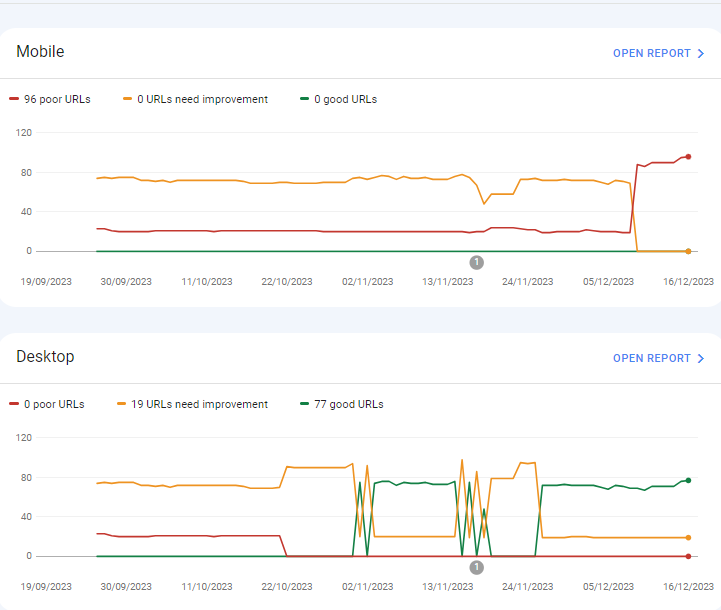
For desktops, pages are indexed as good URLs
while mobile-indexed URLs are displayed as poor URLs.
Our website is the collective material for people looking for Canada immigration (PAIC), and 70% of the portion is filled with text only. We are using webp images for optimization, still it is not passing Core Web Vitals.I am looking forward to the expert’s suggestion to overcome this problem.
-
I can’t understand their algorithm for core web vitals. I have made some technical updates to our website for speed optimization, but the thing that happened in the search console is very confusing for my site.
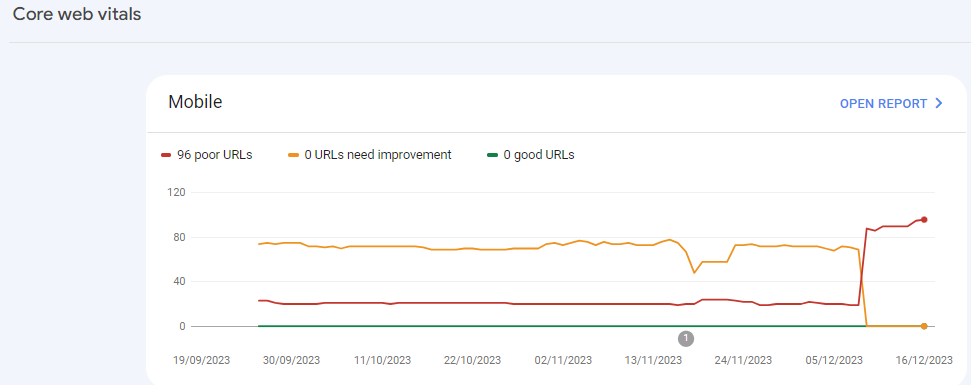
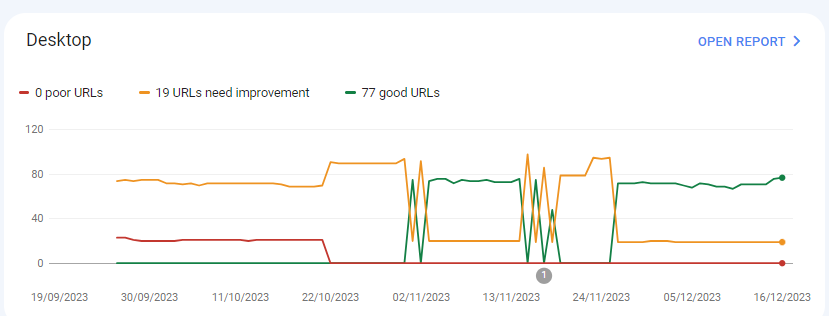
For desktops, pages are indexed as good URLs
while mobile-indexed URLs are displayed as poor URLs.
Our website is the collective material for people looking for Canadian immigration (PAIC), and 70% of the portion is filled with text only. We are using webp images for optimization, still it is not passing Core Web Vitals.I am looking forward to the expert’s suggestion to overcome this problem.
-
@rwat Hi, did you find a solution?
-
Yes, I am also experiencing the same for one of my websites, but most of them are blog posts and I am using a lot of images without proper optimization, so that could be the reason. but not sure.
It is also quite possible that Google maybe adding some more parameters to their main web critical score.



Got a burning SEO question?
Subscribe to Moz Pro to gain full access to Q&A, answer questions, and ask your own.
Browse Questions
Explore more categories
-
Moz Tools
Chat with the community about the Moz tools.
-
SEO Tactics
Discuss the SEO process with fellow marketers
-
Community
Discuss industry events, jobs, and news!
-
Digital Marketing
Chat about tactics outside of SEO
-
Research & Trends
Dive into research and trends in the search industry.
-
Support
Connect on product support and feature requests.
Related Questions
-

Meta name Author
Hello! I have a problem. I'm using Rank Math for WordPress. But I can’t configure a basic thing such as <meta name="author" content="" />. I had to insert this code manually using the hook. Does anyone know a normal way to do this markup? Example page: https://b-shoes.com/foot-shaped-shoes/ Thank you!
Technical SEO | | WayneM.0 -

Unsolved Question about a Screaming Frog crawling issue
Hello, I have a very peculiar question about an issue I'm having when working on a website. It's a WordPress site and I'm using a generic plug in for title and meta updates. When I go to crawl the site through screaming frog, however, there seems to be a hard coded title tag that I can't find anywhere and the plug in updates don't get crawled. If anyone has any suggestions, thatd be great. Thanks!
Technical SEO | | KyleSennikoff0 -

Unsolved Google Search Console Still Reporting Errors After Fixes
Hello, I'm working on a website that was too bloated with content. We deleted many pages and set up redirects to newer pages. We also resolved an unreasonable amount of 400 errors on the site. I also removed several ancient sitemaps that listed content deleted years ago that Google was crawling. According to Moz and Screaming Frog, these errors have been resolved. We've submitted the fixes for validation in GSC, but the validation repeatedly fails. What could be going on here? How can we resolve these error in GSC.
Technical SEO | | tif-swedensky0 -

URL structure for same product in multiple categories?
Hello everyone ! I am building an ecom store using wordpress. I have assigned multiple categories to the same product. What should be the URL structure when users are navigating with different product categories? Categories Assigned: tshirt, blue, striped
Technical SEO | | Dingos
Product Name: blue-striped-tshirt Option 01: Matching site navigation breadcrumb to product url URL - ecomstore.com/tshirt/blue-striped-tshirt
Breadcrumb - home/tshirt/blue-striped-tshirt URL - ecomstore.com/blue/blue-striped-tshirt (canonical to 1 product page)
Breadcrumb - home/color/blue/blue-striped-tshirt URL - ecomstore.com/striped/blue-striped-tshirt (canonical to 1 product page)
Breadcrumb - home/type/striped/blue-striped-tshirt Option 02: Same product urls and different breadcrumbs based on user site navigation URL - ecomstore.com/tshirt/blue-striped-tshirt
Breadcrumb - home/tshirt/blue-striped-tshirt URL - ecomstore.com/tshirt/blue-striped-tshirt (url same as 1 product page)
Breadcrumb - home/color/blue/blue-striped-tshirt URL - ecomstore.com/tshirt/blue-striped-tshirt (url same as 1 product page)
Breadcrumb - home/type/striped/blue-striped-tshirt I have decided to got with Option 01 so that the product in each category can be ranked according to each category keyword. Which option is the best according to your experience or is there any other best practice?0 -

Backlinks on Moz not on Google Search Console
Moz is showing thousands of backlinks to my site that are not showing up on Google Search Console - which is good because those links were created by some spammer in Pakistan somewhere. I haven't yet submitted a disavow report to Google of well over 10K links because the list keeps growing every day with new backlinks that have been rerouted to a 404 page. I have asked Google to clarify and they put my question on their forum for an answer, which I'm still waiting for - so I thought I'd try my luck here. My question... If Moz does not match Google Search Console, and backlinks are important to results, how valid is the ranking that Moz creates to let me know how I'm doing in this competition and if I'm improving or not. If the goal is to get Google to pay attention and I use Moz to help me figure out how to do this, how can I do that if the backlink information isn't the same - by literally over 10 000 backlinks created by some spammer doing odd things... They've included the url from their deleted profile on my site with 100s of other urls, including Moz.com and are posting them everywhere with their preferred anchor text. Moz ranking considers the thousands of spam backlinks I can't get rid of and Google ignores them or disavows them. So isn't the rankings, data, and graphs apples and bananas? How can I know what my site's strength really is and if I'm improving or not if the data doesn't match? Complete SEO Novice Shannon Peel
Link Building | | MarketAPeel
Brand Storyteller
MarketAPeel0 -

Solved How to solve orphan pages on a job board
Working on a website that has a job board, and over 4000 active job ads. All of these ads are listed on a single "job board" page, and don’t obviously all load at the same time. They are not linked to from anywhere else, so all tools are listing all of these job ad pages as orphans. How much of a red flag are these orphan pages? Do sites like Indeed have this same issue? Their job ads are completely dynamic, how are these pages then indexed? We use Google’s Search API to handle any expired jobs, so they are not the issue. It’s the active, but orphaned pages we are looking to solve. The site is hosted on WordPress. What is the best way to solve this issue? Just create a job category page and link to each individual job ad from there? Any simpler and perhaps more obvious solutions? What does the website structure need to be like for the problem to be solved? Would appreciate any advice you can share!
Reporting & Analytics | | Michael_M2 -

Sudden drop in Rankings after 301 redirect
Greetings to Moz Community. Couple of months back, I have redirected my old blog to a new URL with 301 redirect because of spammy links pointed to my old blog. I have transfer all the posts manually, changed the permalink structure and 301 redirected every individual URL. All the ranking were boosted within couple of weeks and regained the traffic. After a month I have observed, the links pointed to old site are showing up in Webmaster Tools for the new domain. I was shocked (no previous experience) and again Disavowed all links. Today, all the positions went down for new domain. My questions are: 1. Did the Disavow tool worked this time with new domain? All the links pointed to old domain were devaluated? Is this the reason for ranking drop? Or 2. 301 Old domain with Unnatural links causes the issue? 3. Removing 301 will help to regain few keyword positions? I'm taking this as a case study. Already removed the 301 redirect. Looking for solid discussion.Thanks.
Technical SEO | | praveen4390 -
How to Resolve Rankings Drop from a DDOS Attack?
Our rankings just plummeted on Tuesday across the board. There was a DDOS attack on Tuesday and since then the rankings went down and have stayed down, even though the DDOS attack has been resolved. Also, this is the 3rd or 4th attack they've encountered this year. How long could this last? How can we deal with this? Thanks
Technical SEO | | poolguy0