Skip to content
    Moz logo Menu open Menu close
    • Products
      • Moz Pro
      • Moz Pro Home
      • Moz Local
      • Moz Local Home
      • STAT
      • Moz API
      • Moz API Home
      • Compare SEO Products
      • Moz Data
    • Free SEO Tools
      • Domain Analysis
      • Keyword Explorer
      • Link Explorer
      • Competitive Research
      • MozBar
      • More Free SEO Tools
    • Learn SEO
      • Beginner's Guide to SEO
      • SEO Learning Center
      • Moz Academy
      • MozCon
      • Webinars, Whitepapers, & Guides
    • Blog
    • Why Moz
      • Digital Marketers
      • Agency Solutions
      • Enterprise Solutions
      • Small Business Solutions
      • The Moz Story
      • New Releases
    • Log in
    • Log out
    • Products
      • Moz Pro

        Your all-in-one suite of SEO essentials.

      • Moz Local

        Raise your local SEO visibility with complete local SEO management.

      • STAT

        SERP tracking and analytics for enterprise SEO experts.

      • Moz API

        Power your SEO with our index of over 44 trillion links.

      • Compare SEO Products

        See which Moz SEO solution best meets your business needs.

      • Moz Data

        Power your SEO strategy & AI models with custom data solutions.

      Turn SEO data into actionable content briefs

      Turn SEO data into actionable content briefs

      Learn more
    • Free SEO Tools
      • Domain Analysis

        Get top competitive SEO metrics like DA, top pages and more.

      • Keyword Explorer

        Find traffic-driving keywords with our 1.25 billion+ keyword index.

      • Link Explorer

        Explore over 40 trillion links for powerful backlink data.

      • Competitive Research

        Uncover valuable insights on your organic search competitors.

      • MozBar

        See top SEO metrics for free as you browse the web.

      • More Free SEO Tools

        Explore all the free SEO tools Moz has to offer.

      Let your business shine with Listings AI

      Let your business shine with Listings AI

      Get found
    • Learn SEO
      • Beginner's Guide to SEO

        The #1 most popular introduction to SEO, trusted by millions.

      • SEO Learning Center

        Broaden your knowledge with SEO resources for all skill levels.

      • On-Demand Webinars

        Learn modern SEO best practices from industry experts.

      • How-To Guides

        Step-by-step guides to search success from the authority on SEO.

      • Moz Academy

        Upskill and get certified with on-demand courses & certifications.

      • MozCon

        Save on Early Bird tickets and join us in London or New York City

      Access 20 years of data with flexible pricing
      Moz API

      Access 20 years of data with flexible pricing

      Find your plan
    • Blog
    • Why Moz
      • Digital Marketers

        Simplify SEO tasks to save time and grow your traffic.

      • Small Business Solutions

        Uncover insights to make smarter marketing decisions in less time.

      • Agency Solutions

        Earn & keep valuable clients with unparalleled data & insights.

      • Enterprise Solutions

        Gain a competitive edge in the ever-changing world of search.

      • The Moz Story

        Moz was the first & remains the most trusted SEO company.

      • New Releases

        Get the scoop on the latest and greatest from Moz.

      Surface actionable competitive intel
      New Feature

      Surface actionable competitive intel

      Learn More
    • Log in
      • Moz Pro
      • Moz Local
      • Moz Local Dashboard
      • Moz API
      • Moz API Dashboard
      • Moz Academy
    • Avatar
      • Moz Home
      • Notifications
      • Account & Billing
      • Manage Users
      • Community Profile
      • My Q&A
      • My Videos
      • Log Out

    The Moz Q&A Forum

    • Forum
    • Questions
    • Users
    • Ask the Community

    Welcome to the Q&A Forum

    Browse the forum for helpful insights and fresh discussions about all things SEO.

    1. Home
    2. SEO Tactics
    3. Intermediate & Advanced SEO
    4. How to stop Google crawling after 301 redirect?

    Moz Q&A is closed.

    After more than 13 years, and tens of thousands of questions, Moz Q&A closed on 12th December 2024. Whilst we’re not completely removing the content - many posts will still be possible to view - we have locked both new posts and new replies. More details here.

    How to stop Google crawling after 301 redirect?

    Intermediate & Advanced SEO
    2
    2
    1559
    Loading More Posts
    • Oldest to Newest
    • Newest to Oldest
    • Most Votes
    Reply
    • Reply as question
    Log in to reply
    This topic has been deleted. Only users with question management privileges can see it.
    • CommercePundit
      CommercePundit last edited by

      I have removed all pages from my old website and set 301 redirect to new website. But, I have verified old website with Google webmaster tools' HTML verification file which enable me to track all data and existence of pages in Google search for my old website. I was assumed that, Google will stop crawling and DE-indexed all pages after 301 redirect. Because, I have set 301 redirect before 3 months.

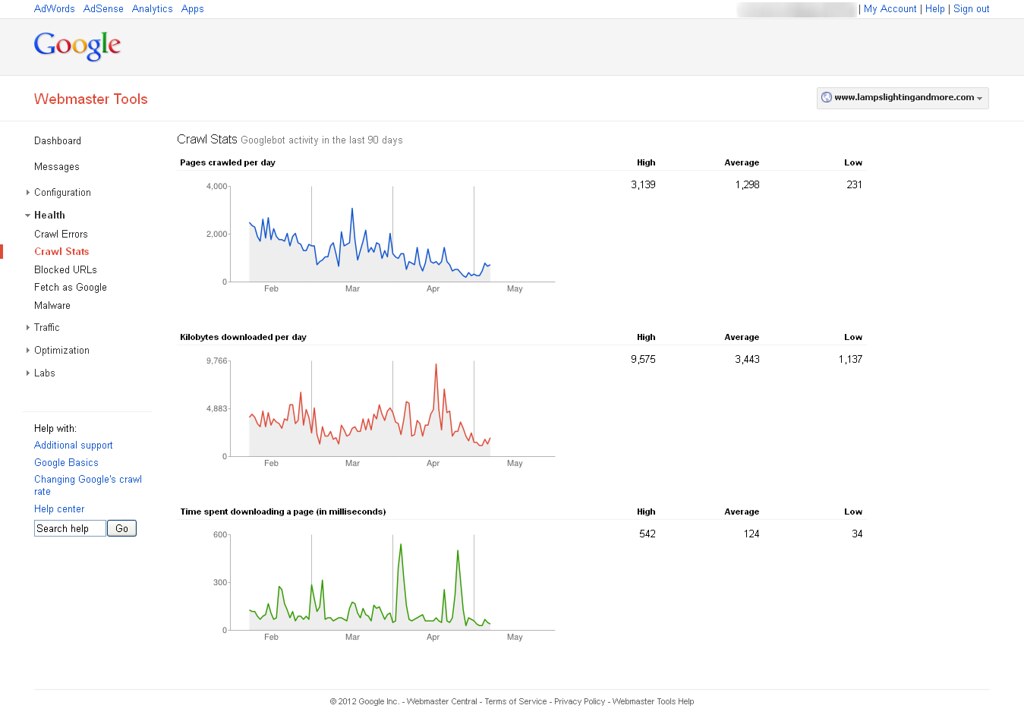
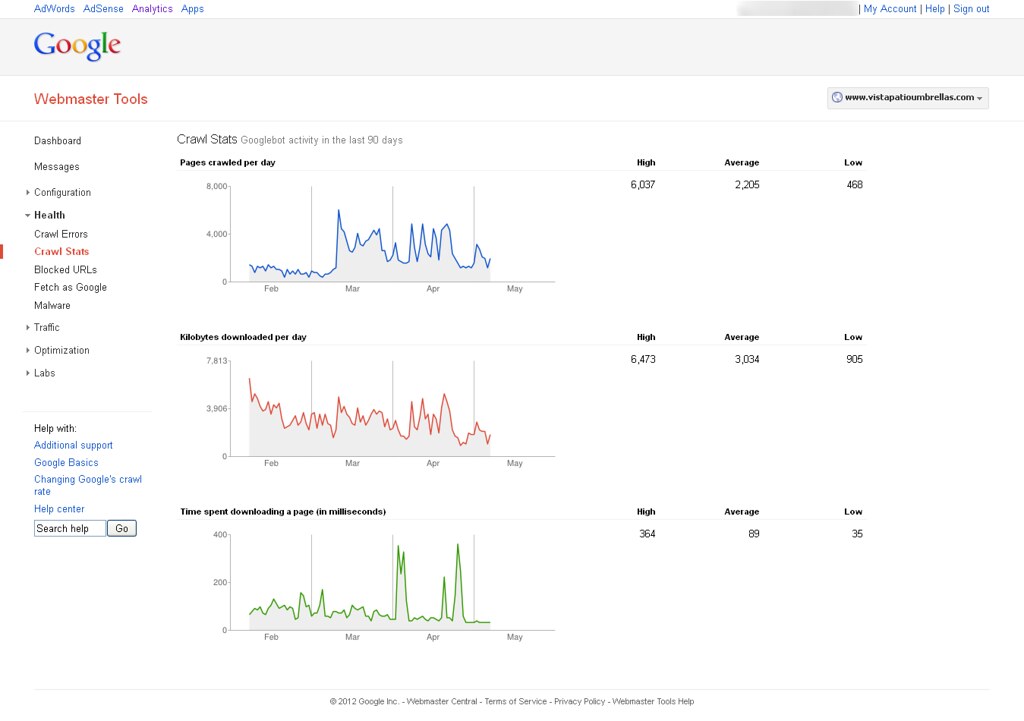
      Now, I'm able to see Google bot activity on my website with help of Google webmaster tools. You can find out attachment to know more about it. How can it possible & How Google can crawl removed pages?

      You can see following image to know more about it.

      First

      &

      Second

      1 Reply Last reply Reply Quote 0
      • irvingw
        irvingw last edited by

        Google is most likely following links on other sites pointing to your old site and then 301'ing to the new site so you're seeing activity in WMT

        looking here is still see two pages in the index:

        https://www.google.com/#hl=en&output=search&sclient=psy-ab&q=site:http%3A%2F%2Flampslightingandmore.com%2F&oq=site:http%3A%2F%2Flampslightingandmore.com%2F&gs_l=hp.3..0l4.1146.2239.0.2363.6.6.0.0.0.0.309.1495.2-3j2.5.0...0.0...1c.gwNTMFHM_dQ&pbx=1&bav=on.2,or.r_gc.r_pw.r_qf.,cf.osb&fp=13df23ca690bfc6f&biw=1920&bih=968

        you can go in and remove the site in WMT using the remove URL tool and see if that stops activity in that old WMT account. Crawling or not crawling, reporting or not reporting, there is not an issue here though - the 301's appear to be properly set up.


        1 Reply Last reply Reply Quote 0
        • 1 / 1
        • First post
          Last post

        Got a burning SEO question?

        Subscribe to Moz Pro to gain full access to Q&A, answer questions, and ask your own.


        Start my free trial


        Browse Questions

        Explore more categories

        • Moz Tools

          Chat with the community about the Moz tools.

        • SEO Tactics

          Discuss the SEO process with fellow marketers

        • Community

          Discuss industry events, jobs, and news!

        • Digital Marketing

          Chat about tactics outside of SEO

        • Research & Trends

          Dive into research and trends in the search industry.

        • Support

          Connect on product support and feature requests.

        • See all categories

        Related Questions

        • jgoehring-troy

          Is domain authority lost if you create a 301 redirect but mark it as noindex, nofollow?

          Hi everyone, Our company sells products in various divisions. While we've been selling Product A and Product B under our original brand, we've recently created a new division with a new domain to focus on a Product B. The new domain has virtually no domain authority (3) while the original domain has some (37). We want customers to arrive on the new domain when they search for key search terms related to Product B instead of the pages that previously existed on our main website. If we create 301 redirects for the pages and content on the main site and add noindex, nofollow tags, will we lose the domain authority that we have from our original domain because the pages now have the noindex, nofollow tags? I read a few blog posts from Moz that said there isn't any domain authority lost with 301 redirects but I'm not sure if that is true if the pages are noindex, nonofollow.   Do you follow?  🙂 Apologies for the lengthy post. Love this community and the great Moz team. Thanks, Joe

          Intermediate & Advanced SEO | | jgoehring-troy
          0
        • Gabriele_Layoutweb

          If I block a URL via the robots.txt - how long will it take for Google to stop indexing that URL?

          If I block a URL via the robots.txt - how long will it take for Google to stop indexing that URL?

          Intermediate & Advanced SEO | | Gabriele_Layoutweb
          0
        • placementLabs

          How can I stop spam Google Organic traffic?

          Hey Moz, I'm a rather experienced SEO who just encountered a problem I have never faced. I am hoping to get some advice or be pointed in the right direction. I just started work for a new client. Really great client and website. Nicer than most design/content. They will need some rel canonical work but that is not the issue here. The traffic looked great at first glance 131k visits in April. Google Analytics Acquisition Overview showed 94% of the traffic as organic. When I dug deeper and looked at the organic source I saw that Google was 99.9% of it. Normal enough. Then I looked at the time on site and my jaw dropped. 118,454 Organic New Users for Google only stayed on the site for 3 seconds. There is no way that the traffic is real. It does not match what Google Webmaster tools, Moz, and Ahrefs are telling me. How do I stop a service that is sending fake organic Google traffic?

          Intermediate & Advanced SEO | | placementLabs
          0
        • EcommRulz

          Does Google Index URLs that are always 302 redirected

          Hello community Due to the architecture of our site, we have a bunch of URLs that are 302 redirected to the same URL plus a query string appended to it. For example: www.example.com/hello.html is 302 redirected to www.example.com/hello.html?___store=abc The www.example.com/hello.html?___store=abc page also has a link canonical tag to www.example.com/hello.html In the above example, can www.example.com/hello.html every be Indexed, by google as I assume the googlebot will always be redirected to www.example.com/hello.html?___store=abc and will never see www.example.com/hello.html ? Thanks in advance for the help!

          Intermediate & Advanced SEO | | EcommRulz
          0
        • lzhao

          Would you rate-control Googlebot? How much crawling is too much crawling?

          One of our sites is very large - over 500M pages.   Google has indexed 1/8th of the site - and they tend to crawl between 800k and 1M pages per day. A few times a year, Google will significantly increase their crawl rate - overnight hitting 2M pages per day or more.  This creates big problems for us, because at 1M pages per day Google is consuming 70% of our API capacity, and the API overall is at 90% capacity.   At 2M pages per day, 20% of our page requests are 500 errors. I've lobbied for an investment / overhaul of the API configuration to allow for more Google  bandwidth without compromising user experience.   My tech team counters that it's a wasted investment - as Google will crawl to our capacity whatever that capacity is. Questions to Enterprise SEOs: *Is there any validity to the tech team's claim?  I thought Google's crawl rate was based on a combination of PageRank and the frequency of page updates.   This indicates there is some upper limit - which we perhaps haven't reached - but which would stabilize once reached. *We've asked Google to rate-limit our crawl rate in the past.   Is that harmful?  I've always looked at a robust crawl rate as a good problem to have. Is 1.5M Googlebot API calls a day desirable, or something any reasonable Enterprise SEO would seek to throttle back? *What about setting a longer refresh rate in the sitemaps?   Would that reduce the daily crawl demand?  We could set increase it to a month, but at 500M pages Google could still have a ball at the 2M pages/day rate. Thanks

          Intermediate & Advanced SEO | | lzhao
          0
        • imran2078

          Should I redirect my Google Update Effected Domain to brand new Domain?

          Hey Moz experts, I had a domain which was really doing better but after the Humming Bird update my traffic was decreased up to 90%. There are plenty of posts on my existing blog, Now what should I do? I mean should I redirect it to a brand new domain or Copy all the posts to a brand new domain and delete my existing domain? Note that the Old domain has PR1, DA 19 and PA 30.

          Intermediate & Advanced SEO | | imran2078
          0
        • BeytzNet

          How to 301 redirect old wordpress category?

          Hi All, In order to avoid duplication errors we've decided to redirect old categories (merge some categories).
          In the past we have been very generous with the number of categories we assigned each post. One category needs to be redirected back to blog home (removed completely) while a couple others should be merged. Afterwords we will re-categorize some of the old posts. What is the proper way to do so?
          We are not technical, Is there a plugin that can assist? Thanks

          Intermediate & Advanced SEO | | BeytzNet
          0
        • seointern

          301 redirect from .html to non .html?

          Previously our site was using this as our URL structure: www.site.com/page.html. A few months ago we updated our URL structure to this: www.site.com/page & we're not using the .html. I've read over this guide & don't see anywhere that discusses this: http://www.seomoz.org/learn-seo/redirection. I've currently got a programmer looking into, but am always a bit weary with their workarounds, as I'd previously had them cause more problems then fix it. Here is the solution he is looking to do: The way that I am doing the redirect is fine. The problem is of where to put the code. The issue is that the files are .html files that need to be redirected to the same url with out a .html on them. I can see if I can add that to the 404 redirect page if there is one inside of there and see if that does the trick. That way if there is no page that exists without the .html then it will still be a 404 page. However if it is there then it will work as normal. I will see what I can find and get back. Any help would be greatly appreciated. Thanks, BJ

          Intermediate & Advanced SEO | | seointern
          0

        Get started with Moz Pro!

        Unlock the power of advanced SEO tools and data-driven insights.

        Start my free trial
        Products
        • Moz Pro
        • Moz Local
        • Moz API
        • Moz Data
        • STAT
        • Product Updates
        Moz Solutions
        • SMB Solutions
        • Agency Solutions
        • Enterprise Solutions
        • Digital Marketers
        Free SEO Tools
        • Domain Authority Checker
        • Link Explorer
        • Keyword Explorer
        • Competitive Research
        • Brand Authority Checker
        • Local Citation Checker
        • MozBar Extension
        • MozCast
        Resources
        • Blog
        • SEO Learning Center
        • Help Hub
        • Beginner's Guide to SEO
        • How-to Guides
        • Moz Academy
        • API Docs
        About Moz
        • About
        • Team
        • Careers
        • Contact
        Why Moz
        • Case Studies
        • Testimonials
        Get Involved
        • Become an Affiliate
        • MozCon
        • Webinars
        • Practical Marketer Series
        • MozPod
        Connect with us

        Contact the Help team

        Join our newsletter
        Moz logo
        © 2021 - 2026 SEOMoz, Inc., a Ziff Davis company. All rights reserved. Moz is a registered trademark of SEOMoz, Inc.
        • Accessibility
        • Terms of Use
        • Privacy

        Looks like your connection to Moz was lost, please wait while we try to reconnect.