Moz Q&A is closed.
After more than 13 years, and tens of thousands of questions, Moz Q&A closed on 12th December 2024. Whilst we’re not completely removing the content - many posts will still be possible to view - we have locked both new posts and new replies. More details here.
Sudden Drop in Mobile Core Web Vitals
-
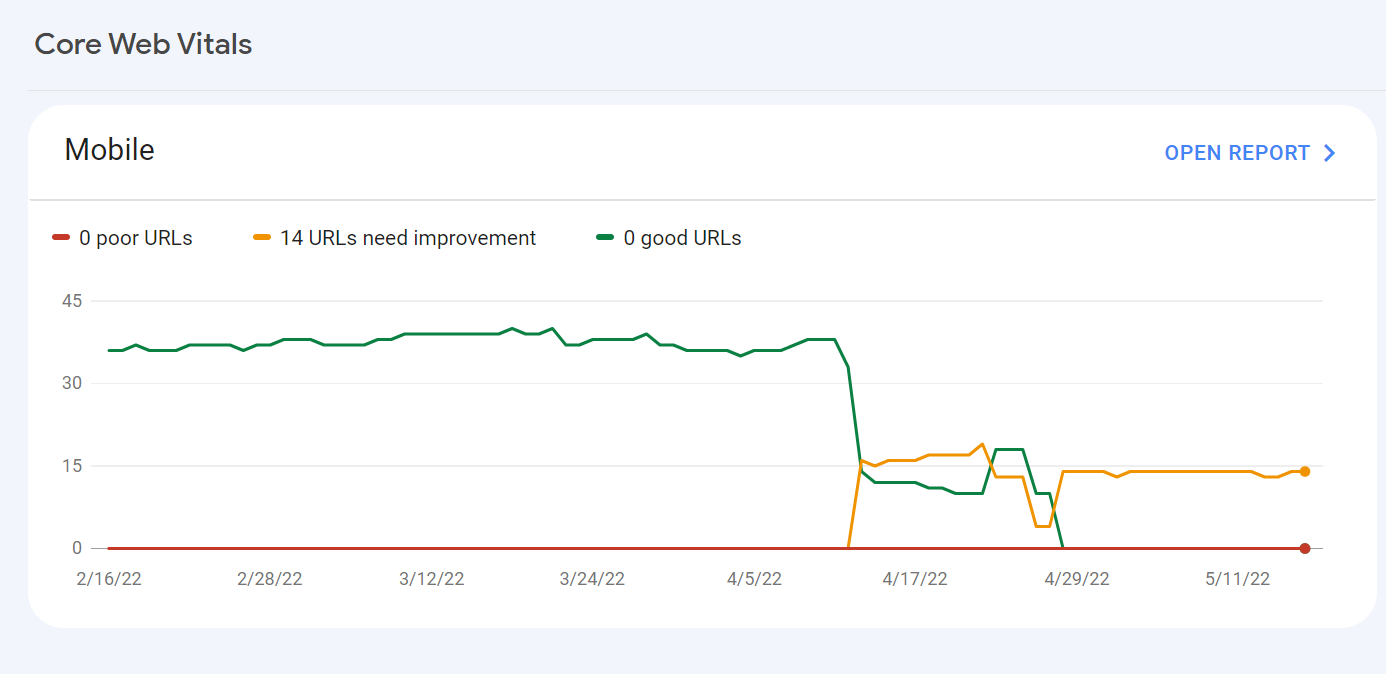
For some reason, after all URLs being previously classified as Good, our Mobile Web Vitals report suddenly shifted to the above, and it doesn't correspond with any site changes on our end.
Has anyone else experience something similar or have any idea what might have caused such a shift?
Curiously I'm not seeing a drop in session duration, conversion rate etc. for mobile traffic despite the seemingly sudden change.
-
I can’t understand their algorithm for core web vitals. I have made some technical updates to our website for speed optimization, but the thing that happened in the search console is very confusing for my site.
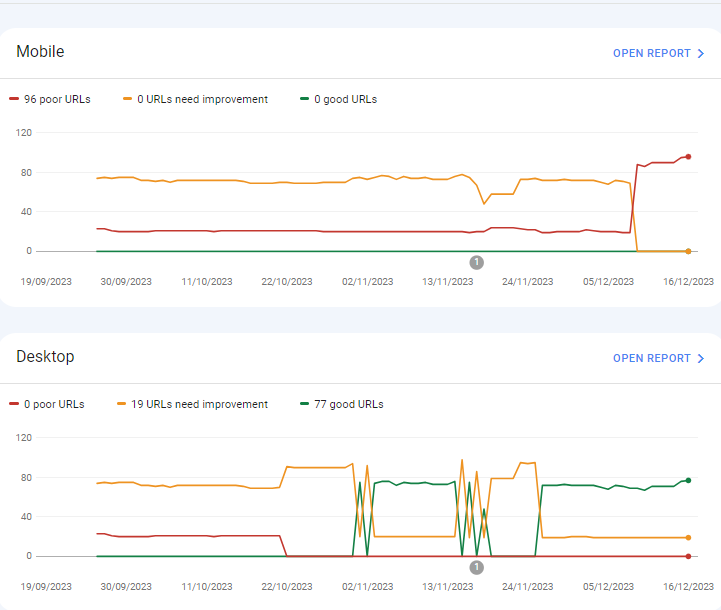
For desktops, pages are indexed as good URLs
while mobile-indexed URLs are displayed as poor URLs.
Our website is the collective material for people looking for Canada immigration (PAIC), and 70% of the portion is filled with text only. We are using webp images for optimization, still it is not passing Core Web Vitals.I am looking forward to the expert’s suggestion to overcome this problem.
-
I can’t understand their algorithm for core web vitals. I have made some technical updates to our website for speed optimization, but the thing that happened in the search console is very confusing for my site.
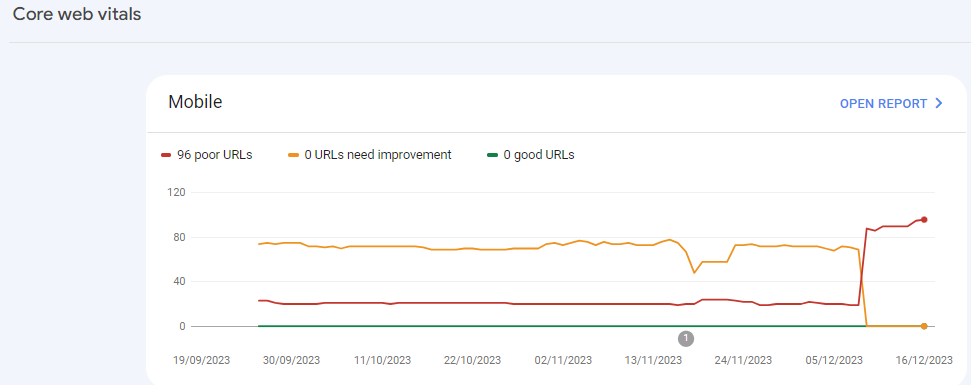
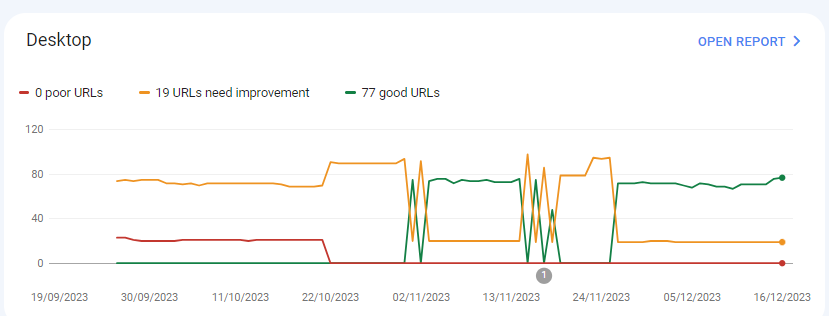
For desktops, pages are indexed as good URLs
while mobile-indexed URLs are displayed as poor URLs.
Our website is the collective material for people looking for Canadian immigration (PAIC), and 70% of the portion is filled with text only. We are using webp images for optimization, still it is not passing Core Web Vitals.I am looking forward to the expert’s suggestion to overcome this problem.
-
@rwat Hi, did you find a solution?
-
Yes, I am also experiencing the same for one of my websites, but most of them are blog posts and I am using a lot of images without proper optimization, so that could be the reason. but not sure.
It is also quite possible that Google maybe adding some more parameters to their main web critical score.



Got a burning SEO question?
Subscribe to Moz Pro to gain full access to Q&A, answer questions, and ask your own.
Browse Questions
Explore more categories
-
Moz Tools
Chat with the community about the Moz tools.
-
SEO Tactics
Discuss the SEO process with fellow marketers
-
Community
Discuss industry events, jobs, and news!
-
Digital Marketing
Chat about tactics outside of SEO
-
Research & Trends
Dive into research and trends in the search industry.
-
Support
Connect on product support and feature requests.
Related Questions
-

How to Boost Your WordPress Website Speed to 95+ (Without Premium Plugins)
I'm reaching out for some advice on improving my WordPress website's speed. I'm currently using a free theme for this fusion magazine and aiming for a score of 95+ on Google PageSpeed Insights. I'm aware that premium plugins can significantly enhance performance, but I'm hoping to achieve similar results using primarily free solutions and manual optimizations.
Technical SEO | | mohammadrehanseo0 -

Unsolved Question about a Screaming Frog crawling issue
Hello, I have a very peculiar question about an issue I'm having when working on a website. It's a WordPress site and I'm using a generic plug in for title and meta updates. When I go to crawl the site through screaming frog, however, there seems to be a hard coded title tag that I can't find anywhere and the plug in updates don't get crawled. If anyone has any suggestions, thatd be great. Thanks!
Technical SEO | | KyleSennikoff0 -

Unsolved IP Address Indexed on Google along with Domain
My website is showing/indexed on Google search results twice, with IP address and domain name
Other SEO Tools | | mupetra
I'm using AWS LightSail
I don't know how to fix this, beside I'm afraid this duplicate can harm my website0 -

How to index e-commerce marketplace product pages
Hello! We are an online marketplace that submitted our sitemap through Google Search Console 2 weeks ago. Although the sitemap has been submitted successfully, out of ~10000 links (we have ~10000 product pages), we only have 25 that have been indexed. I've attached images of the reasons given for not indexing the platform. gsc-dashboard-1 gsc-dashboard-2 How would we go about fixing this?
Technical SEO | | fbcosta0 -

What are best options for website built with navigation drop-down menus in JavaScript, to get those menus indexed by Google?
This concerns f5.com, a large website with navigation menus that drop down when hovered over. The sub nav items (example: “DDoS Protection”) are not cached by Google and therefore do not distribute internal links properly to help those sub-pages rank well. Best option naturally is to change the nav menus from JS to CSS but barring that, is there another option? Will Schema SiteNavigationElement work as an alternate?
Technical SEO | | CarlLarson0 -

Why does my Google Web Cache Redirects to My Homepage?
Why does my Google Webcache appears in a short period of time and then automatically redirects to my homepage? Is there something wrong with my robots.txt? The only files that I have blocked is below: User-agent: * Disallow: /bin/ Disallow: /common/ Disallow: /css/ Disallow: /download/ Disallow: /images/ Disallow: /medias/ Disallow: /ClientInfo.aspx Disallow: /*affiliateId* Disallow: /*referral*
Technical SEO | | Francis.Magos0 -

Drop Down Menu - Link Juice Depletion
Hi, We have a site with 7 top level sections all of which contain a large number of subsections which may then contain further sub sections. To try and ensure the best user experience we have a top navigation with the 7 top level sections and when hovered a selection of the key sub sections. Although I like this format for the user as it makes it easier for them to find the most important sections / sub sections it does lead to a lot of links within every page on the site. In general each top section has a drop down with approx 10 - 15 subsections. This has therefore lead to SeoMoz's tools issuing its too many internal links warning. Then alongside this I am left wondering if I shouldn’t have to many links to my subsections and whether I would be better off being more selective of when I link to them. For instance I could choose the top 5 sub sections and place a link to them from our homepage and by doing so I would be passing a greater amount of link juice down the line. So I guess my dilemma is between ensuring the user has as easy a time traversing the site as possible whilst I try to keep a close watch on where, and how, our link juice is distributed. One solution I am considering is whether no-follow links could be utilised within the drop down menus? This way I could then have the desired user navigation and I would be in greater control of what pages link to which sub sections. Would that even work? Any advice would be greatly appreciated, Regards, Guy
Technical SEO | | guycampbell1 -

Is there a great tool for URL mapping old to new web site?
We are implementing new design and removing some pages and adding new content. Task is to correctly map and redirect old pages that no longer exist.
Technical SEO | | KnutDSvendsen0